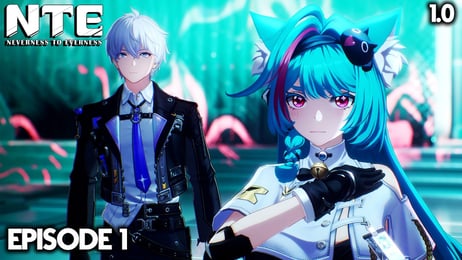


Neverness to Everness Top Up on VGTopup
Neverness to Everness (NTE) drops players into the supernatural open-world city of Hethereau, blending urban exploration, high-speed vehicle customization, and supernatural combat. To unlock top-tier characters, secure exclusive weapon blueprints, and acquire custom vehicle modifications, you need Riftcrystals. VGTopup provides a direct, secure channel to complete your Neverness to Everness top up across all official servers and platforms.
Whether your account is registered on Global, SEA, or regional servers such as Hong Kong, Macau, and Taiwan, you can top up your account with full support for multiple login methods and immediate order processing.
How to Recharge Neverness to Everness on VGTopup
Placing an order on VGTopup takes only a few minutes. Follow these direct steps to ensure your Riftcrystals are credited properly:
- Select Your Riftcrystal Pack: Choose the specific Riftcrystal bundle or monthly supply pack you want to purchase from the product catalog.
- Select Your Server ID: Pick your active game server from the dropdown menu (America, Asia, Europe, SEA, HK, MO, or TW).
- Select Your Login Model: Choose the platform login linked to your NTE account (Official, Facebook, Google, HK Mobile number, MO Mobile number, or TW Mobile number).
- Enter Your Account Information: Type your registered Email or Account username into the required field.
- Enter Your Password: Input your account password securely to allow the processing team to fulfill the top-up order.
- Enter Your User ID: Provide your in-game User ID (userId) so the fulfillment team can confirm character delivery.
- Complete Payment: Click Buy Now, choose your payment channel at the checkout page, and finish your payment. Keep your game client logged off until you receive your order completion notification.
Neverness to Everness Riftcrystal Packs & Bonus Tiers
NTE offers multiple tiers of Riftcrystals to meet your in-game resource needs. Each standard pack comes with baseline amounts and bonus rewards.
| Riftcrystal Tier | Base Riftcrystals | First-Time Recharge Bonus | Standard Repeat Bonus |
|---|---|---|---|
| Starter Pack | 60 | +60 (100% Bonus) | +0 |
| Basic Pack | 300 | +300 (100% Bonus) | +30 |
| Standard Pack | 980 | +980 (100% Bonus) | +110 |
| Advanced Pack | 1,980 | +1,980 (100% Bonus) | +260 |
| Premium Pack | 3,280 | +3,280 (100% Bonus) | +600 |
| Ultimate Bundle | 6,480 | +6,480 (100% Bonus) | +1,600 |
Note: Exact live pricing and currency conversions are displayed on the live checkout screen. First-time double bonuses apply independently to each tier upon the first purchase per account and reset during major version updates or anniversary events.
How to Find Your NTE Server, Login Model, and User ID
To ensure your order is credited without delay, verify your server region, login type, and User ID before submitting your order.
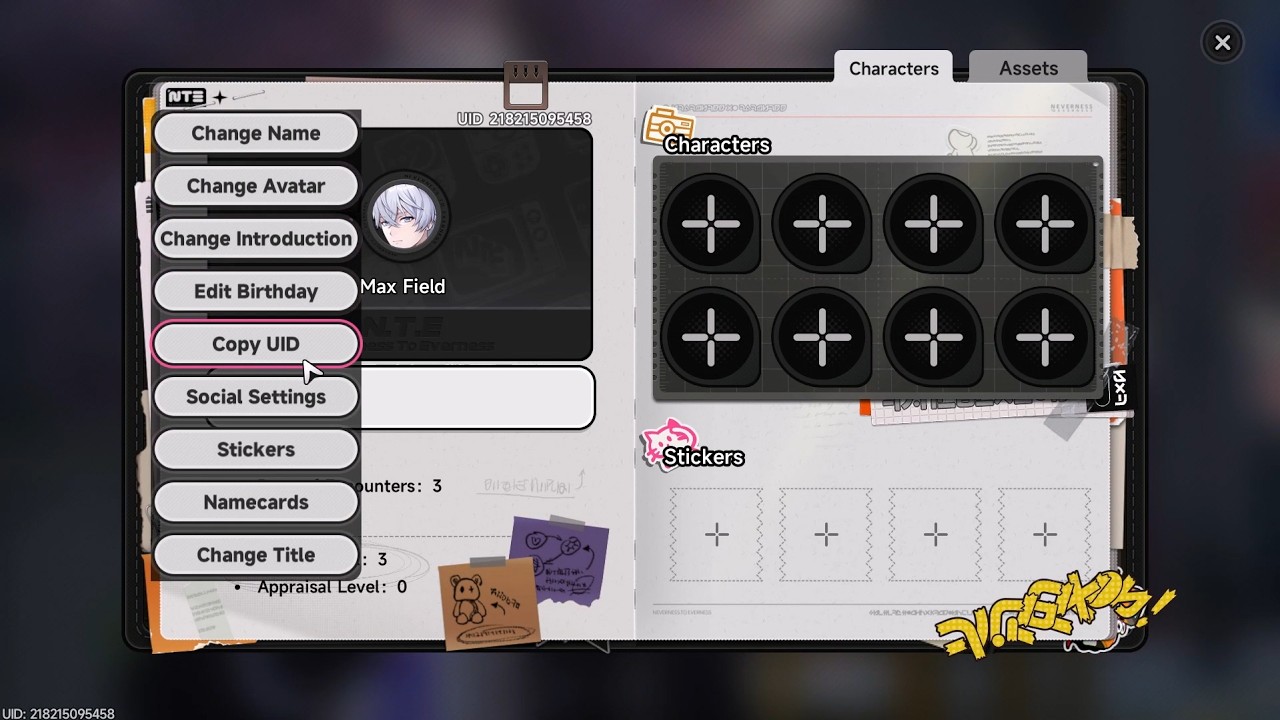
Locating Your Information:
- Server Region: Check the title screen before pressing start. The active server (America, Asia, Europe, SEA, HK, MO, or TW) is displayed in the bottom-center or side menu.
- Login Model: Identify how you log into the game. If you registered directly through the publisher, select Official. If you used social or mobile verification, select Google, Facebook, or the respective regional Mobile number option.
- User ID (UID): Log into the game and open the main PDU (Personal Digital Unit) menu in the top-left or pause screen. Your UID is printed in the lower corner of the profile card and on the lower edge of the HUD during regular gameplay. You can click the copy icon next to your profile UID to paste it directly into VGTopup.
Regional Server Support & Account Linking Guide
Neverness to Everness features cross-platform progression across PC, Android, iOS, and consoles, but accounts are tied to specific server clusters. VGTopup supports the full range of operational regions:
- Global Clusters: America, Europe, Asia, and Southeast Asia (SEA).
- Regional Clusters: Hong Kong (HK), Macau (MO), and Taiwan (TW).
Cross-Platform Linking Steps:
- If you play on mobile and want to use your account on PC, ensure your email or third-party login (Google/Facebook) is properly linked in the in-game User Center.
- If you registered using a regional mobile phone number (HK, MO, or TW), select the corresponding mobile login model on VGTopup to enable fast order verification.
- Do not switch servers or unlink accounts while an order is in processing status.
What Are Riftcrystals & Best Ways to Spend Them in Hethereau
Riftcrystals serve as the premium currency in Neverness to Everness. Managing this currency efficiently accelerates your progress across Hethereau's urban districts.
Primary Uses for Riftcrystals:
- Gacha Pull Conversions: Convert Riftcrystals directly into limited character banner passes and specialized weapon resonance tickets.
- Vehicle Customization & Tuning: Purchase rare car chassis modifications, custom paint coatings, and exclusive body kits for city racing and open-world transit.
- Apartment & Business Decor: Acquire rare interior furnishings and real estate upgrades for your personal living quarters and agency properties.
- Energy Restoration: Refresh your daily investigative stamina to farm character ascension materials, memory chips, and weapon tuning parts.
Account Safety, Privacy Protection, and Order Verification
VGTopup prioritizes player privacy and transaction security on every login-based top-up order:
- Data Encryption: All login credentials submitted during checkout are processed through high-grade SSL encryption and are used strictly for order fulfillment.
- Clean Billing: All Riftcrystals are purchased through legitimate channels, ensuring your account remains fully compliant with game policies.
- Security Recommendation: For added peace of mind, we advise setting a temporary password before placing your order and changing it back once your order status is marked as Completed.
- Stay Logged Out: Avoid logging into the game client while the order is being fulfilled to prevent session conflicts or verification delays.
Payment Methods and Troubleshooting Delivery Status
VGTopup supports an extensive array of secure checkout options, including credit cards, debit cards, e-wallets, and localized payment gateways. Exact rates and available regional options are shown at checkout.
Delivery Troubleshooting Checklist:
- Check Order Status: Look up your transaction under your VGTopup account order history.
- Restart Game Client: Once notified of completion, close Neverness to Everness completely and relaunch the client to refresh your server balance.
- Check In-Game Mail: Certain bonus packs, bundles, or monthly card entitlements are delivered to your in-game mailbox rather than directly to the currency counter.
- Contact Support: If your balance does not update within the estimated processing window, contact the 24/7 VGTopup customer support team with your Order ID and UID for instant assistance.
Frequently Asked Questions
What information do I need to provide to recharge Neverness to Everness?
You need to provide your Server ID, Login Model (Official, Google, Facebook, or Regional Mobile), registered Email/Account username, account password, and your in-game User ID (userId).
How does the Neverness to Everness first-time recharge bonus work?
Each Riftcrystal tier grants a 100% first-time double bonus on your initial purchase of that specific pack. Once claimed, future top-ups for that tier award standard bonus amounts until a server-wide reset occurs.
Can I recharge NTE accounts located in the HK, MO, or TW regions?
Yes. VGTopup supports HK, MO, and TW regional servers, along with dedicated login models for regional mobile numbers and official accounts.
What are Riftcrystals and how do they convert to gacha currency in NTE?
Riftcrystals are the premium hard currency in Neverness to Everness. They can be exchanged 1:1 for standard and event banner gacha tickets, used for vehicle tuning parts, or spent on urban cosmetics and stamina refreshes.
Where can I find my Neverness to Everness User ID?
Open your in-game PDU (pause menu) and view your profile card. Your numeric UID is displayed in the bottom corner of your character card and along the lower edge of your screen.
Is it safe to recharge Neverness to Everness on VGTopup?
Yes. VGTopup processes top-ups through legitimate billing channels with end-to-end encryption, protecting your account integrity and personal data.
What should I do if my Riftcrystals do not appear in-game after recharging?
First, restart your game client and check both your currency counter and in-game mailbox. If the balance has not updated, reach out to the VGTopup 24/7 customer support team with your order confirmation number.
Select Denomination
Tax, payment fees and eligible coupons are calculated at checkout.
| Package | Price |
|---|---|
| 60Riftcrystal (First Top Up Get Double) | USD 0.65 |
| Riftcrystal Mining Permit | USD 3.26 |
| 300Riftcrystal (First Top Up Get Double) | USD 3.26 |
| 980Riftcrystal (First Top Up Get Double) | USD 9.80 |
| 1980Riftcrystal (First Top Up Get Double) | USD 19.61 |
| 3280Riftcrystal (First Top Up Get Double) | USD 32.69 |
| 6480Riftcrystal (First Top Up Get Double) | USD 65.40 |
| All in One(60+300+980+1980+3280+6480)Riftcrystal | USD 131.42 |