


Boli Top Up: Instant Gold Recharge via UID
Boli is an interactive voice chat and social entertainment platform where users connect, host interactive audio rooms, share music, and build communities worldwide. To access premium room customizations, send animated virtual gifts, and participate in exclusive in-app activities, users need Boli Gold. VGTopup provides an automated, secure Boli top up service designed for speed and simplicity.
Recharging your Boli account on VGTopup requires only your User ID (UID). You never have to share account passwords, login credentials, or verification codes. Our automated delivery infrastructure operates 24 hours a day, 7 days a week, processing your order instantly without daily scheduled maintenance downtime. Review the available gold denominations directly on the live checkout interface to find the package that fits your needs.
What is Boli App and Boli Gold Currency
Boli combines voice chat rooms with real-time social gaming and community networking. Within the app, users can create customized voice rooms, invite friends, host karaoke sessions, and interact with global creators. The platform relies on its primary virtual currency, Boli Gold, to drive user interaction and room engagement.
Boli Gold serves as the central medium for all premium transactions inside the application. When you buy Boli gold, you unlock the ability to support your favorite broadcasters, customize your profile appearance, and access VIP social features. Holding an active gold balance ensures you can participate in seasonal room ranking contests, purchase limited-edition chat bubbles, and send high-tier animated gifts that trigger room-wide special effects.
How to Find Your Boli App User ID (UID)
To ensure your Boli recharge reaches your profile accurately, you must supply your correct numeric User ID. Finding your UID inside the Boli application takes only a few seconds:
- Launch the Boli application on your mobile device.
- Log into your account.
- Tap the Profile (or Me) icon located at the bottom-right corner of the main screen.
- Look directly below your profile picture and display nickname to find your numeric User ID (UID).
- Tap the copy icon next to the number to copy it to your clipboard, avoiding typing errors.
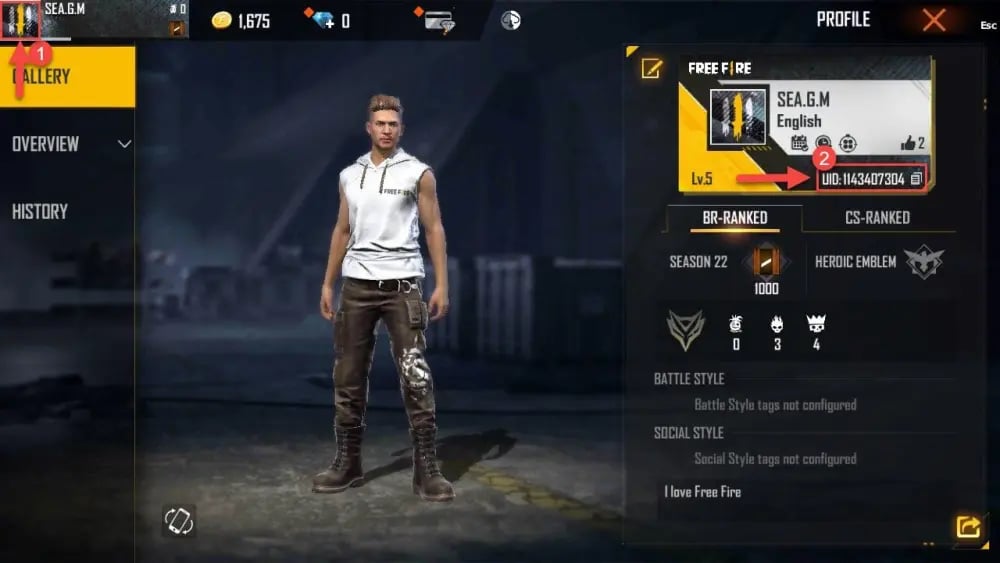
Always double-check that you have copied the full numeric string before submitting your order on VGTopup.
Step-by-Step Guide to Top Up Boli Gold via UID
Recharging your account on VGTopup is straightforward and does not require complex account authorizations. Follow these steps to complete your transaction:
- Select Gold Package: Browse the available Boli Gold amounts displayed on this page and choose your preferred bundle.
- Enter Your UID: Paste your Boli numeric User ID into the designated input box on the checkout page.
- Confirm Details: Double-check that your entered UID matches your in-app profile identifier.
- Complete Payment: Select your preferred payment option from the available checkout channels and complete your payment.
- Receive Gold: The system verifies the payment automatically and transfers the gold balance directly to your Boli account. Open the Boli app and check your in-app wallet to view your updated balance.
| Order Step | User Action | Verification Details |
|---|---|---|
| 1. Select Package | Choose desired Boli Gold denomination | Check live checkout pricing |
| 2. Input UID | Enter Boli User ID into the UID field | Copy directly from Boli profile |
| 3. Payment | Complete transaction via secure gateway | Review order summary |
| 4. Delivery | Refresh Boli in-app wallet | Instant automated crediting |
Benefits and Uses of Boli Gold in Voice Rooms
Acquiring Boli Gold enhances your overall experience inside the app across several core areas:
Animated Virtual Gifting
Virtual gifts are the primary method of interacting with room hosts and content creators. Sending gifts such as luxury cars, crowns, fireworks, and special effects increases the room popularity score, boosts host rankings on leaderboards, and strengthens social connections within communities.
Room Customization and Visual Assets
Room owners can spend gold to purchase exclusive room backgrounds, customized microphone frames, entry banners, and animated welcome effects. These visual assets help your voice room stand out in the public room directory and attract more listeners.
VIP Status and Privileges
Upgrading your account status with gold unlocks VIP tier badges, distinguished name colors, custom chat bubbles, and entry announcements when joining popular voice rooms. VIP members also receive priority microphone queue privileges during busy events.
Interactive Mini-Games and Room Events
Many audio rooms host interactive mini-games, lucky draws, and community challenges. Boli Gold allows you to participate in these community activities, compete with other users, and earn exclusive event badges.
Account Safety and Secure Password-Free Delivery on VGTopup
Account safety is essential when purchasing digital currencies online. VGTopup implements strict security measures to protect your personal information and gaming accounts:
- Password-Free Transactions: We only require your public Boli User ID. We never ask for your password, phone number, email login, or two-factor authentication codes.
- Direct UID Routing: Gold is credited directly to the account tied to the entered UID through automated systems, eliminating manual account handling risks.
- Continuous 24/7 Processing: Our servers process orders around the clock without offline maintenance gaps, ensuring you receive your currency whenever you need it.
- Safe Gifting to Friends: Because top-ups only require a UID, you can recharge accounts for friends, family members, or room hosts securely without needing access to their private credentials.
Troubleshooting Common Boli Recharge Issues
If you experience any delay or issue with your order, review the following troubleshooting steps:
Balance Display Delay
If your gold does not show up immediately after payment confirmation, completely close the Boli application from your device task manager and reopen it. Check your internet connection to ensure the app syncs properly with the server.
Typo in UID Entry
If you entered an incorrect UID during checkout, delivery may fail or credit the wrong account. Transactions completed to a valid third-party UID cannot be reversed once processed by the network. If your order status shows an error or remains pending, reach out immediately to VGTopup customer support with your order number and correct UID.
Payment Processing Holds
Certain banking channels or payment processors may occasionally take extra time to confirm fund transfers. Once the payment status confirms as successful, our system automatically releases your gold instantly.
Frequently Asked Questions
How do I find my Boli UID for a top-up?
Open the Boli app, tap the Profile icon in the bottom-right corner, and locate the numeric User ID displayed directly beneath your avatar and display name. Tap the copy icon next to it to paste it directly into the checkout field.
Do I need to share my Boli account password to recharge?
No. VGTopup only requires your public numeric UID to process your Boli top up. Never share your password, login credentials, or SMS verification codes with anyone.
How long does Boli gold delivery take after payment?
Delivery is automated and starts immediately after your payment is successfully verified. In most cases, the gold appears in your Boli wallet within moments of completing checkout.
Can I top up Boli gold for a friend using their UID?
Yes. Enter your friend's numeric Boli UID in the UID field on the VGTopup product page. Once payment is completed, the gold will be credited directly to their in-app wallet.
What should I do if my Boli gold balance does not update?
First, restart your Boli app to refresh your wallet balance. If the gold does not appear after a few minutes, verify your transaction status on VGTopup and contact our 24/7 customer support team with your order number for assistance.
What payment methods can I use to buy Boli gold?
VGTopup supports a wide selection of secure global and regional payment options. You can view all currently supported payment channels during the checkout process.
Select Denomination
Tax, payment fees and eligible coupons are calculated at checkout.
| Package | Price |
|---|---|
| Boli - Boli*20000 | USD 1.69 |
| Boli - Boli*25000 | USD 2.12 |
| Boli - Boli*50000 | USD 4.23 |
| Boli - Boli*100000 | USD 8.46 |
| Boli - Boli*500000 | USD 42.32 |
| Boli - Boli*1000000 | USD 84.65 |
| Boli - Boli*5000000 | USD 423.23 |
| Boli - Boli*15000 | USD 1.27 |






























































