The One Rule That Blocks Most Redemptions
Here is the rule that causes 90% of the Steam gift card region lock headaches:
Steam wallet codes must match the exact currency of the target account to redeem. Try a EUR code on a GBP or USD account and it fails. Same the other way. USD on a Euro account? Declined.
Valve checks the currency, not just the country. Your account has a store country and a wallet currency. The code has to line up with that currency. No workaround at the redeem screen — just the red error box and a code that looks valid but won't apply.
There is one helpful exception. Euro-denominated Steam cards redeem across any eurozone member state. A single EUR code works whether your account is set to Germany, France, Spain, Italy, Netherlands, or any other Euro-using country. They share the currency. GBP is separate. USD is separate. TRY, ARS, INR, all separate.
Buy the right currency once instead of gambling on a converter or forum trick. If your account says USD at checkout, buy USD. If it says EUR, buy EUR.
USD vs EUR vs GBP vs Global: Which Label Matches Your Account?
Labels are where gift-givers get burned. You see USD, EUR, TR, Global, and they all look like Steam. They are not interchangeable.
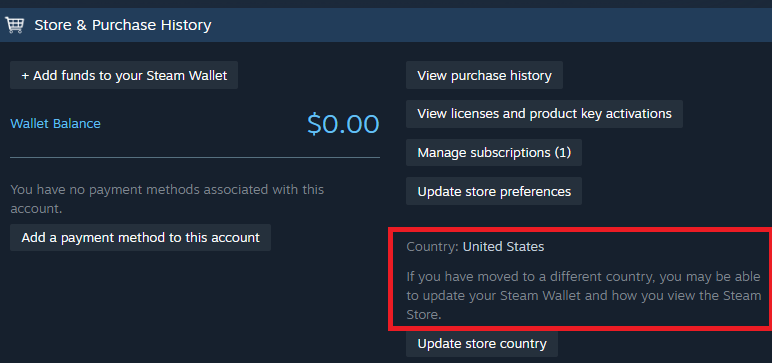
Check your account first. Open Steam > Account Details > Store & Purchase History. Your wallet currency is shown right there. That is your answer. Not your IP, not your language, not where you bought the code.
This is the currency match you need to get right before you pay:
| Code Currency |
Redeems On |
Will Be Rejected On |
| USD |
United States accounts (USD wallet) |
EUR, GBP, PHP, TRY wallets |
| EUR |
Any eurozone account (Germany, France, Spain, Italy, Netherlands, etc.) |
USD, GBP, PHP wallets |
| GBP |
United Kingdom accounts (GBP wallet) |
USD, EUR wallets |
| PHP |
Philippines accounts (PHP wallet) |
USD, EUR wallets |
| Global |
Only accounts flagged as Global / no fixed currency* |
Most fixed-currency accounts |
*Global sounds universal. It isn't. For most fixed-currency accounts, a Global code still fails if the store expects USD or EUR. I treat Global as a niche label, not a safe default.
Takeaway: If you are unsure, do not buy Global hoping it will flex. Buy the exact currency shown in the recipient's Wallet. You can check the current Steam Gift Card options on vgtopup to confirm which currencies are currently listed and what denominations from $5 to $100 are available for that currency.
How Regional Pricing Really Works in 2026
People ask why Vietnam or Indonesia codes exist at all. Price gaps.
Steam lets publishers set regional prices, and some regions can list lower than the US store. Steam's system ties pricing to the store currency, so when a store switches currencies the old gaps disappear. That is what happened when Argentina and Turkey moved from local currencies to USD pricing in late 2023. After that, bargain hunters looked at Vietnam and Indonesia instead.
Those two regions can show some of the lowest comparative prices on Steam because of how regional pricing works, with popular titles in the table below showing 30% to 60% savings compared to standard US store prices.
You can see the gap in the examples below. These are not vgtopup prices, they are the kind of store price differences that make people chase the wrong gift card region.
Here is a snapshot of how the same game can list very differently by region:
| Game |
US Store Price vs Vietnam Store Price |
Note |
| Elden Ring |
$59.99 (US) vs ~$25 (Vietnam) |
Prices fluctuate based on regional pricing rules and exchange rates. |
| Baldur's Gate 3 |
$59.99 (US) vs ~$28 (Vietnam) |
Prices fluctuate based on regional pricing rules and exchange rates. |
| Cyberpunk 2077 |
$59.99 (US) vs ~$24 (Vietnam) |
Prices fluctuate based on regional pricing rules and exchange rates. |
| EA Sports FC 24 |
$69.99 (US) vs ~$32 (Vietnam) |
Prices fluctuate based on regional pricing rules and exchange rates. |
Takeaway: Cheaper store prices do not mean you can redeem a cheaper region's gift card on a US or EU account. The wallet still has to match.
Steam knows people try. Changing a Steam store region officially requires a local payment method or genuine relocation. You also get a mandatory three-month cooldown once changed. I have seen people stuck for a full quarter because they switched to chase a deal.
If your account is USD and you live in the US, the Vietnam price is interesting but irrelevant to your gift card choice. Buy USD. If you actually moved and your Wallet is now VND or IDR with a local payment method on file, then buy that currency. For most readers funding a $5-$100 Wallet with GCash, DANA, PIX, Mada or PayPal, the clean path is to match what you already have and grab a USD Steam Wallet code for your region if that is what your account shows, instead of trying to outsmart the store.
Picking the Right Card for Your Spending Style
You don't need $100 every time. How you spend matters more than the max.
Light / F2P Top-Up: $5 - $20
You play free-to-play titles, grab market items, or need a little extra for a sale. A $5 or $10 Steam wallet code covers a cheap indie, a battle pass top-up via Wallet, or that DLC you missed. Low risk if you are gifting and unsure of the exact amount.
Mid-Core Buyer: $25 - $50
You buy 1-2 full games a quarter, usually on sale. This is the sweet spot for most PC gamers. A $25 or $30 code clears a new release at a discount, or a $50 code covers a $59.99 title when you add existing balance. I usually tell friends in this tier to buy the $50 and keep the leftover for the next sale. It stretches further than two small cards.
Heavy / Collector: $50 - $100
You pre-order, you buy at launch, you own the DLC season pass. Get the $50 or $100. One redemption, one balance, less hassle. If you are gifting to this type, don't overthink it. They will burn through it in a week during the Summer or Winter sale.
Across all tiers, the rule stays: currency first, amount second. A $100 code in the wrong currency is worth $0 to that account. A $10 code in the right currency is instant value.
Buying Safely: What a Real Checkout Asks For vs What a Scam Asks For
Funding a Wallet should be boring. Boring is safe.
A legitimate top-up will ask for:
- The currency and denomination you want ($5-$100)
- Your email for code delivery
- Your chosen payment method (PayPal, GCash, DANA, PIX, Mada, or card)
- Confirmation before you pay
A scam will ask for:
- Your Steam password or Steam Guard code
- Remote access to your PC to "redeem for you"
- A photo of your ID or full credit card number over chat
- Payment via gift cards or crypto sent to a personal handle
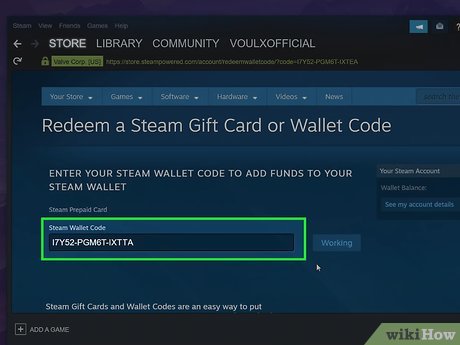
Never hand over your Steam login to redeem a gift card. The code is meant to be redeemed by you, inside your own account at store.steampowered.com or in the client under Games > Redeem a Steam Wallet Code. If a seller needs your password, walk away.
Also remember digital gift card codes are generally treated as final sale items and are non-refundable once delivered. That is standard for codes industry-wide. Double-check currency and email before you confirm. If you want to compare denominations and currencies without guessing, browse the Steam Wallet codes by region on vgtopup and match it to what your Account Details shows.
FAQ
Can I use a US Steam gift card on a European Euro account?
No. Steam wallet codes must match the currency of your account. A USD code will be declined on a EUR-denominated account, even though both are in Europe or North America. Buy EUR for a Euro wallet, USD for a USD wallet.
How long does it take to receive a digital Steam gift card after purchase?
Digital codes are delivered instantly or within a few minutes directly to your email inbox by online vendors. If you don't see it, check spam and promotions folders first, then confirm the email you entered at checkout is correct.
Are Steam gift cards refundable after delivery?
No, digital gift card codes are treated as final sale items and cannot be cancelled or exchanged once sent. This is consistent across most reputable stores because the code can be redeemed immediately. Always verify region and currency before paying.
Do Steam Wallet funds expire?
No, Steam gift cards and redeemed Wallet balances do not have an expiration date. You can redeem now and spend during the next sale without losing value.
What does Steam gift card Global actually mean?
Global is marketed as a flexible region, but it only redeems on accounts that accept Global codes. For the majority of fixed-currency accounts like USD, EUR, or GBP, a Global code will still fail. When in doubt, match the exact wallet currency instead of gambling on Global.
Can I change my Steam region to use a cheaper currency code?
Changing a Steam store region officially requires a local payment method from that region or a genuine relocation, and triggers a three-month cooldown. Sources also disagree on whether using out-of-region cards to bypass pricing violates Steam's terms, with some resellers marketing it as a workaround while others warn it risks account action. I would not risk it for a $10 saving.
Final Call: Buy the Currency Your Account Already Uses
If you remember one thing from this guide, make it this: your Steam Wallet currency decides everything.
Don't buy what is cheapest. Don't buy what says Global and looks safe. Open your account, read the three letters next to your balance, and buy that. USD account = USD code. EUR account = EUR code. PHP account = PHP code.
For most PC gamers and gift-givers paying with GCash, DANA, PIX, Mada, or PayPal and loading $5-$100, the win is a clean redeem on the first try. No error, no support ticket, no wasted code. Match the currency, pick the amount that fits how you play, and redeem it yourself in the Steam client.
I keep it simple. I check the wallet, I buy the same currency, I redeem, I buy the game. You should do the same.






Comments