



What Is a Yula Top Up and How Does It Work?
A Yula top up is a direct account funding service that adds game currency, passes, or balance directly into your Yula profile. Instead of managing app store gift cards or linking sensitive payment cards directly inside mobile apps, players use their unique Player ID to purchase game items and credits online.
When you complete a top-up on VGTopup, the system matches your unique numerical or alphanumeric identifier and credits your profile directly. This direct-delivery method eliminates the risk of sharing personal login details, third-party social media access, or email verification codes. Your transaction processes through secure external billing channels while your account inventory updates automatically in real time.
How to Find Your Yula Player ID in the App
Your Player ID is the only information required to complete an order on VGTopup. Finding this identifier inside the app takes only a few taps:
- Launch the Yula application on your device.
- Tap on your Avatar or Profile Icon, located in the top-left or main settings corner of the home screen.
- Open your profile overview page.
- Locate the Player ID (often displayed as ID or UID) next to your character display name.
- Tap the Copy icon next to the number, or write it down carefully to avoid transcription errors.
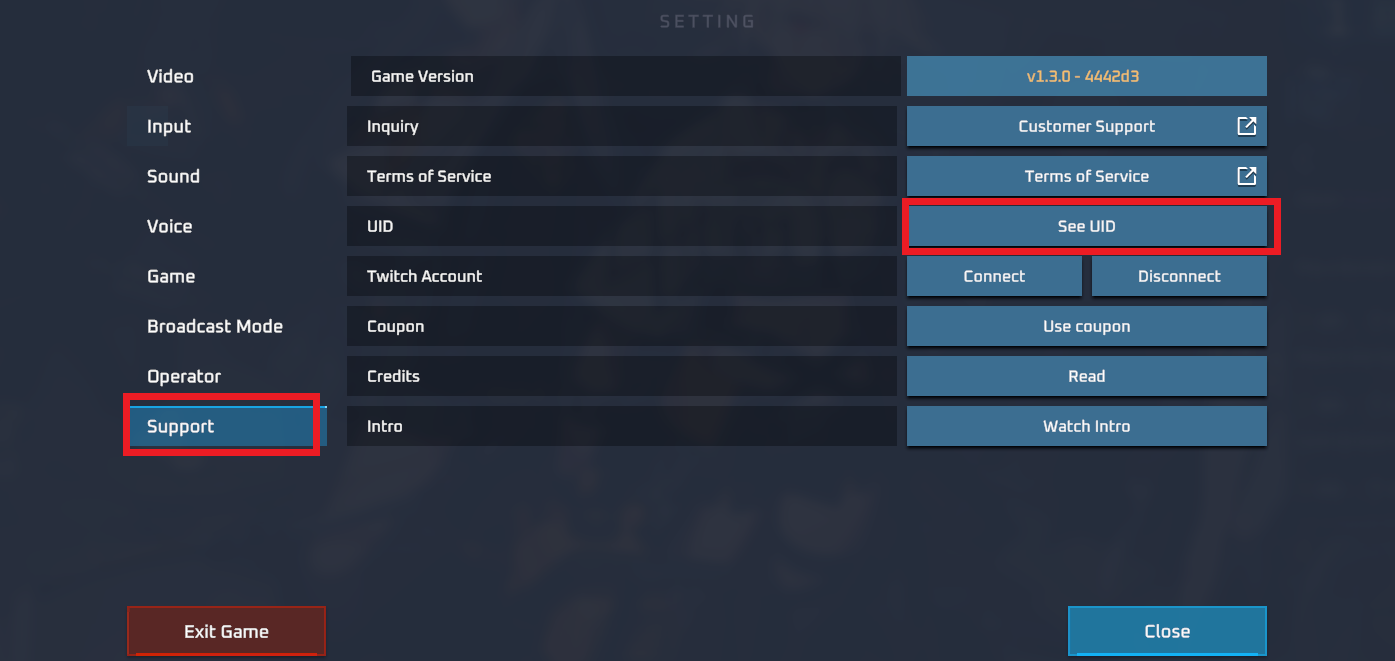
Always double-check that you copy the full numeric string without any trailing spaces or accidental punctuation before proceeding to checkout.
Step-by-Step Guide to Recharge Yula Online
To ensure your account receives credits without delay, follow these straightforward purchasing steps on VGTopup:
| Step | Action | Description |
|---|---|---|
| 1 | Select Package | Choose your desired denomination or item pack on the product catalog. |
| 2 | Input Player ID | Paste your copied Yula Player ID into the designated field. |
| 3 | Select Payment | Pick your preferred local or international payment method from the checkout list. |
| 4 | Confirm Order | Review the order summary, total amount, and destination ID, then complete payment. |
| 5 | Check Delivery | Re-open your Yula app to view your updated in-game currency balance. |
Once payment confirms, VGTopup initiates direct API fulfillment to credit your profile immediately.
Safe and Password-Free Top-Up Process on VGTopup
Account safety is critical when purchasing digital items. VGTopup operates on a strict zero-credential policy. You are never asked for:
- Account passwords
- Social login credentials (Facebook, Google, Apple ID)
- One-time passwords (OTP) or email verification codes
- Secret security questions
Because the recharge process uses exclusively your public Player ID, your account security remains completely in your own hands. You avoid the dangers of account hijacking, unauthorized access, and credential sharing risks associated with informal trading or unauthorized sellers.
Supported Payment Methods and Live Order Verification in 2026
VGTopup provides access to a broad range of domestic and international payment solutions in 2026. Available options include major credit and debit card networks, recognized e-wallets, direct online banking gateways, and localized digital payment channels.
Exact exchange rates, regional fees, and live product prices are calculated automatically and presented clearly on the live checkout screen before you finalize your transaction. This transparent pricing model guarantees zero hidden processing fees at the final stage of payment.
After finalizing your payment, you receive an instant on-screen order status receipt containing a unique transaction reference number. You can use this reference to track your order state or confirm delivery details at any point.
Troubleshooting Common Yula Top-Up and Delivery Issues
While most top-up requests process within moments, network delays or input mistakes can occasionally happen. Follow this troubleshooting checklist if you encounter any issues:
1. In-Game Balance Has Not Updated
- Restart the App: Close the Yula app completely from your device's background app manager and reopen it. A fresh server handshake is often required to refresh display balances.
- Check Order Status: Look up your order on the VGTopup order verification page to confirm that the payment gateway marked the order as completed rather than pending.
- Wait for Server Sync: During peak traffic or in-game update windows, server processing may take a few extra minutes.
2. Typo in Player ID
- If you submitted an incorrect Player ID that belongs to an active user, digital items are dispatched automatically by game servers and cannot be refunded or transferred. Always copy and paste your ID directly from the game profile.
- If you entered an invalid ID format that does not match any registered account, the transaction will fail to credit. Contact VGTopup customer support with your transaction reference number and your correct Player ID for manual order correction.
3. Payment Deducted but Order Marked Failed
- If your payment provider processed the charge but the checkout page failed to finalize, hold onto your payment receipt and bank transaction code. Provide these details to customer support to manually verify the transaction and release your items.
Frequently Asked Questions About Yula Top-Ups
How do I top up my Yula account using my Player ID?
Select the credit package you want on the VGTopup Yula page, paste your Player ID into the input field, choose a payment method, and complete the checkout. Your game balance updates automatically upon payment confirmation.
Do I need to provide my Yula account password to top up?
No. VGTopup only requires your public Player ID to send your in-game balance. Never share your password, social login data, or verification codes with anyone.
Where can I find my Yula Player ID?
Open Yula, tap your profile avatar on the home screen, and find the numeric ID listed on your profile card. Use the copy button next to it to avoid typos.
How long does it take to receive credits after completing a Yula top-up?
Under standard server conditions, orders process immediately once your payment clears. If the balance does not display right away, restart the game client to refresh the data connection.
What should I do if I enter the wrong Player ID during checkout?
If you realize an error before payment completes, cancel the prompt and re-enter the correct ID. If the order has already been finalized, contact VGTopup support immediately with your order number and correct ID. Note that successfully dispatched orders to existing third-party IDs cannot be recalled.
What payment methods can I use to buy Yula top-ups on VGTopup?
VGTopup supports popular credit/debit card brands, digital e-wallets, and regional payment services. Check the live checkout panel on the product page to see the exact real-time payment options and localized pricing for your area in 2026.
Select Denomination
Tax, payment fees and eligible coupons are calculated at checkout.
| Package | Price |
|---|---|
| Yula - Yula*50000 | USD 0.94 |
| Yula - Yula*70000 | USD 1.32 |
| Yula - Yula*100000 | USD 1.88 |
| Yula - Yula*200000 | USD 3.76 |
| Yula - Yula*500000 | USD 9.40 |
| Yula - Yula*700000 | USD 13.17 |
| Yula - Yula*1000000 | USD 18.81 |
| Yula - Yula*2000000 | USD 37.62 |
| Yula - Yula*5000000 | USD 94.05 |
| Yula - Yula*10000000 | USD 188.10 |






























































