



Shila Chat Top Up: Instant UID Balance Recharge
Get Shila Chat coins added directly to your account balance with VGTopup. Shila Chat is an interactive audio streaming and group voice room app where users connect across live voice channels, play interactive party games, and send dynamic virtual gifts to their favorite hosts. Coins serve as the primary in-app currency, giving you full access to exclusive room privileges, animated entry banners, profile badges, and special event items.
When you complete a Shila Chat top up on VGTopup, the coins credit directly to your account using only your User ID (UID). There is no need to share your private account password, link external credentials, or wait for complicated verification steps. Choose your desired coin denomination, submit your UID, and enjoy immediate access to live voice room interactions across the platform.
How to Top Up Shila Chat Coins on VGTopup
Recharging your coin balance on VGTopup is simple and direct. Follow these quick steps to complete your purchase:
- Select the coin package you want to purchase from the list above. Live rates and available denominations are displayed directly on the checkout selection menu.
- Enter your Shila Chat User ID (UID) into the designated player ID field.
- Double-check your entered UID to prevent sending balance to an incorrect profile.
- Choose your preferred payment method from the available localized and global options.
- Complete the checkout process.
- Once payment confirmation is received, VGTopup automatically processes your order and sends the coins straight to your Shila Chat account.
| Top-Up Step | Action Required | Details |
|---|---|---|
| 1. Select Pack | Choose coin quantity | Check the live checkout menu for current coin packages and pricing |
| 2. Enter UID | Provide numeric User ID | Located directly in your Shila Chat profile screen under your avatar |
| 3. Pay & Confirm | Complete checkout | Select your preferred payment channel and finalize transaction |
| 4. Verify | Check in-app wallet | Re-open your Shila Chat profile to see your updated coin balance |
How to Find Your Shila Chat UID
To make sure your coin purchase credits to the correct profile, you must enter your exact numeric Shila Chat User ID. Finding your UID takes only a few seconds inside the mobile app:
- Open the Shila Chat application on your Android device.
- Tap the Profile icon (labeled "Me" or "My Profile") located in the bottom navigation bar.
- Look directly beneath your profile picture, nickname, and level display.
- You will see a unique numeric string labeled "ID" or "UID".
- Tap the copy icon next to the number, or write it down carefully to paste directly into the VGTopup order field.
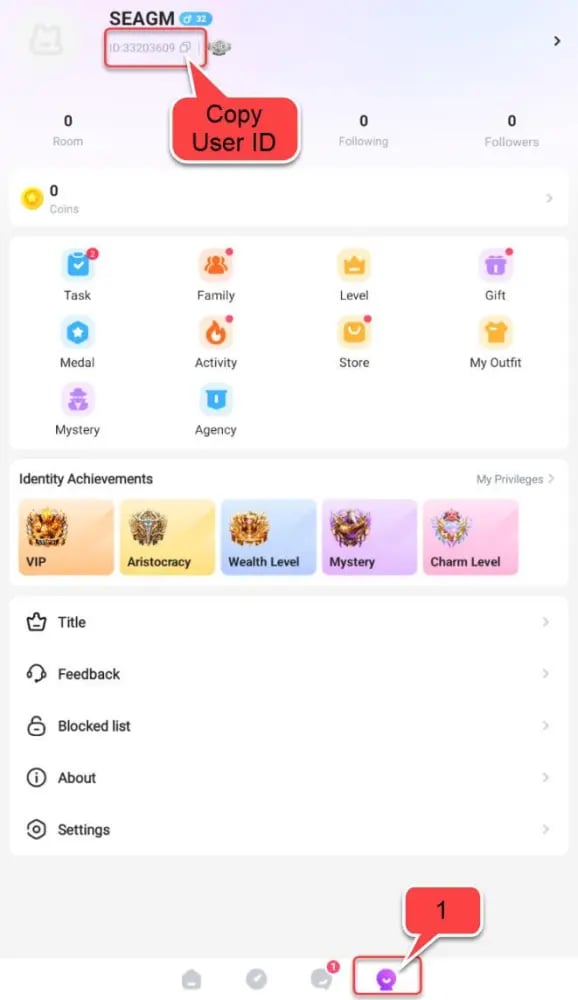
Always copy and paste the ID directly from the app whenever possible. This prevents typing errors that could route your coins to another user.
What Are Shila Chat Coins Used For?
Shila Chat coins give you the freedom to participate in community activities and customize your presence across live audio channels:
- Sending Animated Virtual Gifts: Send luxury digital gifts—ranging from flowers and hearts to sports cars, yachts, and celebration rockets—to voice room hosts and performers during live broadcasts.
- Unlocking Special Entrance Effects: Stand out the moment you join a public or private voice room with custom avatar frames, ride effects, and high-tier entry animations.
- Participating in Room Competitions and PK Battles: Boost your favorite room hosts during competitive live room events, family battles, and leaderboards.
- Activating VIP Badges and Privilege Perks: Obtain exclusive profile decorations, colored chat text, and unique status privileges that signal your standing in the community.
- Creating and Customizing Group Rooms: Upgrade your personal audio rooms with custom themes, background music rights, and premium seating arrangements for your guests.
Account Safety: Password-Free Top Up Delivery
Protecting your digital assets and account privacy is essential. VGTopup uses direct UID crediting, meaning:
- Zero Password Requirements: You will never be asked for your login email, phone number verification code, password, or third-party social media credentials.
- No Account Sharing: Your Shila Chat account remains entirely in your hands. Nobody else logs into your profile to complete transactions.
- Secure Transaction Channels: All payment operations run through encrypted, industry-standard gateways to protect your billing information.
- Direct Platform Fulfillment: Coins are credited directly to the game server database linked to your specific player ID.
Shila Chat and Velira: Understanding App Identity
Depending on regional app store updates and operating system distributions, Shila Chat is also recognized in association with the Velira voice room platform and the Android package identifier com.chat.shila. Both reference the same core social voice streaming ecosystem.
If your installed app displays Velira or Shila Chat branding, your numeric account UID functions identically across the platform network. Using VGTopup guarantees that your coin recharge routes precisely to your active profile under com.chat.shila, regardless of minor visual differences in regional app store listings.
Troubleshooting Coin Delivery and Balance Verification
If your coins do not appear immediately after completing payment, use these standard verification steps:
- Restart the Shila Chat App: Fully close the app from your device's recent apps switcher and relaunch it. This forces the client to refresh cached wallet data from the main server.
- Check Your In-App Wallet History: Go to your profile, open the "Wallet" or "Coins" tab, and review the transaction log to confirm recent balance updates.
- Check Your VGTopup Order Status: Visit the order tracking page on VGTopup to confirm that your payment has cleared and the system marked the order as completed.
- Contact Customer Support: If the balance does not show within a short period after order completion, contact VGTopup customer support with your Order ID and UID. Our support team is ready to assist you in verifying the delivery status.
Frequently Asked Questions
Where can I find my Shila Chat UID for top up?
You can find your Shila Chat UID by opening the app, tapping on the "Me" or Profile tab in the bottom menu, and looking at the numeric ID located right below your avatar and nickname. Tap the copy icon next to the number to copy it to your clipboard.
Do I need to provide my Shila Chat password to top up coins?
No. VGTopup only requires your numeric Shila Chat User ID (UID) to process your coin recharge. You should never share your account password, SMS verification codes, or login credentials with anyone.
What can I spend Shila Chat coins on inside the app?
Shila Chat coins can be spent on sending virtual gifts to voice room hosts, entering room PK battles, purchasing animated entrance effects, customizing profile frames, and unlocking VIP community privileges.
Is Shila Chat the same as the Velira voice room app?
Yes. Shila Chat and Velira share the same underlying platform infrastructure and the Android package name com.chat.shila. Your numeric UID from either interface connects to the same account network, allowing you to top up coins safely on VGTopup.
How do I verify if my Shila Chat coin top up was successful?
Open the Shila Chat app, go to your Profile page, and check your coin balance under the Wallet section. You can also review your VGTopup order history to confirm that your transaction status shows as completed.
What should I do if I entered the wrong UID during checkout?
Because UID top-ups are processed automatically to the server based on the number provided, balances sent to a valid, existing third-party UID cannot be reversed. If you notice an error immediately before the order status updates to processing, contact VGTopup support right away with your order number to see if the transaction can be corrected prior to dispatch.
Select Denomination
Tax, payment fees and eligible coupons are calculated at checkout.
| Package | Price |
|---|---|
| Shila Chat - Shila Chat*20000 | USD 1.77 |
| Shila Chat - Shila Chat*25000 | USD 2.21 |
| Shila Chat - Shila Chat*50000 | USD 4.42 |
| Shila Chat - Shila Chat*100000 | USD 8.84 |
| Shila Chat - Shila Chat*500000 | USD 44.19 |
| Shila Chat - Shila Chat*1000000 | USD 88.39 |
| Shila Chat - Shila Chat*5000000 | USD 441.95 |
| Shila Chat - Shila Chat*15000 | USD 1.33 |






























































