
Quick and Secure Opa Live Top Up with Your UID
Recharging your balance on Opa Live allows you to interact directly with your favorite broadcasters, send vibrant animated gifts, join interactive room events, and stand out in community live chats. VGTopup provides a direct top up service that credits your in-app currency straight to your account using only your User ID (UID).
You never need to share sensitive account credentials or passwords. By entering your numerical UID, selecting your desired diamond pack, and completing checkout, your Opa Live balance updates quickly so you can continue supporting top creators without missing any live action.
Where to Find Your Opa Live User ID (UID)
Locating your Opa Live UID takes only a few seconds within the mobile application. Follow these simple steps to retrieve your ID accurately:
- Open the Opa Live app on your mobile device and log in to your account.
- Tap the Profile or Me tab located at the bottom-right corner of the screen.
- Look directly beneath your profile picture and nickname at the top of the screen.
- Locate the numerical sequence labeled UID or ID.
- Tap the copy icon next to the number, or write down the exact digits.
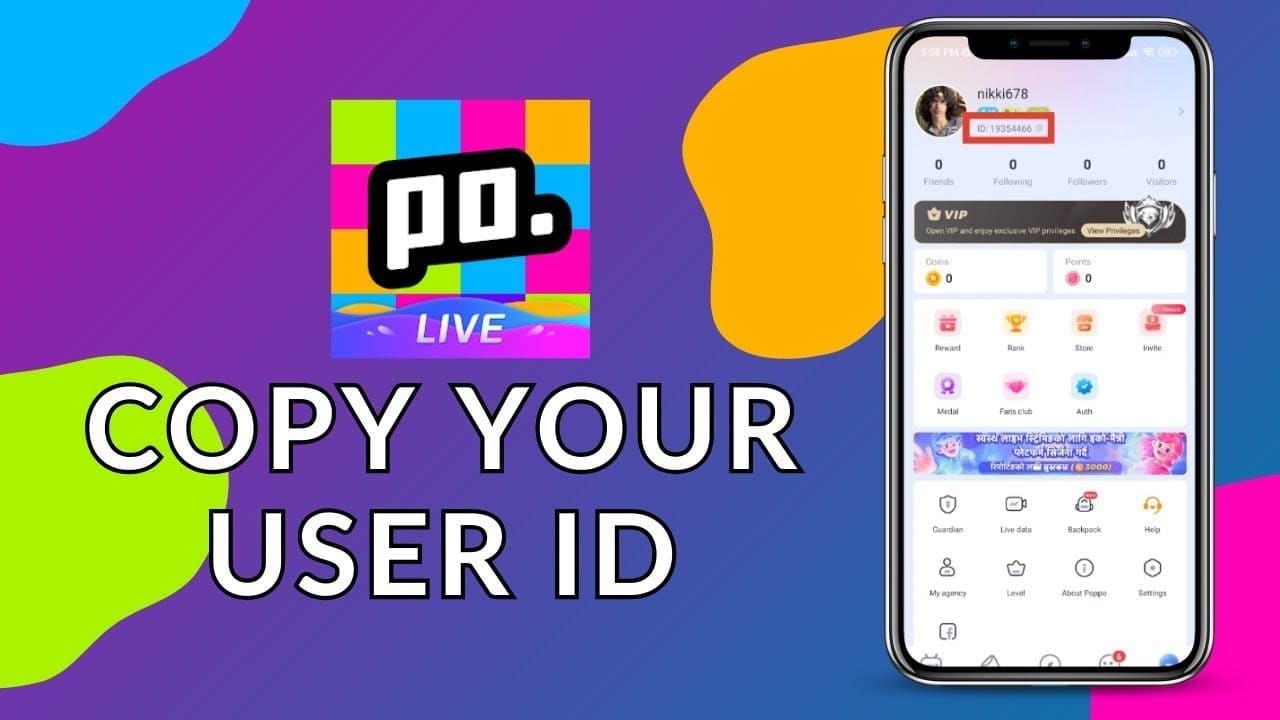
Always double-check your UID before proceeding to checkout. Because top-ups are processed directly to the ID submitted, entering the correct digits ensures your diamonds arrive without delay.
How to Top Up Opa Live on VGTopup
Completing an Opa Live recharge on VGTopup is straightforward. Follow this step-by-step guide to place your order:
| Step | Action | Details |
|---|---|---|
| Step 1 | Choose Package | Browse the available diamond denominations and pick the pack you want. |
| Step 2 | Enter UID | Input your numerical Opa Live UID into the designated player ID field. |
| Step 3 | Select Payment | Review live checkout rates and choose your preferred local or international payment method. |
| Step 4 | Complete Checkout | Finalize your payment through the secure payment gateway. |
| Step 5 | Check Balance | Open Opa Live to confirm that your newly recharged diamonds have arrived. |
Why Recharge Opa Live on VGTopup
Choosing VGTopup for your Opa Live recharge ensures a safe, reliable, and user-friendly transaction experience. Key benefits include:
- Zero Password Sharing: Your account security remains completely intact. VGTopup only requires your public UID to deliver currency, eliminating any risk to your login credentials or personal data.
- Transparent Live Pricing: Current prices, currency conversions, and pack options are displayed directly on the live checkout interface so you always see exactly what you pay.
- Multiple Payment Methods: Select from a wide variety of localized payment gateways, international credit cards, and digital wallets tailored to your region.
- Direct Balance Delivery: Orders are processed automatically through direct top-up channels, sending diamonds to your Opa Live account promptly upon payment confirmation.
- Dedicated Customer Support: If you ever have a question about your order status, VGTopup customer service is available to review your transaction details and assist you.
Supported Payment Options and Delivery Process
VGTopup accommodates users worldwide by offering localized checkout solutions alongside global payment gateways. Depending on your location, you can complete your order using major credit and debit cards, secure regional bank transfers, or popular digital e-wallets. Active payment channels, processing fees, and regional currency conversions are calculated and displayed in real time on the live checkout screen.
Once your payment clears, our system routes the order directly to your Opa Live account using your submitted UID. In most cases, your diamonds appear in your in-app wallet shortly after transaction completion. You can verify the delivery immediately by opening the Opa Live app and checking your wallet balance under your profile menu.
Troubleshooting Common Top Up Issues and Delivery Checks
If you experience any delay or do not see your updated balance right away, follow these troubleshooting checks:
- Refresh the Opa Live App: Force-close the Opa Live application completely and reopen it. In many cases, a simple app restart forces the client to refresh your server balance.
- Check Your Order Status on VGTopup: Log in to your VGTopup account and verify that your order status is marked as completed. If your payment is still pending, the recharge will process as soon as the payment gateway confirms the transfer.
- Verify the Submitted UID: Review your order confirmation receipt on VGTopup to confirm that the UID entered matches your actual in-app ID. If you notice a typo, contact customer support immediately with your transaction ID.
- Contact Support with Your Order ID: If your order shows as completed but your diamonds have not arrived after refreshing, reach out to VGTopup customer support with your order number and screenshot of your in-app profile. Our team will trace the delivery status with the processing system.
Using Recharged Diamonds and Coins to Support Creators
Recharging your Opa Live balance gives you full access to the platform's interactive social features:
- Send Virtual Gifts: Reward entertaining hosts by sending animated gifts ranging from small tokens of appreciation to premium full-screen effects.
- Boost Broadcaster Rankings: Your gifts help your favorite streamers climb daily, weekly, and event leaderboards, increasing their visibility across the platform.
- Increase Fan Level Badges: Regular gifting unlocks higher fan club tiers, exclusive chat badges, and entry into VIP rooms.
- Participate in PK Battles: Help your preferred creator win live head-to-head battles against other streamers by sending support items during competition rounds.
Frequently Asked Questions
What information is needed to top up Opa Live?
You only need your numerical Opa Live User ID (UID) and your choice of diamond package. You do not need to provide your phone number, email address, password, or third-party login credentials.
How do I find my Opa Live UID?
Open the Opa Live app, tap the Profile or Me icon in the lower-right menu, and look at the top section under your username. Your numerical UID is displayed there with a quick-copy button.
Do I need to share my Opa Live password or login credentials?
No. VGTopup never asks for your password, verification codes, or login details. All recharges are sent directly to your account using your public UID only.
How quickly will the top up arrive in my Opa Live balance?
Deliveries are processed immediately after your payment is confirmed by the payment gateway. Once completed, your diamonds typically reflect in your in-app wallet within moments. Restart the app if your balance does not update automatically.
What should I do if I entered the wrong UID?
Top-ups are automated and applied directly to the UID submitted at checkout. If you realize you entered an incorrect UID, contact VGTopup customer service immediately with your order details. If the order has not yet been processed by the system, our support team will attempt to correct the destination ID.
Is it safe to buy Opa Live recharge on VGTopup in 2026?
Yes. VGTopup utilizes secure encrypted payment gateways and direct UID-based delivery. Because you never expose your login credentials, your Opa Live account remains completely secure throughout the transaction.
Select Denomination
Tax, payment fees and eligible coupons are calculated at checkout.
| Package | Price |
|---|---|
| Opa Live - Opa Live*20000 | USD 1.50 |
| Opa Live - Opa Live*25000 | USD 1.88 |
| Opa Live - Opa Live*50000 | USD 3.75 |
| Opa Live - Opa Live*100000 | USD 7.50 |
| Opa Live - Opa Live*500000 | USD 37.52 |
| Opa Live - Opa Live*1000000 | USD 75.04 |
| Opa Live - Opa Live*5000000 | USD 375.21 |
| Opa Live - Opa Live*15000 | USD 1.13 |