



How to Top Up Salam via UID on VGTopup in 2026
Recharging your Salam account balance through VGTopup is straightforward and secure. The entire process requires only your public User ID (UID), ensuring you never have to expose private login information.
Follow these steps to complete your top-up:
- Select your preferred Salam balance package or denomination from the product catalog.
- Enter your Salam UID accurately into the required input field.
- Click the purchase button to proceed directly to the secure checkout page.
- Select your preferred payment option from the available regional and international methods.
- Confirm your payment details and finalize the transaction.
- The system processes your order and sends the credit straight to your Salam account balance.
| Top-Up Step | Action Required | Essential Details |
|---|---|---|
| 1. Select Package | Choose balance denomination | Verify package matches your requirements |
| 2. Input UID | Type your exact Salam UID | UID only, no login credentials required |
| 3. Checkout | Select payment channel | Live rates and regional methods displayed |
| 4. Delivery | Automatic credit processing | Check your updated balance directly in-app |
Step-by-Step Guide to Finding Your Salam UID
To ensure your Salam balance recharge reaches the correct account, you must locate and copy your official User ID from the Salam interface before placing an order.
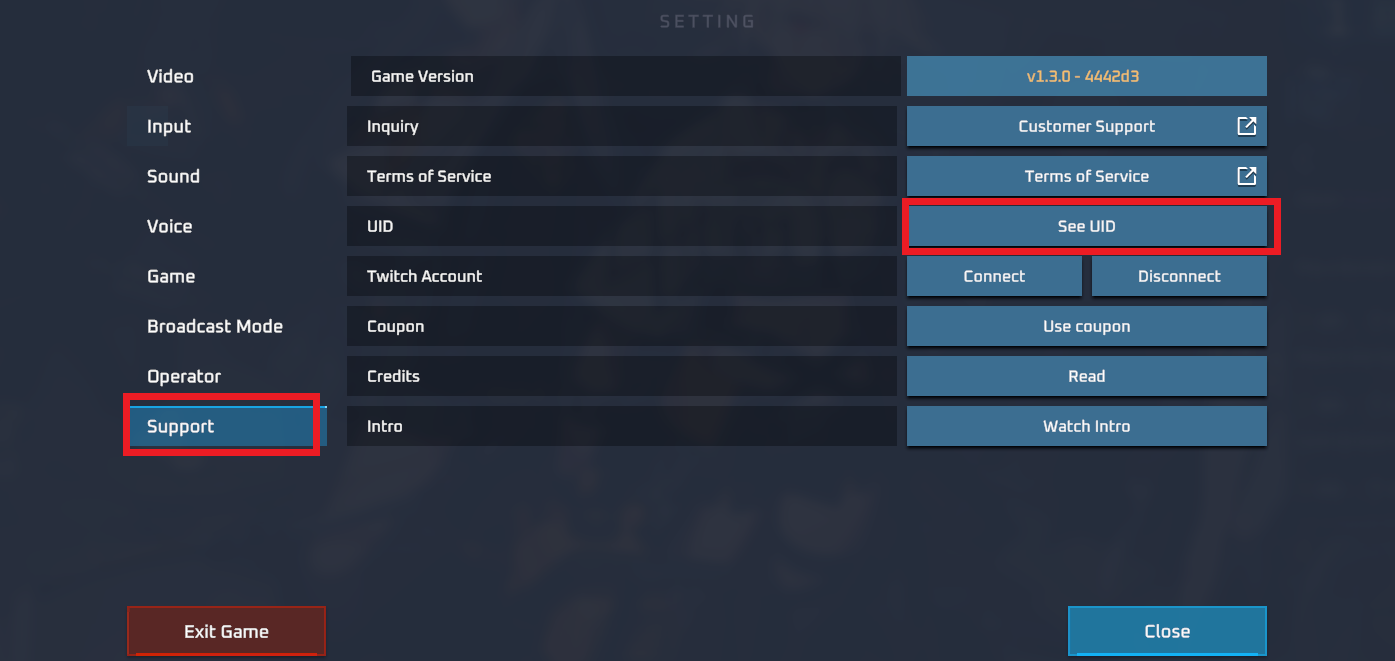
Here is how to find your Salam UID:
- Launch the Salam application or access your account profile on your device.
- Tap your user profile icon or open the personal account settings section.
- Find the numeric UID displayed under your account name or profile summary.
- Copy the UID to your clipboard or write it down carefully.
- Paste the UID into the player ID field on VGTopup during checkout, ensuring there are no extra spaces or missing digits.
Double-checking your UID prevents delivery delays and guarantees your credit lands in the right account.
Safe and Password-Free Top-Up: Protecting Your Salam Account
Account safety is a vital concern when purchasing digital services online. VGTopup relies entirely on direct UID processing for Salam recharges. This system guarantees that your account security remains fully intact throughout the transaction.
Key security advantages of UID-only top-ups include:
- Zero Password Sharing: You never need to disclose your login password, security questions, or temporary authorization codes.
- Protection Against Phishing: Since third-party login forms are never used, your sensitive personal information cannot be intercepted.
- Account Integrity: Direct UID credit delivery removes the risk of unauthorized account modifications, settings changes, or session takeovers.
- Safe Third-Party Gifting: You can send recharges to friends or family members using only their public UID without ever accessing their private profile.
By keeping authentication separated from the recharge process, VGTopup provides a safe purchasing environment.
Available Global and Local Payment Methods at Checkout
VGTopup accommodates customers worldwide by offering an extensive selection of verified payment options. Because processing options and regional banking rules change, all available payment methods and real-time prices are dynamically displayed directly on the live checkout page.
During checkout, you can choose from:
- Major credit and debit card networks.
- Established digital wallets and mobile payment platforms.
- Regional online banking transfer options.
- Localized electronic payment channels based on your billing region.
Every transaction is processed through encrypted payment gateways, providing full clarity on applicable totals and currencies before you confirm your order.
How to Check and Confirm Your Salam Balance After Top-Up
Once your transaction completes on VGTopup, verifying the new credit in your Salam account takes only a moment:
- Open your Salam application or sign in to your official user portal.
- Go to the account overview or main dashboard.
- Pull down to refresh the screen if the app was already active in the background.
- Check your updated total balance to confirm the new funds have registered.
- Review the in-app transaction records or recharge history tab to see the incoming credit timestamp.
- Compare the balance update with the receipt details provided in your VGTopup order summary.
Troubleshooting Salam Recharge Errors and Order Delays
Most Salam top-up transactions are completed automatically, but occasional delays can occur due to network or input errors. If you experience an issue, use the following checklist:
- Verify the UID Provided: Check the order details on your VGTopup account. If an incorrect UID was submitted, the top-up may fail validation or be credited to another user.
- Check Payment Confirmation: Ensure your bank or payment provider approved the transaction. If a payment is pending on the provider's side, VGTopup will process the order as soon as payment verification clears.
- Refresh the Application: App caches can sometimes display stale balance numbers. Close the Salam app completely and reopen it to trigger a fresh data query from the server.
- Account Server Maintenance: Scheduled network maintenance on the Salam platform can temporarily delay balance displays. Check whether the platform is currently undergoing system updates.
- Contact Customer Support: If your order status on VGTopup shows completed but the credit does not appear after refreshing, contact VGTopup customer service. Provide your Order ID, purchase timestamp, and Salam UID for prompt investigation.
Frequently Asked Questions
How do I top up Salam online using my UID?
To top up Salam, select your desired credit package on VGTopup, enter your Salam UID in the player ID field, and proceed to checkout. Choose your preferred payment method and finalize the order. The balance will be delivered directly to the account associated with the UID.
Where can I locate my Salam UID?
Open your Salam app, tap your profile icon or navigate to your personal account settings. Your UID is listed in your profile details alongside your account information. Copy this ID and paste it into the UID field on VGTopup.
Do I need to share my Salam account password to recharge?
No. VGTopup recharges your Salam account using your UID only. You never need to provide your password, login credentials, or one-time verification codes.
How long does it take for the Salam top-up to reflect in my account?
Most UID top-ups are processed automatically and reflect in your Salam account balance shortly after payment verification. You can check your updated balance by refreshing your Salam account dashboard.
Can I purchase a Salam top-up for a friend using their UID?
Yes. You can send a recharge to friends or family members by entering their specific Salam UID into the player ID field during checkout. Verify the UID with them before submitting payment to ensure accurate delivery.
What should I do if my Salam recharge has not arrived?
First, refresh your Salam application and check your transaction history. Next, review your VGTopup order page to verify that the transaction was completed and that the entered UID was accurate. If the balance remains uncredited, reach out to VGTopup customer support with your Order ID for immediate assistance.
Select Denomination
Tax, payment fees and eligible coupons are calculated at checkout.
| Package | Price |
|---|---|
| Salam - Salam*1000000 | USD 8.66 |
| Salam - Salam*5000000 | USD 43.29 |
| Salam - Salam*10000000 | USD 86.58 |
| Salam - Salam*500000 | USD 4.33 |

































































