



Mixu Top Up: Instant Coin Delivery for 1v1 Video Chats
Mixu is a global social video platform designed to connect users across different countries through random matching, direct 1v1 video calls, real-time message translation, and interactive virtual gifting. To start private video conversations, connect with specific creators, or apply advanced matching filters, you need a healthy balance of Mixu coins.
VGTopup provides a direct, secure way to purchase Mixu coins online using only your Player ID. Without requiring passwords or private login credentials, our system processes your top-up directly to your account so you can continue your chats without interruption.
What Are Mixu Coins and How Do They Work in 1v1 Video Chat?
Mixu coins function as the core in-app currency for all premium social interactions inside the Mixu application. Understanding how coins are spent helps you choose the right package for your communication needs.
1. Direct 1v1 Private Video Calling
While basic discovery allows random connections, starting or maintaining a direct private video call with a preferred user consumes coins per minute. The coin rate is determined by the platform and creator settings. Having sufficient coins ensures your call does not cut off mid-conversation.
2. Location and Gender Matching Filters
If you want to meet people from specific regions or set gender preferences during discovery matching, Mixu requires coins to activate these precision filters. This saves you time by connecting you directly with the people you want to talk to.
3. Interactive Virtual Gifts
Sending animated gifts during a live video chat is the fastest way to get noticed by popular broadcasters. Gifts range from simple tokens like flowers and hearts to high-tier animations like luxury cars and private yachts. Sending gifts boosts your profile visibility and shows appreciation to your favorite hosts.
4. Real-Time Text Translation and Direct Messaging
Connecting with friends who speak different languages is made easy with built-in instant translation. Coins allow you to send direct messages and unlock unlimited live text translations during chat sessions.
Step-by-Step Guide: How to Top Up Mixu Coins on VGTopup
Recharging your Mixu account on VGTopup takes only a few moments. Follow these steps to complete your order:
- Select Your Coin Package: Browse the available Mixu coin bundles on this page and pick the amount that fits your needs.
- Enter Your Mixu Player ID: Type your numeric Player ID into the designated input box. Make sure every digit matches your profile.
- Proceed to Checkout: Click the buy button and choose your preferred payment method from the available options.
- Complete the Transaction: Follow the secure payment prompts to finalize your payment.
- Receive Your Coins: Once payment confirmation is complete, the coins are credited directly to your Mixu account balance. Open the Mixu app to verify your new total.
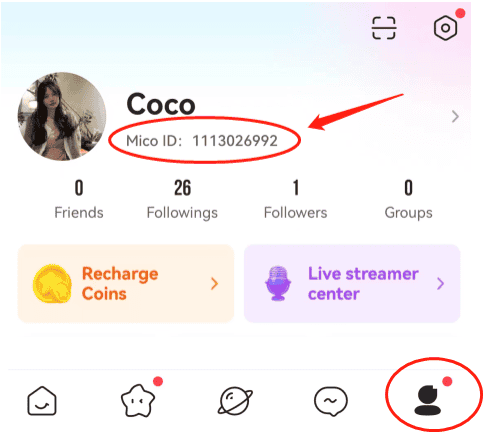
How to Find Your Mixu Player ID (UID)
Your Mixu Player ID is a unique numeric identifier linked directly to your profile. You only need this number to complete a top-up on VGTopup.
To locate your Player ID inside the Mixu app:
- Launch the Mixu app on your mobile device.
- Tap the Profile icon (usually labeled Me or represented by an avatar icon) in the bottom navigation bar.
- Your Player ID (or User ID) is displayed directly beneath your username and profile picture.
- Tap the copy icon next to the number or write it down carefully to avoid mistakes during checkout.
Available Mixu Coin Packages and Pricing Comparison
VGTopup offers multiple package tiers to accommodate casual callers and active live video enthusiasts alike. All current prices, active rates, and promotions are displayed directly on the live checkout selector above.
| Package Tier | Best Suited For | Top-Up Requirement |
|---|---|---|
| Starter Bundle | Trying out 1v1 video chats and short calls | Mixu Player ID Only |
| Standard Bundle | Regular video calls and sending mid-tier gifts | Mixu Player ID Only |
| Advanced Bundle | Extended conversations and regional match filters | Mixu Player ID Only |
| VIP Creator Bundle | Heavy live gifting, private shows, and VIP badges | Mixu Player ID Only |
Note: Live pricing and package availability reflect current catalog updates. Check the product selector above for exact real-time prices in your local currency.
Safe Mixu Recharges: Why You Never Need to Share Passwords
Account safety is a top priority when purchasing digital currencies online. Many third-party sellers compromise user safety by requesting social media logins, email passwords, or verification codes.
VGTopup uses direct-to-ID delivery, ensuring a completely safe transaction:
- No Password Required: We only ask for your public Mixu Player ID. We will never ask for your password, Google account, Facebook login, or SMS verification code.
- Zero Risk of Account Lockouts: Because our system delivers coins through standard player identification routing, your account credentials remain strictly in your control.
- Protected Payment Gateways: All checkout transactions are processed through encrypted, compliant payment gateways to safeguard your financial details.
Troubleshooting Delivery and What to Do If Coins Have Not Arrived
Most Mixu top-ups on VGTopup are delivered promptly after payment confirmation. If you do not see your coins immediately, follow these troubleshooting steps:
- Refresh the Mixu App: Fully close the Mixu application on your phone (swipe it away from your recent apps screen) and reopen it. This forces the app to pull the latest balance from the server.
- Check Your Order Status on VGTopup: Log in to your VGTopup account and review your order history to confirm that your transaction status shows as completed.
- Verify the Submitted Player ID: Check your receipt to confirm that the Player ID you entered during checkout matches the ID on your Mixu profile. A single incorrect digit will send the coins to a different account.
- Contact Customer Support: If your order shows completed and you have restarted the app but still do not see your coins, reach out to VGTopup customer support with your order number and a screenshot of your Mixu profile page for prompt assistance.
Frequently Asked Questions About Mixu Top Up
What are Mixu coins used for?
Mixu coins are used to initiate private 1v1 video calls, apply regional and gender matching filters, send animated virtual gifts to creators, and unlock real-time message translations.
How do I find my Mixu Player ID for a top-up?
Open the Mixu app, tap your profile icon at the bottom of the screen, and locate the numeric ID shown below your avatar. Copy this number and paste it into the Player ID field on VGTopup.
Do I need to share my Mixu account password to recharge coins?
No. VGTopup requires only your public Mixu Player ID. You should never share your account password, email login, or verification codes with anyone.
How long does it take for Mixu coins to reach my account?
Coins are credited directly to your account shortly after payment confirmation. In rare cases of server maintenance, delivery might take a few extra minutes.
Can I buy Mixu coins for a friend using their Player ID?
Yes. As long as you have your friend's correct Mixu Player ID, you can enter their ID at checkout and the coin balance will be delivered directly to their profile.
What should I do if I entered the wrong Mixu Player ID?
Top-ups are processed immediately upon payment. Because coin transfers to a valid numeric ID cannot be reversed once completed by the server, please double-check your Player ID carefully before completing your order. If you realize an error before the order completes, contact VGTopup customer support immediately.
Select Denomination
Tax, payment fees and eligible coupons are calculated at checkout.
| Package | Price |
|---|---|
| mixu 650 coins | USD 3.26 |
| mixu 1250 coins | USD 6.29 |
| mixu 1800 coins | USD 8.64 |
| mixu 3500 coins | USD 15.65 |
| mixu 7000 coins | USD 30.71 |
| mixu 15000 coins | USD 66.51 |






























































