



Hoob Live Top Up: Fast and Direct Coin Delivery
Hoob Live is a popular interactive live streaming and voice chat platform that connects broadcasters, content creators, and audiences worldwide. Users interact through live video broadcasts, multi-guest voice rooms, dynamic PK battles, and community events. To actively participate in these interactions, send virtual gifts, and support your favorite hosts, you need Hoob Live coins.
VGTopup provides a direct Hoob Live top up service designed for speed and simplicity. You do not need to share sensitive account passwords or link third-party social media profiles. By entering your unique numeric Player ID, your coins are credited directly to your in-app account balance around the clock.
How to Top Up Hoob Live Coins by Player ID
Recharging your Hoob Live balance on VGTopup takes only a few quick steps:
- Select Your Coin Package: Browse the available denomination options at the top of this page and pick the coin amount you want to purchase.
- Enter Your Player ID: Input your exact Hoob Live numeric User ID into the designated account field.
- Double-Check Your Information: Verify that the numbers match your profile exactly to ensure your recharge reaches the correct account.
- Complete the Payment: Choose your preferred payment method on our secure checkout interface and confirm your order.
- Check Your In-App Balance: Open the Hoob Live app, access your wallet, and watch your updated coin balance appear ready for use.
Where to Find Your Hoob Live Player ID
Finding your Player ID inside the Hoob Live application requires only a few taps:
- Launch the Hoob Live app on your Android or iOS mobile device.
- Tap the Profile (or My) icon in the bottom-right corner of the main screen.
- View the top section of your profile page, right below your display name and avatar.
- Locate the numerical string labeled ID.
- Copy or write down this number to paste directly into the VGTopup order field.
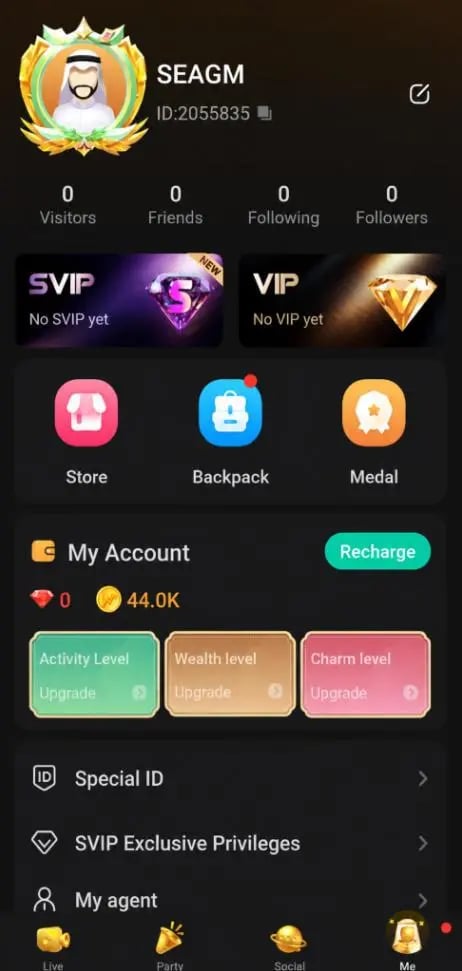
Make sure to enter only the numeric digits shown on your profile. Do not enter your screen nickname, username, or phone number.
What Are Hoob Live Coins Used For?
Hoob Live coins serve as the primary in-app currency across the entire entertainment platform. Having a ready coin balance lets you access exclusive features and build stronger connections with creators:
- Sending Virtual Gifts: Choose from a wide catalog of standard, animated, and full-screen special effect gifts. Sending gifts shows appreciation to broadcasters and helps them reach daily platform goals.
- Powering PK Battles: Broadcasters frequently compete in head-to-head live PK matches. Gifting during these battles helps your favorite host score points and win competitive rounds.
- Voice Party Room Interactions: Spend coins in multi-speaker audio rooms to initiate mini-games, send room-wide lucky bags, or trigger custom audio-visual reactions.
- VIP Badges and Profile Perks: Regular coin usage unlocks higher VIP tiers, custom chat bubble frames, animated entry banners when entering rooms, and exclusive profile badges.
- Direct Creator Support: Coins sent as gifts convert into creator earnings, helping independent streamers produce higher-quality live content.
Safe and Password-Free Hoob Live Recharge on VGTopup
Account security is essential when purchasing digital currencies. VGTopup uses a direct ID-based fulfillment process to keep your account safe:
- Zero Password Requirement: You never have to share your Hoob Live password, verification codes, or linked social media login credentials.
- 24/7 Uninterrupted Service: Unlike platforms that shut down during overnight maintenance windows, VGTopup operates continuous automated processing day and night.
- No Manual Chat Steps: Your order is processed straight from your submitted Player ID without forcing you to contact a customer service agent via external chat apps.
- Encrypted Transactions: All transactions run through protected payment gateways, keeping your billing details safe.
Available Hoob Live Coin Packages and Live Rates in 2026
VGTopup provides multiple coin package sizes to match different needs, from small top-ups for casual tipping to large bundles for competitive PK support and room events.
| Coin Package Tier | Primary In-App Utility | Fulfillment Method |
|---|---|---|
| Starter Packages | Basic chat gifts, daily host tipping, and casual reactions | Direct Numeric Player ID |
| Medium Packages | PK battle contributions, voice room games, and combo gifts | Direct Numeric Player ID |
| VIP & Event Packages | Leaderboard pushes, exclusive entry effects, and major gifting | Direct Numeric Player ID |
Live pricing and active coin packages update in real time on the package selector above. Check the top of this page to view current exchange rates and select the exact package for your Hoob Live account.
Troubleshooting Hoob Live Coin Balance and Delivery Issues
If you complete a top-up and want to verify your balance, follow these troubleshooting guidelines:
- Refresh the App: Fully close the Hoob Live app from your device background task manager and reopen it. This forces the client to fetch updated wallet data from the server.
- Check Your In-App Wallet Tab: Go to your Profile tab and open the "Wallet" or "My Coins" section to verify your total balance rather than relying on cached stream room displays.
- Verify Submitted Player ID: Review your order confirmation receipt on VGTopup. Ensure the Player ID entered matches your current in-app ID.
- Check Regional Account Settings: Confirm that your account is registered on active supported servers. If you switched regions recently, your local app cache might take a moment to sync.
- Contact VGTopup Support: If your coins have not appeared after completing the above checks, reach out to VGTopup customer support with your order number and Player ID for immediate assistance.
Frequently Asked Questions About Hoob Live Top Up
Where do I find my Hoob Live Player ID?
Open the Hoob Live app, tap the Profile icon in the bottom-right corner, and locate the numeric ID displayed underneath your avatar and display nickname.
Do I need to provide my password for a Hoob Live top-up?
No. Recharging on VGTopup requires only your numeric Player ID. You should never share your account password, email login, or SMS verification codes with anyone.
How long does it take for coins to appear in my Hoob Live account?
Orders are processed automatically upon successful payment. In most cases, coins credit to your account balance within a few moments. Refreshing your in-app wallet will display the updated total immediately.
What can I purchase with Hoob Live coins?
You can use coins to purchase virtual animated gifts, support streamers in competitive PK battles, send lucky bags in voice chat rooms, and unlock VIP privileges and profile badges.
What happens if I enter the wrong Player ID during checkout?
Because digital coin transfers are processed automatically to the numeric ID provided, recharges sent to an existing incorrect account cannot be reversed. Always double-check your Player ID carefully before completing payment. If an invalid, non-existent ID was entered, contact our support team immediately.
Is the Hoob Live recharge available for accounts outside the MENA region?
Yes. While Hoob Live maintains a strong presence across the MENA region, ID-based recharges on VGTopup work for standard global user accounts registered on supported international servers. Make sure your numeric ID is active in the app.
Select Denomination
Tax, payment fees and eligible coupons are calculated at checkout.
| Package | Price |
|---|---|
| Hoob live - Hoob live*70000 | USD 0.97 |
| Hoob live - Hoob live*100000 | USD 1.38 |
| Hoob live - Hoob live*200000 | USD 2.76 |
| Hoob live - Hoob live*500000 | USD 6.90 |
| Hoob live - Hoob live*700000 | USD 9.66 |
| Hoob live - Hoob live*1000000 | USD 13.81 |
| Hoob live - Hoob live*2000000 | USD 27.61 |
| Hoob live - Hoob live*5000000 | USD 69.03 |
| Hoob live - Hoob live*10000000 | USD 138.06 |






























































