



Dimo Top Up: Voice Chat Credits and Room Perks
Dimo is an interactive social voice chat platform where users join live audio rooms, meet friends worldwide, participate in group activities, and interact with room hosts. In-app credits form the core of the community experience on Dimo. When you complete a Dimo top up, you receive in-app balance that allows you to participate actively in chat rooms, support content creators, and personalize your profile.
In-app recharges on Dimo allow you to:
- Send Animated Virtual Gifts: Express appreciation to room hosts, broadcasters, and friends with dynamic visual gifts and sound effects.
- Activate Room Entrance Effects: Stand out when entering popular voice rooms with exclusive arrival animations and VIP banners.
- Purchase Profile Decorations: Customize your avatar frame, chat bubbles, and profile badges to highlight your level in the community.
- Participate in Room Events and Games: Join voice room competitions, host mini-games, and unlock special interactive features during live sessions.
To ensure uninterrupted conversations and community participation, VGTopup provides a direct recharge system that credits your account using only your Dimo Player ID.
Dimo Voice Chat vs DIMO Network Token: Product Disambiguation
Before placing your order, verify that you are recharging the correct platform. There are two distinct entities online sharing the name "Dimo":
| Feature | Dimo Voice Chat App | DIMO Network Token ($DIMO) |
|---|---|---|
| Category | Social Voice Chat & Entertainment | Web3 Automotive IoT Platform |
| Platform Type | Mobile App (iOS / Android) | Blockchain Network & Decentralized Token |
| Account Identifier | Numerical Player ID / User ID | Web3 Crypto Wallet Address (e.g., MetaMask) |
| In-App Currency | Voice Room Coins / Diamonds / Credits | ERC-20 / Polygon Utility Token |
| Recharge Purpose | Virtual gifts, room effects, VIP status | Vehicle data rewards, decentralized governance |
| VGTopup Product | Yes (This Page) | No |
This page is exclusively for topping up the Dimo voice chat room application. Do not purchase this product if you are searching for crypto automotive hardware or decentralized vehicle tokens.
How to Find Your Dimo Player ID in the App
You only need your unique Player ID to complete an order on VGTopup. Follow these steps on your mobile device to locate your ID:
- Open the Dimo app on your phone.
- Tap the Profile or Me icon located in the bottom-right corner of the main screen.
- Look beneath your profile avatar and username at the top of the screen.
- Locate the numerical string labeled ID or User ID.
- Tap the copy icon next to your ID to copy it to your clipboard.
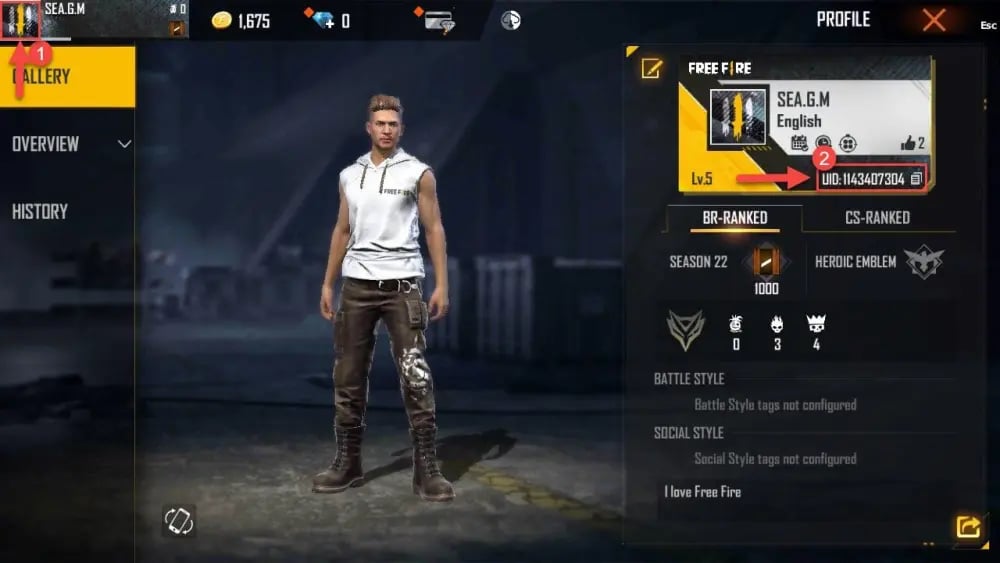
Ensure you copy the exact numerical sequence without adding extra spaces or symbols.
Step-by-Step Guide: How to Top Up Dimo on VGTopup in 2026
Recharging your Dimo account on VGTopup is simple and does not require account passwords. Follow this quick walkthrough:
- Select Your Top-Up Denomination: Choose the credit or coin pack you want to add to your Dimo account from the live catalog above.
- Enter Your Dimo Player ID: Paste your numerical ID into the
Player IDfield on the product page. - Proceed to Checkout: Select your preferred payment method on the live checkout interface.
- Review and Pay: Confirm that your Player ID is entered accurately, then complete the transaction.
- Check Your In-App Balance: Open the Dimo app, head to your profile or wallet tab, and verify that your new balance is available.
Live pack options, currency conversions, and pricing details are displayed directly on the live checkout interface.
Account Security: Why You Only Need a Player ID and No Password
Protecting your personal account is essential. VGTopup uses a direct Player ID delivery system. Here is why this process keeps your account safe:
- Zero Login Credentials Required: You never have to share your Dimo password, third-party login (Google, Facebook, Apple ID), or SMS verification codes.
- Direct In-Game Delivery: Credits are sent straight to your public account ID through direct backend integration, keeping your private settings secure.
- Safe Transaction Environment: All payment transactions on VGTopup use encrypted channels to protect your billing details.
- No Risk of Account Takeover: Because no one gains access to your login credentials, your personal chat logs, friends list, and profile settings remain completely private.
Never share your account passwords or one-time verification pins with anyone claiming to provide top-up assistance.
Supported Global and Local Payment Methods for Dimo Recharges
VGTopup supports an extensive range of secure payment options so users around the world can top up easily. Depending on your region, you can complete your purchase using:
- Credit and Debit Cards: Visa, Mastercard, and other major card networks.
- Digital Wallets and E-Wallets: Regional mobile wallets and online payment systems.
- Online Banking and Instant Bank Transfers: Direct bank checkout systems available in supported regions.
All available payment options, processing channels, and local currency rates are dynamically updated on the checkout page.
Troubleshooting Common Dimo Top-Up and Delivery Issues
If you completed a purchase and your Dimo balance has not updated immediately, follow these troubleshooting steps:
- Restart the Dimo App: Close the Dimo application completely on your phone and open it again. A fresh session forces the app to sync with the server.
- Check Your Profile Wallet: In some versions of the app, gifts and credits appear in the Wallet or My Diamonds sub-menu rather than the home dashboard.
- Verify the Submitted Player ID: Check your order confirmation email from VGTopup. Compare the Player ID listed in your receipt with the ID displayed in your Dimo profile to confirm there were no typos.
- Confirm Payment Completion: Check your bank or wallet app to ensure the payment went through and was not placed on hold by your payment provider.
- Contact VGTopup Support: If your order shows as completed on VGTopup but your balance does not update after a few minutes, reach out to the 24/7 VGTopup customer service team with your Order Number and Dimo Player ID for immediate assistance.
Frequently Asked Questions
How do I find my Dimo Player ID for a recharge?
Open the Dimo app, navigate to the Profile (or Me) tab in the bottom right corner, and find your numerical User ID displayed directly beneath your profile name and avatar. Tap the copy icon next to the number to copy it.
Do I need to share my Dimo password to complete a top up?
No. VGTopup only requires your Dimo Player ID. You should never disclose your password, verification codes, or social media login credentials to anyone.
What can I purchase with Dimo top-up credits in voice rooms?
You can use your Dimo balance to send animated virtual gifts to room hosts and friends, purchase entrance animations, unlock premium profile frames, obtain VIP badges, and enter in-room events or games.
How long does it take for my Dimo balance to update after payment?
Delivery is processed automatically once payment confirmation is received. In most cases, your credits appear in your Dimo wallet within a few minutes of completing your order on VGTopup.
Why is Dimo on my phone and how do I use the voice chat features?
Dimo is a mobile voice-streaming and social audio application. You can explore public voice rooms, start your own live chat room, invite friends to talk, play audio games, and connect with other users in real time.
What should I do if I entered the wrong Player ID during checkout?
If you realize you submitted an incorrect Player ID, contact VGTopup customer support immediately with your order details. If the order has already been processed by the system to the incorrect ID, completed transactions cannot be reversed, so always double-check your ID before finalizing payment.
Select Denomination
Tax, payment fees and eligible coupons are calculated at checkout.
| Package | Price |
|---|---|
| Dimo - Dimo*5000 | USD 4.13 |
| Dimo - Dimo*10000 | USD 8.26 |
| Dimo - Dimo*15000 | USD 12.39 |
| Dimo - Dimo*20000 | USD 16.52 |
| Dimo - Dimo*25000 | USD 20.65 |
| Dimo - Dimo*50000 | USD 41.29 |
| Dimo - Dimo*100000 | USD 82.58 |
| Dimo - Dimo*500000 | USD 412.90 |
| Dimo - Dimo*2000 | USD 1.65 |






























































