



Ayome Top Up: What Is Ayome and What Are Ayome Coins Used For?
Ayome is an interactive social platform built around real-time voice chat rooms, multi-user audio hangouts, live entertainment, and competitive PK battles. Users connect across regions to chat, showcase talents, play casual games, and support their favorite content creators and room hosts.
Ayome coins serve as the primary virtual currency within the platform. When you buy Ayome coins, you unlock full access to the interactive ecosystem. Coins allow you to:
- Send Virtual Gifts: Choose from standard emojis to high-tier animated gifts that light up the entire voice room screen.
- Power PK Battles: Send gift points directly during real-time host competitions to help your favorite streamer win match rounds.
- Boost Social Rank: Upgrade your profile badge level and appear on daily, weekly, and monthly contributor leaderboards.
- Access Room Customization: Use coins for dynamic entrance banners, personalized chat bubble styles, and distinct avatar frames.
- Support Broadcasters: Direct coin gifting helps creators build their communities and produce high-quality audio streams.
VGTopup provides an instant Ayome recharge solution using only your numeric Player ID, making account credit quick and secure.
Benefits of Ayome Coin Recharge for Live Voice Rooms and PK Battles
Having a ready balance of Ayome coins ensures you never miss a critical moment during live events. Live audio rooms move quickly, especially during scheduled events and community showdowns.
Interactive Room Gifting
Voice rooms thrive on active participation. Sending coins triggers on-screen sound effects and graphic animations that alert the host and all room listeners. High-tier gifts grant special announcement banners across the platform, giving your profile immediate visibility.
Decisive Influence in PK Battles
PK battles pit two hosts against each other in timed rounds where the winner is determined by total gift points received. Recharging Ayome coins beforehand lets you send high-value gifts during bonus multiplier windows, turning the tide of the match instantly.
VIP Status and Community Recognition
Regular gifting increases your contributor level. Higher contributor tiers unlock exclusive entrance animations when you enter any voice room, customized text formatting, and priority positioning on the room's active user list.
How to Locate Your Ayome Player ID in the App
To complete an Ayome top up on VGTopup, you only need your unique numeric Player ID. Finding it takes just a few seconds inside the Ayome mobile application.
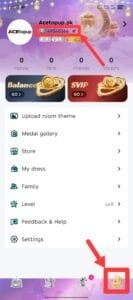
- Launch the Ayome app on your mobile device.
- Tap the Profile or Me icon located in the bottom-right corner of the main screen.
- Locate the numeric code labeled ID displayed directly beneath your profile picture and nickname.
- Tap the Copy icon next to the numbers to copy your Player ID to your clipboard.
Always copy and paste the ID directly instead of typing it manually to prevent typos that could misdirect your coin delivery.
Step-by-Step Guide: How to Top Up Ayome Coins on VGTopup
Recharging your Ayome coin balance through VGTopup is straightforward. Follow these steps to complete your purchase:
- Choose Your Coin Denomination: Browse the available coin packages on the VGTopup product page. Live package options and pricing appear directly on the active order panel.
- Enter Your Ayome Player ID: Paste your numeric Player ID into the designated input box. Double-check the number against your profile in the Ayome app.
- Proceed to Checkout: Click the buy button to move to the secure payment portal.
- Select Your Payment Method: Pick your preferred payment option from the international billing methods supported by VGTopup.
- Confirm and Receive Coins: Complete the transaction. Once payment verification finishes, the coins credit directly to your Ayome account balance automatically.
Ayome Recharge Specifications
| Feature | Details |
|---|---|
| Game / Platform | Ayome (Live Voice Rooms & Social Entertainment) |
| Top-Up Item | Ayome Coins (In-App Virtual Currency) |
| Required Account Info | Numeric Player ID Only (No Password) |
| Delivery Method | Direct In-App Account Credit |
| Applicable Platforms | Android and iOS |
| Platform Support | 24/7 VGTopup Customer Service |
Account Safety: Secure Direct Player ID Top-Up Without Passwords
Keeping your account protected is essential when purchasing digital currency online. VGTopup relies entirely on direct Player ID delivery.
- Zero Passwords Required: You never need to enter your Ayome password, social media logins, or one-time verification codes (OTPs).
- No Account Sharing: Your account stays completely in your hands. Nobody logs into your profile to manually load coins.
- Encrypted Billing: Checkout data and payment processes run through secure, industry-standard encrypted channels.
- Official System Credit: Coins are added directly to the Ayome server balance tied to your numeric ID, preserving your account standing.
Troubleshooting Ayome Delivery Delays and Incorrect ID Submissions
While most Ayome top up orders process within moments, network delays or input mistakes can occasionally happen. Use the following guide to resolve any issues quickly.
Balance Not Showing After Purchase
- Restart the App: Fully close the Ayome app on your phone and open it again. This forces your client to sync with the server and refresh your coin counter.
- Check Internet Connection: Switch between mobile data and Wi-Fi to ensure your device is receiving current account updates.
- Verify Order Status on VGTopup: Check your VGTopup order history to ensure the transaction shows as completed.
Submitting an Incorrect Player ID
If you realize you entered an incorrect numeric ID:* If the order has not yet been processed, reach out to VGTopup customer support immediately with your Order ID and the correct Player ID.* If the order has already completed delivery to an existing active account matching the submitted ID, digital top-up transfers cannot be reversed. Always verify your copied ID before confirming payment.
Contacting Customer Support
If your transaction shows completed but your balance has not updated after 15 minutes and an app restart, contact the VGTopup 24/7 customer support team. Provide your VGTopup Order Number, Ayome Player ID, and transaction receipt for swift resolution.
Frequently Asked Questions About Ayome Top Up
What is the Ayome app and what are Ayome Coins used for?
Ayome is a live voice communication and social gaming application. Ayome Coins are the in-app currency used to send virtual gifts to room hosts, participate in live PK competition rounds, unlock dynamic profile effects, and increase contributor rankings.
How do I find my Ayome Player ID for top-up?
Open Ayome, tap the Me or Profile tab in the bottom-right corner, and find the numeric ID located under your nickname. Tap the copy icon next to the number to copy it for your VGTopup order.
Do I need to share my Ayome password to buy coins?
No. VGTopup requires only your Ayome Player ID. You should never share your account password, email login, or verification codes with anyone.
How long does it take for Ayome Coins to be credited?
Coins are credited to your Ayome account shortly after your payment confirms on VGTopup. In rare cases of server maintenance or network congestion, delivery may take a few extra minutes.
What should I do if my Ayome Coins are not received after checkout?
First, force-close and relaunch the Ayome app to refresh your balance. If the coins do not display, check your VGTopup order status and contact VGTopup 24/7 live support with your Order ID for immediate investigation.
Can Ayome Coins be transferred between different accounts?
No. Once Ayome coins are delivered to a specific Player ID, they are permanently bound to that account and cannot be transferred directly to another user ID. Coins can only be spent in-app through features like room gifting.
Select Denomination
Tax, payment fees and eligible coupons are calculated at checkout.
| Package | Price |
|---|---|
| Ayome - Ayome*10000 | USD 8.73 |
| Ayome - Ayome*30000 | USD 26.20 |
| Ayome - Ayome*50000 | USD 43.67 |
| Ayome - Ayome*70000 | USD 61.14 |
| Ayome - Ayome*100000 | USD 87.35 |
| Ayome - Ayome*200000 | USD 174.69 |
| Ayome - Ayome*500000 | USD 436.73 |






























































