



Kessmet Chat Top Up: Step-by-Step UID Guide
Topping up your Kessmet Chat balance allows you to connect with streamers, initiate private live video calls, and send virtual gifts. VGTopup provides a direct recharge system that credits your profile using only your public User ID (UID). You do not need to share login credentials or private passwords at any stage.
Follow these steps to complete your Kessmet Chat top up:
- Select the desired balance package from the product list on the VGTopup live catalog.
- Enter your Kessmet Chat UID into the designated player ID field.
- Verify that the entered numeric ID matches your profile details.
- Choose your preferred payment option from the live checkout screen.
- Complete the payment process to submit your order.
- Open Kessmet Chat and check your in-app wallet balance.
| Feature | Direct UID Recharge on VGTopup | Account Login / Password Sharing |
|---|---|---|
| Account Safety | High (No login data required) | Low (Risks unauthorized access) |
| Password Required | No | Yes |
| Delivery Method | Direct to User ID | Manual session takeover |
| App Access During Order | Uninterrupted | May cause forced logout |
How to Locate Your Kessmet Chat UID in the App
Finding your exact User ID is essential to ensure your recharge arrives in the correct account. The UID is a distinct sequence of numbers assigned to your personal profile upon registration.
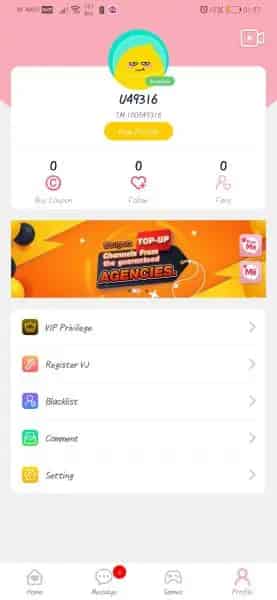
To retrieve your UID quickly on Android or iOS:
- Launch the Kessmet Chat application on your mobile device.
- Log into your account if prompted.
- Tap the Profile or My icon located in the lower right corner of the navigation bar.
- Look directly below your profile picture and nickname.
- Find the label marked ID or UID followed by a numeric string.
- Tap the small copy icon next to the number to copy your UID directly to your clipboard.
Paste this copied string into the input box on VGTopup to prevent manual typing errors.
Premium Features: Unlocking 1v1 Calls, Live PK Battles, and Virtual Gifts
Kessmet Chat connects users across the globe through dynamic social interactions, high-definition live broadcasts, and real-time private conversations. Adding balance to your account unlocks the core interactive features of the platform.
1v1 Private Video Calls
Kessmet Chat allows users to start direct one-on-one live video chats with hosts and creators. These private rooms require balance per minute or per call session. Having an active balance ensures uninterrupted communication without sudden call drops.
Interactive Virtual Gifts and Special Effects
Show appreciation to your favorite broadcasters during public live streams. Sending gifts triggers dynamic animations on screen, highlights your username in the chat room, and improves your level within the community ranking system.
Host Support in Live PK Battles
During live PK battles, two streamers compete against each other in real-time. Viewers use their balance to send battle gifts that increase their chosen creator's score bar. Supporting hosts during PK sessions helps them climb competitive leaderboards.
VIP Status and Profile Customization
Account recharges contribute to user tier progression. Higher membership ranks display unique entrance banners, specialized chat bubbles, and priority visibility in creator discovery lists.
Safe and Password-Free Kessmet Chat Top Up on VGTopup
Security is a fundamental requirement when purchasing digital credits. VGTopup relies strictly on the official UID delivery mechanism.
- Zero Password Requests: You will never be asked for your Kessmet Chat password, social login tokens, phone verification codes, or personal security questions.
- Account Integrity: Direct-to-UID transactions comply with standard user guidelines and keep your account safe from unauthorized device logins or regional flags.
- Data Confidentiality: Payment and profile information is encrypted during transmission, protecting your privacy on every purchase.
- Reliable Customer Assistance: A dedicated support team is available to assist with order tracking, transaction inquiries, and balance verifications.
Checkout and Payment Options for Kessmet Chat in 2026
VGTopup offers a structured checkout interface designed for international accessibility in 2026. The real-time product menu reflects exact balance quantities and current pricing directly on the store page.
When ordering your Kessmet Chat recharge:
- Select your currency and region preferences at the top of the interface.
- Review the total balance amount and pricing directly on the live checkout screen before confirming.
- Choose from multiple secure payment channels suited to your local region.
- Receive an instant digital transaction receipt with an order tracking code once the payment clears.
Prices and available balance packs are updated dynamically on the live order module, ensuring full transparency without unexpected fees at payment.
Troubleshooting Delayed or Incorrect Kessmet Chat Recharges
Most direct top-ups process immediately after payment verification. If you experience an unexpected delay or entered incorrect information, follow these resolution steps:
1. Restart the Mobile Application
Sometimes the Kessmet Chat client needs to refresh its server cache to display updated wallet values. Fully close the app from your recent apps switcher, wait ten seconds, and relaunch it. Check your in-app wallet under the Profile menu.
2. Confirm the Target UID
Verify that the UID submitted during checkout matches the UID currently displayed on your active profile. If you maintain multiple accounts, check whether the balance was applied to an alternative profile.
3. Check Payment Status
Log into your payment provider or banking app to confirm that the funds were deducted and marked as completed rather than pending.
4. Contact VGTopup Customer Support
If your balance has not reflected after completing the steps above, reach out to VGTopup customer service. Provide the following details for immediate investigation:
- Your VGTopup Order ID.
- The Kessmet Chat UID used for the transaction.
- A screenshot of your in-app profile screen displaying your UID.
- The proof of payment receipt.
Frequently Asked Questions
How do I find my Kessmet Chat UID for recharge?
Open the Kessmet Chat app, navigate to your profile by tapping the icon in the bottom right corner, and find the numeric ID located below your profile picture. Tap the copy icon next to the number to copy it.
Do I need to provide my Kessmet Chat password during top up?
No. VGTopup only requires your numeric Kessmet Chat UID. You should never share your account password, email credentials, or two-factor authentication codes with anyone.
What features can I unlock with Kessmet Chat top up balance?
Recharging your balance allows you to join 1v1 private video calls, send animated virtual gifts in live streams, support creators during PK competitions, and increase your profile level.
How fast will my Kessmet Chat recharge be credited to my account?
Once your payment is confirmed through the VGTopup checkout, the balance is sent directly to your Kessmet Chat UID. Most orders reflect in your account balance shortly after completion.
What should I do if I entered the wrong Kessmet Chat UID?
Because digital credits are applied immediately to the submitted UID, recharges sent to an active, incorrect account cannot usually be reversed. Contact VGTopup customer support immediately with your order details so the team can verify the order status.
Is it safe to top up Kessmet Chat through VGTopup?
Yes. VGTopup uses direct-to-UID balance distribution with secure transaction processing, eliminating the risks associated with account sharing or password disclosures.
Select Denomination
Tax, payment fees and eligible coupons are calculated at checkout.
| Package | Price |
|---|---|
| Kessmet Chat - Kessmet Chat*15000 | USD 1.94 |
| Kessmet Chat - Kessmet Chat*20000 | USD 2.58 |
| Kessmet Chat - Kessmet Chat*25000 | USD 3.22 |
| Kessmet Chat - Kessmet Chat*50000 | USD 6.45 |
| Kessmet Chat - Kessmet Chat*100000 | USD 12.90 |
| Kessmet Chat - Kessmet Chat*500000 | USD 64.49 |
| Kessmet Chat - Kessmet Chat*1000000 | USD 128.99 |
| Kessmet Chat - Kessmet Chat*10000 | USD 1.29 |






























































