Checking Your Total Genshin Impact Playtime Through a Miliastra Wonderland Stage
For five years, the most asked question in any Genshin Impact group chat has been some version of "how many hours have you actually sunk into this thing?" And for five years, the answer has been th...
Checking Your Total Genshin Impact Playtime Through a Miliastra Wonderland Stage
For five years, the most asked question in any Genshin Impact group chat has been some version of "how many hours have you actually sunk into this thing?" And for five years, the answer has been the same shrug: there is no in-game counter, only shows active days, and unless you pulled the data export, you were stuck guessing. A community-built stage inside Miliastra Wonderland has finally cracked it open by abusing a perfectly innocent timer node. Whether HoYoverse leaves the trick alone is anybody's guess, so this is the moment to grab a screenshot of your own number before it disappears.
Genshin Impact does not display total playtime anywhere in the client. Open the Paimon menu, scroll the profile, dig through the settings — none of it surfaces a clock. the official companion, gives you "active days" right next to the daily check-in and the Traveler's Diary, but active days only count distinct calendar days where you logged in at least once. A 30-second login to grab daily commissions and a 14-hour weekend grind both add up to one day on that counter.
The only fully accurate path until now was filing an account data request and waiting on an Excel sheet from customer support, which lists total playtime, active days, and a pile of other server-side stats. That works, but it is slow, and most players never bother. Console users could peek at platform-level "hours played" in the system menu, mobile players could check Google Play (one community-shared number sits at 43.2 hours from a phone-only account), and PC users were essentially blind unless they had been running PlayTracker since launch.
Third-party UID tools fill in pieces of the picture. shows world exploration percentages and character usage. can estimate your account creation date with about a one-day margin on Asia and roughly an eight-day margin on America. Akasha System pulls profile and combat stats through Enka. None of them, however, expose a real "total hours" figure — that data simply is not in any public endpoint, which is what makes the new Miliastra Wonderland workaround interesting.
Finding the Stage Inside Miliastra Wonderland
Miliastra Wonderland is the user-generated content mode that launched with Version 6.1 Luna II on 22 October 2025. To get in, you only need to finish the Knights of Favonius portion of the Prologue Act I Archon Quest "The Outlander Who Caught the Wind." That is a low bar — newer accounts can clear it in an afternoon. From there, the entry point sits as a quick-access button in the top-right of the main menu, right next to the events button.
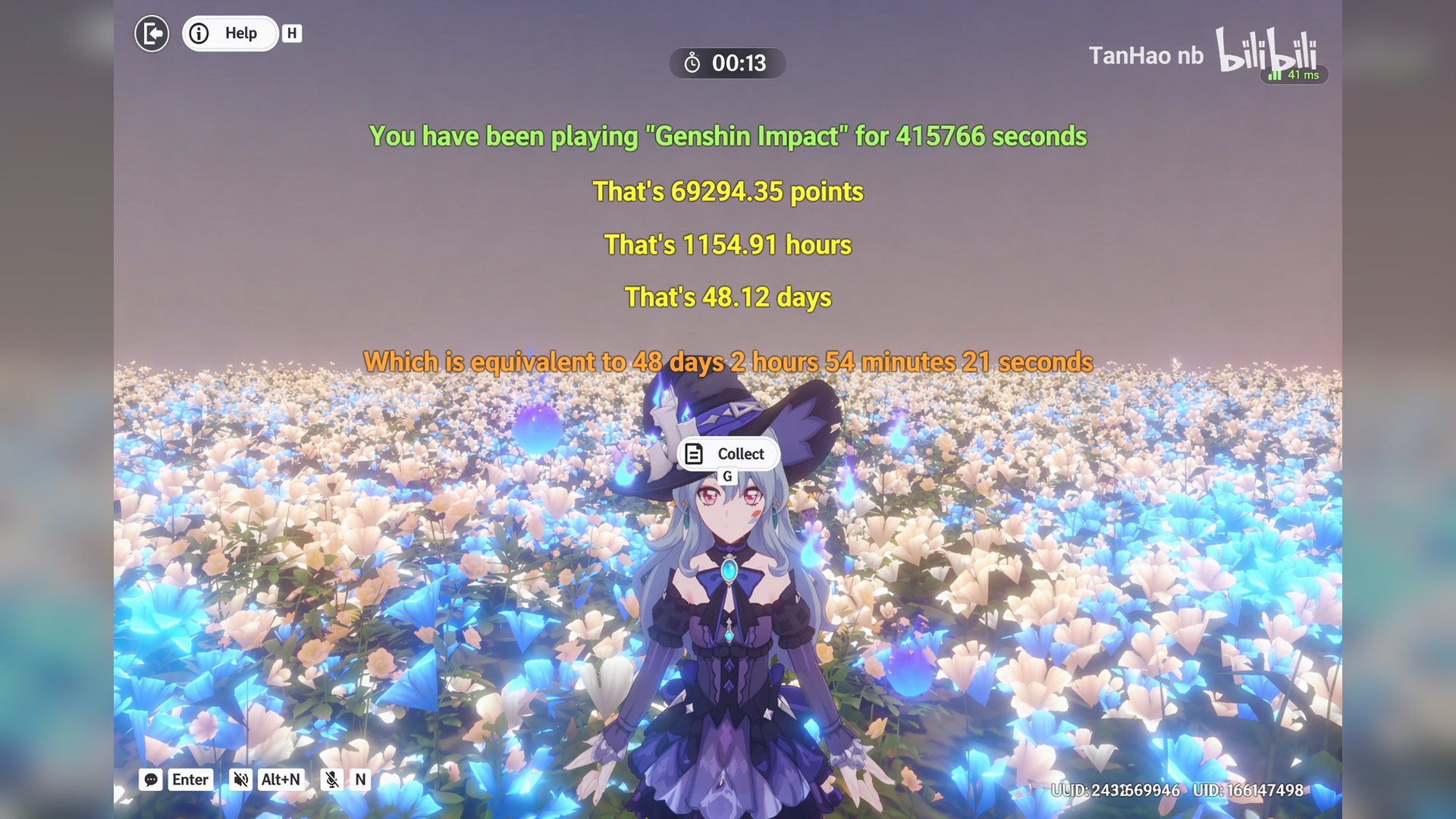
Once you are in the lobby, open the Wonderland catalogue. The stage in question is titled along the lines of "Genshin Total Playtime Query." Search for playtime or duration keywords; community uploads have been re-listing it under several similar names because the popularity has been climbing fast. Tap in, let it load, and the stage immediately surfaces a number on screen attached to your UID. It does not ask you to do anything — no platforming, no combat, no tutorial. The whole experience is a single readout.
In the demonstrated run the creator's account showed 1,154 hours, equivalent to roughly 48 days, 2 hours, 54 minutes. That precision is the giveaway that this is not a guess; it is being read straight off a clock.
What the Reported Numbers Look Like
Before getting into the mechanics, the cross-check with active days is what convinced people the readout is plausible. The creator pulled friends from the group chat and lined the two figures up.
active days
Stage-reported total hours
Hours per active day
~1600
~1680
~1.05
~900
~1100
~1.22
~300
~200+
~0.7
Creator's account
1154
—
The ratios are not identical, which makes sense — long-term daily-commission players spike active days without spiking hours, while burst-grinders during a new region patch do the opposite. But the totals scale in roughly the right direction for the active-day band, and that is the best smell test available without a server data export.
The creator also flags that the highest figure they have personally seen is below 3,000 hours. There are anecdotal posts from multi-platform veterans claiming totals between 5,000 and 11,000 hours, but those are unverified and likely include AFK stretches with the client open in the background. Day-one accounts that started in October 2020 commonly land near 1,300 active days against the 1,484 calendar days the game has been live, which suggests genuine total playtime in the low thousands of hours for the most committed crowd.
How the Trick Actually Works
The creator was upfront that no exploit or modified client is involved. The stage uses a legitimate Miliastra Wonderland scripting node — the one that reads "Get Current Client Time (High Precision)." That node is documented in the editor as returning the current client time in seconds and milliseconds, intended for synchronising in-stage events.
What the node returns is not your device's wall-clock time. It returns a value that, on this account, corresponds to the server-side accumulated online duration. The stage simply reads that value, formats it into hours, days, and minutes, and prints it to the screen along with your UID. There is no manipulation of game data, no packet inspection, no third-party hook — just a UI element pulling from an editor primitive that happens to expose more than the developers may have intended.
This is also why the readout differs from your phone's "hours used" stat or a Steam-style external counter. It is not measuring your sessions; it is reading whatever the server has been ticking against your account, and the editor's documented timer flow rate caps at 1 in-game second per real second on the global timer node, so the values do not get distorted by stage-internal time scaling.
Caveats Before You Trust the Number
A few things to keep in mind before you screenshot the result and post it everywhere.
The stage queries only the currently logged-in account. If you maintain a main and an alt — and a lot of people do — you have to log out, switch, and re-enter. Numbers do not cross-aggregate.
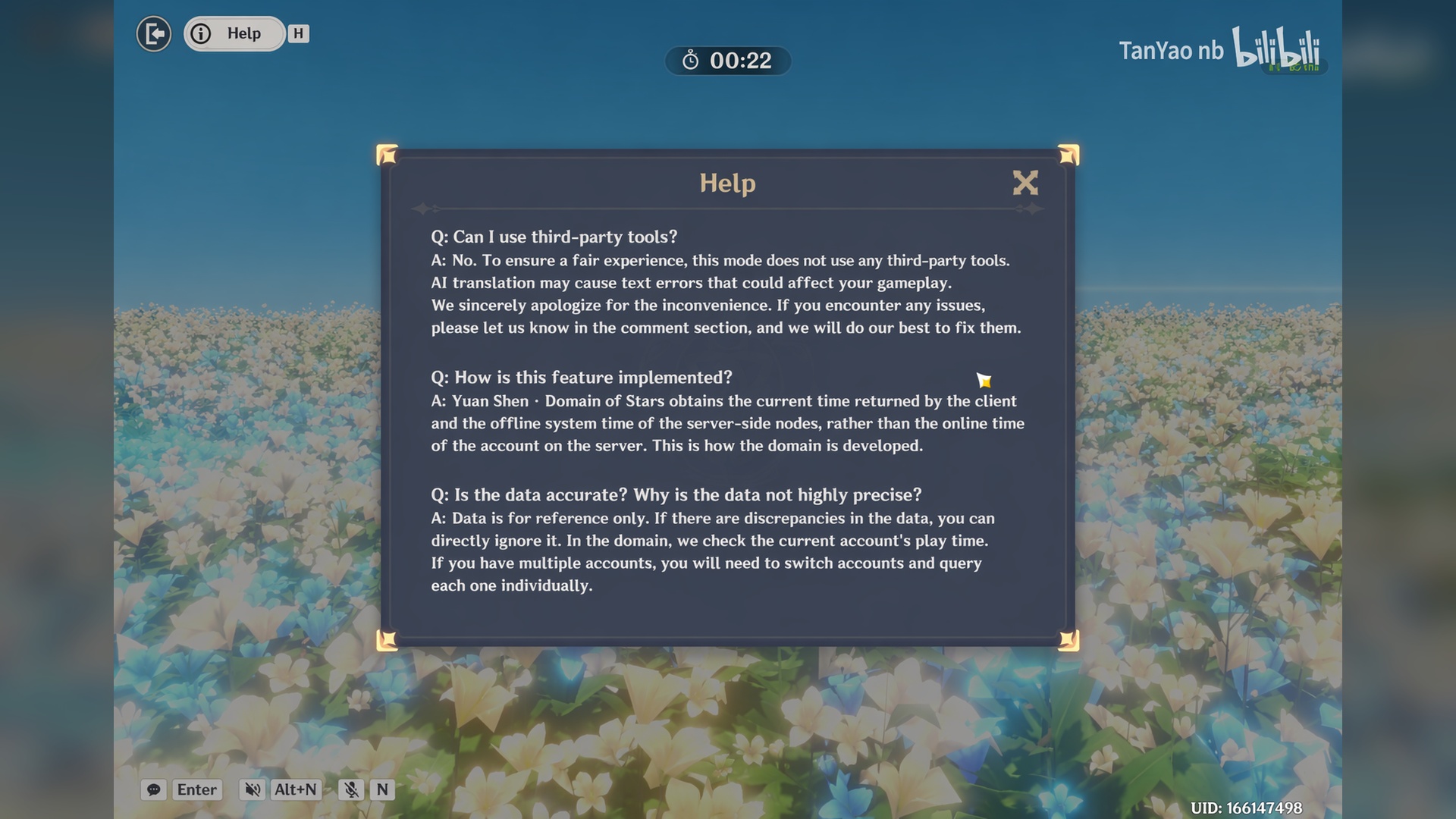
Data is offered "for reference." The creator's own in-stage FAQ explicitly says players who feel the value looks low should treat it as entertainment rather than canonical. Some idle time, background sessions, and disconnected sessions may or may not be included; the exact accounting is opaque.
Patch risk is real. HoYoverse maintains tight control over what the editor exposes. If they decide returning a server-tied accumulator from a "client time" node was unintended, the next Miliastra Wonderland sandbox update could quietly change the node's behaviour. Anyone curious should run it now rather than later.
Active days are not hours. Do not retroactively recalculate someone else's hours from their active days; the per-day ratio is wildly variable.
The stage is also PC-only in spirit — you can play user-made stages on any platform that supports Genshin Impact, but the Miliastra Sandbox creation tools themselves are PC-restricted, which is why all the cloning and re-uploading of similar query stages is happening from desktop accounts.
Other Methods Worth Knowing
If the stage gets patched, or if you want to corroborate the figure, there are several long-running fallbacks.
Method
What it gives you
Effort
profile
Active days only
Free, instant
Character Archive → Amber
Exact join date as a proxy for account age
Free, in-client
Account data request form
Multi-sheet Excel including total playtime and active days
Days to weeks
PlayTracker
Per-platform exact playtime, graphs, achievements
Free account, link platforms
(UID)
World exploration, character usage stats
Public, just paste UID
(UID)
Account creation date estimate (Asia ±1 day, America ±8 days)
Public
Akasha System (UID / Enka)
Profile and combat stats
Public
Console "Games" section
Platform-level total hours
Built into the OS
The Amber trick is the simplest cross-check sitting inside the game itself: open the Paimon menu, go to Character Archive, select Amber, and you will see the exact day she joined the party. That is effectively your account's first day of meaningful play. Multiply that span by your real average daily session and you have a sanity floor for what the stage tells you.
For anyone who actually wants to know down to the minute, the official data export is still the only authoritative answer. Everything else, including this Miliastra Wonderland readout, is best treated as a strong estimate.
The Community Angle
The most fun part of all this is that the playtime stage exists at all. Miliastra Wonderland was sold as a sandbox for tower defense, cooking minigames, soccer, and MOBA-style modes. Within weeks of launch, players were instead building diagnostic tools that pull data the main client refuses to surface. That is exactly the kind of UGC behaviour that ends up shaping how a sandbox evolves — devs see what people actually want and either incorporate it or wall it off.
Drop your number in the comments under any post sharing this stage. Pair it with your active days so people can see the ratio. Day-one veterans with 1,300+ active days and four-digit hours will rightfully flex; people who are surprised at how few hours they have despite years of daily login will at least know the truth. Whether HoYoverse patches the node or quietly leaves it alone, the genie is out of the bottle: a single Miliastra Wonderland stage just turned the most-asked Genshin Impact question into a two-tap lookup.
Stockholm based, Pelle Dietz writes in English and Swedish on the European side of online entertainment — region pricing, EU payment rules, the way a Nordic-locked account handles a global launch. He worked four years on a Swedish e-commerce fraud team before moving to games coverage, which made him oddly comfortable explaining IBANs and chargeback windows to people who just wanted in-game currency before the weekend. His VGTopup pieces span PC and console games, mobile gachas, live-streaming platforms, and prepaid services, with an eye on which deal actually clears once local taxes and currency hit the receipt.
Stockholm, Sweden English #European Markets #Payments and Pricing #Account Safety #Live Streaming #Cross-Border Recharge #Currency Coverage










Comments