


YAYYA Chat Top Up Online via Player ID
YAYYA Chat is a global social voice platform where users gather in themed voice rooms, participate in live audio conversations, host group games, and share virtual gifts with friends and content creators. To participate in high-tier room activities, send animated gifts, and customize your profile with exclusive decorations, you need in-app credits.
VGTopup provides a direct, safe channel for your YAYYA Chat top up needs. Instead of sharing your private account passwords or linking sensitive third-party login profiles, you only need to provide your public YAYYA Chat Player ID. The order is processed securely, and your credits are credited directly to your account balance.
How to Top Up YAYYA Chat Using Player ID
To complete a YAYYA Chat recharge through VGTopup, follow these clear steps:
- Select the credit package or denomination you wish to purchase from the product catalog above.
- Enter your YAYYA Chat Player ID into the designated input field.
- Verify that your entered Player ID matches the numbers shown in your in-app profile.
- Proceed to the checkout page and pick your preferred payment option.
- Complete the payment transaction.
- Once payment is confirmed, your credits will transfer directly into your YAYYA Chat account. Open the app to view your updated balance.
Step-by-Step Guide: How to Find Your YAYYA Chat Player ID
Your Player ID is a unique numeric identifier assigned to your account when you register. It serves as your public routing address for account top-ups and friend requests. Follow these instructions to find it inside the app:
- Launch the YAYYA Chat application on your mobile device and log in to your account.
- Tap the Profile icon (labeled "Me" or represented by your avatar) in the bottom-right corner of the main screen.
- Check the area directly below your display name or adjacent to your profile picture.
- Locate your numeric Player ID sequence.
- Tap the copy icon next to the number to copy it to your clipboard, or write it down carefully to enter it on VGTopup.
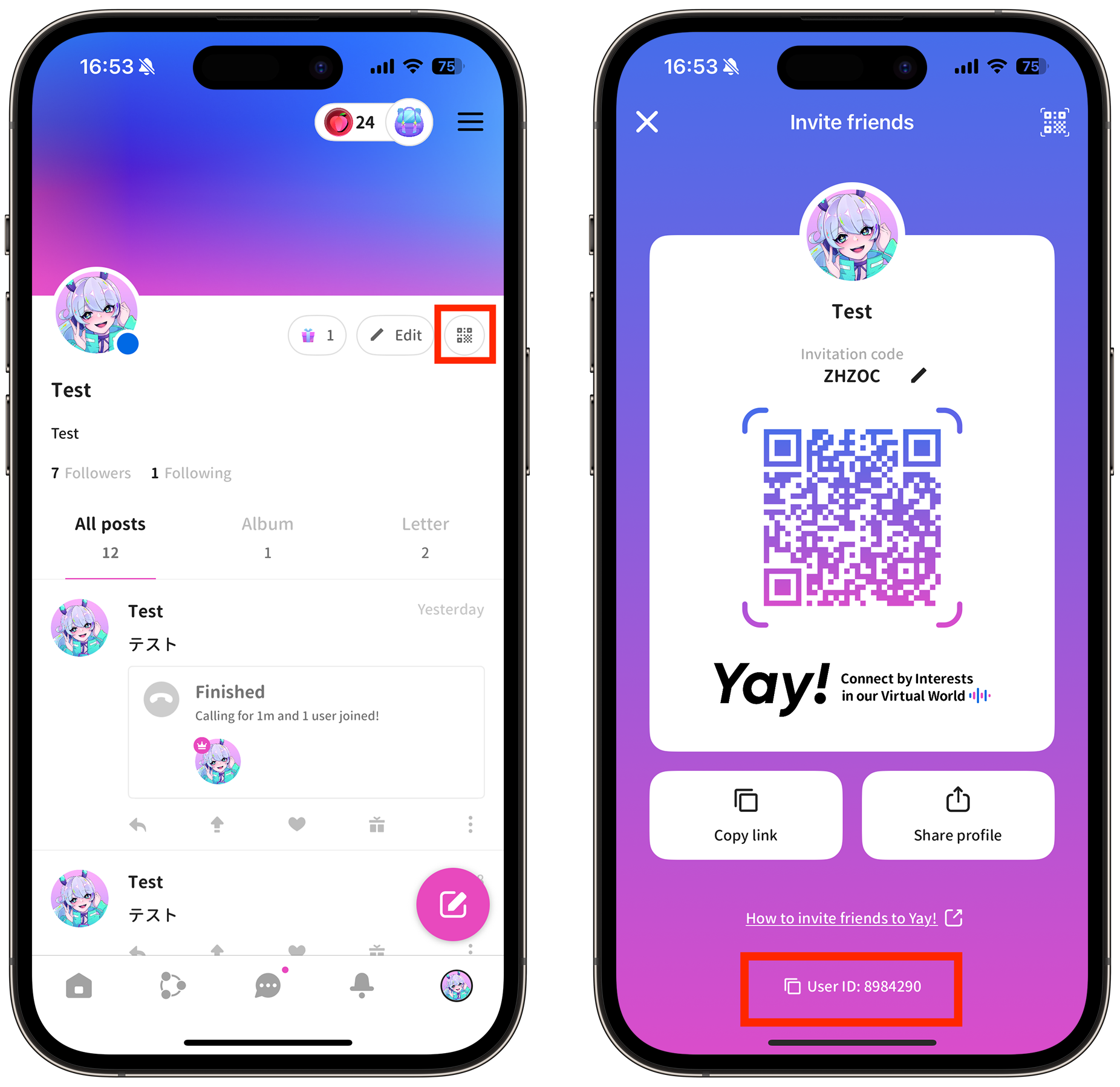
Make sure to enter your numeric Player ID rather than your display nickname or room ID, as the automated top-up system relies solely on the numeric Player ID to route the recharge.
What Are YAYYA Chat Credits and Virtual Gifts?
Credits are the primary digital currency inside YAYYA Chat. Once you buy YAYYA Chat credits, you can use them across multiple in-app features to personalize your experience and interact with room communities.
| Feature Category | In-App Purpose & Utility | Primary Benefits |
|---|---|---|
| Virtual Gifts | Send animated gifts to room hosts, broadcasters, and friends | Boosts room popularity, supports creators, and displays your user status |
| Profile Customization | Purchase noble titles, animated avatar frames, and chat bubbles | Distinguishes your profile in member lists and active voice room chats |
| Room Enhancements | Unlock exclusive entrance effects, special badges, and audio effects | Displays custom welcome visuals whenever you join a voice room |
| Interactive Mini-Games | Participate in community games and group social events | Increases interaction with community members and unlocks achievements |
Sending virtual gifts allows you to climb user contribution rankings and gain VIP recognition in popular voice rooms. Special entrance effects and noble frames display your rank as soon as you step into a live audio discussion.
Benefits of Password-Free YAYYA Chat Recharges
Protecting your personal data and account integrity is critical. When you complete a YAYYA Chat top up on VGTopup, you benefit from a secure, password-free process:
- No Password Sharing: You never have to reveal your password, email credentials, or verification codes. Your personal account stays strictly under your control.
- Zero Risk of Account Hijacking: Because the top-up requires only your public Player ID, third parties cannot modify your account settings, read private messages, or unlink your social accounts.
- Quick and Direct Checkout: Entering a Player ID takes seconds, removing the friction of two-factor authentication prompts or regional account switching.
- Direct In-App Delivery: Funds transfer straight into the specified account via digital fulfillment systems, ensuring your profile receives the credits reliably.
Common YAYYA Chat Top-Up Issues and Troubleshooting
While top-ups on VGTopup are simple and direct, occasional network delays or input mistakes can occur. Here is how to handle common scenarios:
Credits Not Appearing Immediately: - Fully close and restart the YAYYA Chat app to refresh your wallet balance. - Check your internet connection to ensure the app is syncing with the central game servers. - Allow a few minutes during peak network hours for the system to finalize the transaction.
Entered an Incorrect Player ID: - Recharges are processed automatically based on the Player ID provided. Credits delivered to an existing, valid third-party ID cannot be recalled. - Always double-check your ID digits before confirming payment. If you notice a typo before payment is completed, update the field immediately.
Payment Completed but Status Pending: - Check your bank or payment provider statement to verify the charge succeeded. - Keep your order number and transaction receipt accessible so VGTopup customer support can trace your transaction quickly if necessary.
Frequently Asked Questions About YAYYA Chat Top-Ups
What is YAYYA Chat and what are top-ups used for?
YAYYA Chat is a social voice chat application enabling users to join group audio rooms, play interactive party games, and connect with global communities. A YAYYA Chat top up refills your credit balance, allowing you to send virtual gifts to hosts, buy noble profile frames, access room entrance animations, and participate in special in-app events.
Where do I find my YAYYA Chat Player ID?
You can find your Player ID by launching YAYYA Chat, tapping on the "Me" or Profile tab in the bottom menu, and checking the numeric code displayed below your username and avatar. Use the copy button next to the ID to ensure accurate entry.
Do I need to share my YAYYA Chat password to top up?
No. VGTopup only requires your public YAYYA Chat Player ID to process your recharge. You should never share your account password, email login, or verification codes with anyone.
How long does it take for credits to reflect in my YAYYA Chat account?
Once your payment is confirmed at checkout, the credits are processed directly to your YAYYA Chat account. You can verify the updated balance by checking your in-app wallet after restarting the application.
What should I do if I entered the wrong Player ID during checkout?
If you entered an incorrect Player ID and the transaction has already completed, the credits are delivered to the specified ID and cannot be recalled. If the order has not yet been processed, reach out immediately to VGTopup customer support with your order ID and the correct Player ID for assistance.
Which payment options are available for YAYYA Chat top-up?
VGTopup supports multiple international and local payment methods tailored to your region. You can review all active payment gateways, local currencies, and real-time checkout prices directly on the live checkout screen when placing your order.
Select Denomination
Tax, payment fees and eligible coupons are calculated at checkout.
| Package | Price |
|---|---|
| YAYYA CHAT - YAYYA CHAT*30000 | USD 2.39 |
| YAYYA CHAT - YAYYA CHAT*50000 | USD 3.99 |
| YAYYA CHAT - YAYYA CHAT*70000 | USD 5.58 |
| YAYYA CHAT - YAYYA CHAT*100000 | USD 7.97 |
| YAYYA CHAT - YAYYA CHAT*200000 | USD 15.94 |
| YAYYA CHAT - YAYYA CHAT*500000 | USD 39.86 |
| YAYYA CHAT - YAYYA CHAT*700000 | USD 55.80 |
| YAYYA CHAT - YAYYA CHAT*1000000 | USD 79.71 |
| YAYYA CHAT - YAYYA CHAT*2000000 | USD 159.43 |
| YAYYA CHAT - YAYYA CHAT*5000000 | USD 398.57 |






























































