



VONE Top Up: Instant Recharge for Live Streaming and Host Gifting
VONE is an interactive live streaming and video social platform where users connect with broadcasters, participate in real-time video chats, and support their favorite creators. In-app coins serve as the primary currency across the VONE platform, allowing you to send virtual gifts, access private interactions, and boost creator rankings during live broadcasts.
VGTopup provides a direct VONE top up service designed for speed and security. You do not need to share login credentials or link private social profiles. By entering your numerical VONE Player ID, you can recharge your account balance and return to your favorite streams without disruption.
What Is VONE and How Are Coins Used?
VONE connects creators and viewers globally through interactive live streams, audio party rooms, and 1-on-1 video connections. To participate fully in the community features, users utilize in-app coins for several key functions:
- Virtual Gifting: Send animations, stickers, and premium gift effects ranging from simple roses to luxury sports cars and celebration rockets during live broadcasts.
- Creator Support and Tipping: Direct gifts help broadcasters rank on daily and weekly platform leaderboards, increasing their visibility and community standing.
- Exclusive Video Interactions: Use coins to initiate direct video calls, join VIP live rooms, or request special interactive features with hosts.
- Profile Customization and Badges: Higher gifting activity unlocks distinct supporter badges, chat bubble colors, and entrance effects when entering high-traffic stream rooms.
Clarification: This recharge service is exclusively for the VONE social live streaming mobile application. It is not affiliated with financial exchange-traded funds (such as the Vanguard Russell 1000 ETF ticker VONE) or cryptocurrency assets.
How to Find Your VONE Player ID
To ensure your VONE recharge is credited to the correct account, you must provide your exact numeric Player ID from the mobile app. Follow these visual steps to locate your ID:
- Open the VONE application on your mobile device.
- Tap the Profile icon (labeled "My" or "Me") located in the bottom-right corner of the main navigation bar.
- Look directly underneath your display avatar and nickname at the top of the profile screen.
- Find the numeric string labeled ID.
- Tap the copy icon next to the number to copy your Player ID directly to your clipboard.
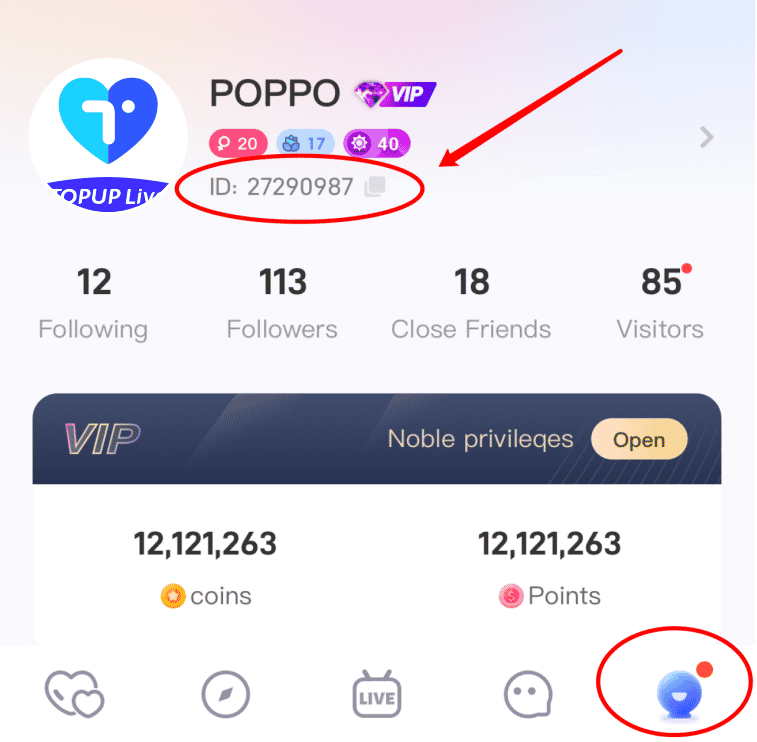
Make sure to copy the numeric Player ID rather than your display nickname, as nicknames can be changed and cannot be used to route direct account recharges.
Step-by-Step Guide to Top Up VONE Coins on VGTopup
Recharging your VONE balance on VGTopup takes only a few simple steps. The checkout system connects directly to direct fulfillment channels to process your order accurately.
- Select Coin Denomination: Browse the available coin packages on the VGTopup product page and choose the amount you wish to purchase. Current rates and pack sizes are updated directly on the live selection interface.
- Enter Your Player ID: Paste your numeric VONE Player ID into the designated input field. Double-check the digits to ensure there are no missing or extra characters.
- Proceed to Checkout: Click the buy button to move to the secure payment screen.
- Choose Payment Method: Select your preferred local or international payment option from the available list at checkout.
- Confirm and Receive: Complete the transaction. Once payment confirmation is received, your VONE coins are credited directly to your in-app balance.
VONE Top Up Service Details
| Feature | Details |
|---|---|
| Platform | VONE Live Streaming App |
| Required Identifier | Numeric Player ID (UID) |
| Account Password Required? | No (ID-only recharge) |
| In-App Currency | VONE Coins / Points |
| Primary Uses | Virtual gifts, host tipping, video calls, VIP entrance |
| Fulfillment Channel | Direct account top up via VGTopup |
Safe Player ID Checkout: No Passwords Required
Account security is critical when purchasing virtual currencies online. VGTopup uses an ID-only direct delivery system for all VONE top up orders.
- Zero Password Sharing: You will never be asked for your account password, email login, or third-party social credentials (such as Google, Facebook, or Apple ID).
- No Account Handover: Your account remains entirely in your control at all times. The recharge is pushed externally via your public Player ID.
- Encrypted Checkout: Payment transactions are processed through encrypted, compliant payment gateways to protect personal billing information.
Never share your VONE login passwords or verification codes with anyone claiming to offer direct coin top-ups or free coin promotions.
Troubleshooting Common VONE Top Up Issues
While most recharges process smoothly, occasional delays or input mistakes can happen. Here is how to resolve common situations:
1. Coins Have Not Appeared in the App
If you completed your payment but your coin total has not updated:* Refresh the App: Completely close the VONE app from your active background applications and reopen it.* Check Transaction Status: Review your order status on VGTopup to confirm that payment processing is complete.* Verify Profile: Ensure you are logged into the exact same VONE account profile associated with the Player ID entered during checkout.
2. Entered an Incorrect Player ID
Because digital top-ups are fulfilled automatically based on the provided identifier, orders sent to an existing, valid Player ID belonging to another user cannot be reversed once processed.
If you realize you made a typo before the order completes, contact VGTopup customer support immediately with your order number and the correct Player ID. Always verify your Player ID before submitting payment.
3. Payment Completed but Order Pending
Certain payment methods require a short verification window from your bank or payment provider. Once the payment clearinghouse confirms the transaction, the order will automatically complete and credit your VONE account.
Frequently Asked Questions
What is VONE?
VONE is an interactive mobile live streaming and video chat platform. It enables users to watch global broadcasters, participate in real-time group conversations, join video streams, and support content creators using in-app virtual gifts.
Where do I find my VONE Player ID?
Open the VONE app, tap the profile icon in the bottom-right corner, and locate the numeric ID displayed beneath your avatar and nickname. You can tap the copy icon next to the number to copy it to your clipboard.
Do I need to share my VONE account password to recharge?
No. Recharging on VGTopup requires only your numeric VONE Player ID. You should never share your login password, SMS verification codes, or social media credentials with third parties.
Can I recharge Vone coins for free?
No. VONE coins are premium digital currency purchased with real currency. Websites, tools, or generators advertising free VONE coins are unauthorized and frequently designed to compromise account security. Always use secure, established platforms like VGTopup for coin recharges.
How fast will VONE coins arrive after completing the order?
Orders are sent for processing as soon as payment is confirmed. Most recharges are credited to your VONE account shortly after checkout. If high server traffic causes a slight delay, restarting the VONE app will refresh your balance.
What should I do if I entered the wrong VONE Player ID?
Contact VGTopup customer service as soon as possible with your order reference number and correct Player ID. If the coins have not yet been dispatched, support staff can correct the recipient ID. Once coins are successfully delivered to an active account, digital orders cannot be refunded or transferred.
Select Denomination
Tax, payment fees and eligible coupons are calculated at checkout.
| Package | Price |
|---|---|
| VONE - VONE*10000 | USD 0.93 |
| VONE - VONE*30000 | USD 2.79 |
| VONE - VONE*50000 | USD 4.65 |
| VONE - VONE*70000 | USD 6.50 |
| VONE - VONE*100000 | USD 9.29 |
| VONE - VONE*200000 | USD 18.58 |
| VONE - VONE*500000 | USD 46.46 |
| VONE - VONE*700000 | USD 65.04 |
| VONE - VONE*1000000 | USD 92.92 |
| VONE - VONE*2000000 | USD 185.83 |






























































