



Ume Chat Top Up: Quick UID Recharge Guide
Topping up Gold in Ume Chat through VGTopup takes only a few moments. Direct top-ups require only your public User ID (UID), ensuring a fast checkout process without sharing private account credentials.
Follow these steps to complete your recharge:
- Select Your Gold Pack: Browse the available Ume Chat Gold packages on the VGTopup live checkout and choose the amount that fits your needs.
- Enter Your Ume Chat UID: Input your numeric User ID into the designated UID field. Verify the numbers carefully to prevent delivery delays.
- Proceed to Checkout: Review your order summary and click the buy button.
- Complete Payment: Select your preferred payment method on our secure payment gateway and finalize the transaction.
- Receive Your Gold: Once the payment verifies, the Gold balance reflects directly in your Ume Chat wallet. Open the app to view your updated balance.
How to Locate Your Ume Chat User ID (UID)
Your Ume Chat UID is a unique numeric identifier linked directly to your profile. You do not need to provide passwords, phone numbers, or social media logins to receive your top-up.
Here is how to find your UID inside the app:
- Launch the Ume Chat app on your Android or iOS device.
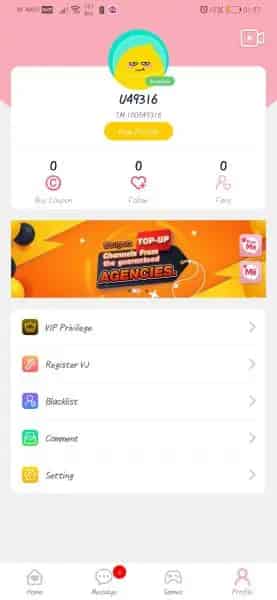
- Tap the Profile icon (labeled "Me") in the bottom right corner of the screen.
- Your profile screen will display your avatar, nickname, and account details.
- Look directly below your nickname to find your numeric ID (UID).
- Tap the Copy icon next to your ID to copy the number to your clipboard.
- Paste the copied ID into the UID input field on VGTopup.
Ume Chat Gold Uses: Virtual Gifts, VIP Nobility, and Party Rooms
Gold is the primary premium currency inside Ume Chat. It powers social interactions across voice rooms, host support, and account customization.
Virtual Gifts and Animations
Sending gifts is the primary way to support your favorite room hosts, creators, and friends during live voice broadcasts. Ume Chat offers a wide catalog of virtual gifts ranging from basic roses and cheers to luxury animated items like sports cars, yachts, and castles. Sending high-tier gifts triggers full-screen animations across the room, announcing your support to all active listeners.
VIP Nobility Tiers and Privileges
Upgrading your account to Nobility status grants exclusive cosmetic perks and social recognition. Higher VIP ranks provide:- Unique animated entrance banners when joining any voice room- Exclusive microphone seating frames and profile avatar borders- Custom chat bubble colors and high-priority message placement- In-room anti-kick and anti-mute protections depending on your nobility tier
Party Room Enhancements
Room creators can use Gold to customize their voice party spaces. Premium features include custom room backgrounds, audio soundboard effects, dynamic party themes, and promotional boosts that place the room higher in the public explore directory.
In-App Currency and Item Breakdown
| Item / Currency | How to Obtain | Primary Use Cases |
|---|---|---|
| Gold | Direct Top-Up on VGTopup | Sending animated gifts, unlocking VIP Nobility, purchasing room frames |
| Coins / Diamonds | Earned via hosting & gifts | In-app reward redemption, creator earnings, interactive mini-games |
| VIP Badges | Unlocked with Gold spending | Special profile icons, chat bubbles, exclusive entrance effects |
| Room Themes | Purchased via Gold | Customizing voice room visual backgrounds and seat styles |
Safe and Secure Top Up: Why Account Passwords Are Never Needed
Account safety is a top priority when purchasing digital currencies. Direct top-up systems communicate with backend server APIs that credit accounts using only the unique account identifier (UID).
Key security practices to keep in mind:- Never Share Your Password: Legitimate top-up services will never ask for your account password, email login credentials, or SMS verification codes.- Protect Verification Codes: One-time passwords (OTP) sent to your mobile device are strictly for personal account recovery and should never be provided to third parties.- Verify the UID Before Checkout: Because top-ups credit the specific UID provided during checkout, double-checking your numeric ID ensures your funds land in your account.- No Account Linking Required: VGTopup processes your order externally and delivers your Gold balance directly without requiring login access to your Ume Chat account.
Popular In-App Activities: Voice Party Rooms, Ludo, and PK Battles
Ume Chat connects users worldwide through interactive audio entertainment and casual multiplayer games.
Multi-Seat Voice Party Rooms
Voice rooms allow up to 8 or more users to speak simultaneously on high-quality audio channels. Room hosts organize themed hangouts, talent competitions, open-mic singing, and language exchange sessions. Listeners can interact via public text chat, request to speak on an open microphone, or send gifts to active speakers.
Creator PK Battles
PK battles pit two room hosts against each other in timed competitive challenges. Supporters on both sides send Gold gifts during the battle window. The host with the highest gift score at the end of the round wins, triggering celebratory animations for the winning room.
Interactive Social Games
When taking a break from live conversations, users can participate in built-in board games directly inside the chat interface. Popular games include:- Ludo: Play classic 2-player or 4-player Ludo matches against friends or random room members in real time.- Domino: Compete in casual block and draw domino games while continuing voice chat in the background.- Lucky Wheel: Spin for in-app perks, temporary frames, and bonus room gifts.
Troubleshooting Common Ume Chat Recharge and Delivery Issues
If your Gold balance does not update immediately after purchasing on VGTopup, review the following troubleshooting steps:
- Restart the Ume Chat App: Close Ume Chat completely from your device's recent apps switcher and reopen it. This forces the app to refresh your wallet balance from the server.
- Check Your In-App Bag / Wallet: Open your profile, go to the Wallet or My Bag section, and verify if the Gold has credited to your balance or stored gift inventory.
- Verify Your Order Status on VGTopup: Check your order history on VGTopup to confirm the transaction status shows as completed.
- Check for UID Typos: Review the UID listed on your order confirmation receipt. If an incorrect UID was entered, contact customer support immediately. Transactions that have already completed delivery to an active third-party account cannot be reversed.
- Network Latency: High server traffic during global holiday events can occasionally cause slight delivery delays. Allow a few minutes for the server queue to clear.
Why Choose VGTopup for Ume Chat Recharges
VGTopup provides a straightforward platform for purchasing Ume Chat Gold across global regions. All transactions feature:- Fast Order Processing: Gold credits to your Ume Chat profile shortly after payment confirmation.- Clear Pricing on Live Checkout: View accurate package rates and accepted local payment methods directly on the checkout screen before placing your order.- UID-Only Simplicity: Complete your transaction without ever sharing private login details or passwords.- Dedicated Customer Support: Our help team is ready to assist you with order verification, balance checks, and payment questions.
Frequently Asked Questions
Where can I find my Ume Chat UID for top up?
Open the Ume Chat app, tap the Profile ("Me") tab in the bottom-right corner, and find your numeric ID displayed beneath your nickname. Tap the copy icon next to the number to copy your UID.
Do I need to share my Ume Chat password to receive Gold?
No. Top-ups on VGTopup require only your public Ume Chat UID. You should never share your account password, social login tokens, or SMS verification codes.
How long does it take for Ume Chat Gold to reflect in my account?
Gold delivers directly to your account immediately after your payment is verified. In rare cases of server latency, restart your app to refresh your wallet.
What can I do with Gold and Coins in Ume Chat?
Gold is used to send animated virtual gifts to room hosts, purchase VIP Nobility status tiers, customize chat frames, and upgrade voice room themes. Coins and Diamonds are reward currencies earned through room activities and interactive mini-games.
What should I do if I entered the wrong UID during checkout?
Contact VGTopup customer support immediately with your order number. If your order has not yet been processed by the automated delivery system, our team can correct the UID. Once Gold has been successfully delivered to an active UID, the transfer cannot be reversed.
Is Ume Chat free to download and use?
Yes. Ume Chat is free to download on mobile app stores. Basic voice rooms, text messaging, and casual games are free to access, while Gold purchases are optional for users who want premium gifts, nobility ranks, and room customization.
Select Denomination
Tax, payment fees and eligible coupons are calculated at checkout.
| Package | Price |
|---|---|
| Ume Chat - Ume Chat*100000 | USD 1.81 |
| Ume Chat - Ume Chat*500000 | USD 9.07 |
| Ume Chat - Ume Chat*1000000 | USD 18.14 |
| Ume Chat - Ume Chat*5000000 | USD 90.72 |
| Ume Chat - Ume Chat*10000000 | USD 181.44 |
| Ume Chat - Ume Chat*50000 | USD 0.91 |

































































