


Fast and Secure Top Top Top Up via Player ID
Top Top is an interactive social gaming platform that brings players together for board games, card matches, and live voice chat rooms. Whether you compete in classic Ludo tournaments, Dominoes, Uno, or Candy Boom, TopTop coins serve as the central currency required to enter high-stake matches, purchase room gifts, and unlock exclusive profile customizations.
VGTopup provides a direct, non-custodial Top Top top up service designed for speed and account safety. You only need your public TopTop Player ID to receive coins directly into your account balance. With live order processing, competitive checkout rates, and zero password sharing, topping up your coins is simple and reliable.
How to Find Your TopTop Player ID in the App
Locating your Player ID correctly is the most important step to make sure your coin order reaches your game profile without delay. Follow these visual steps inside the TopTop application on Android or iOS:
- Open the TopTop app on your mobile device.
- Tap the Profile icon (labeled "Me" or represented by your avatar) located in the bottom-right corner of the main screen.
- Look beneath your display name and profile picture at the top of the screen.
- Locate the numerical string labeled ID (e.g.,
12345678). - Tap the copy icon next to your ID number to copy it to your clipboard.
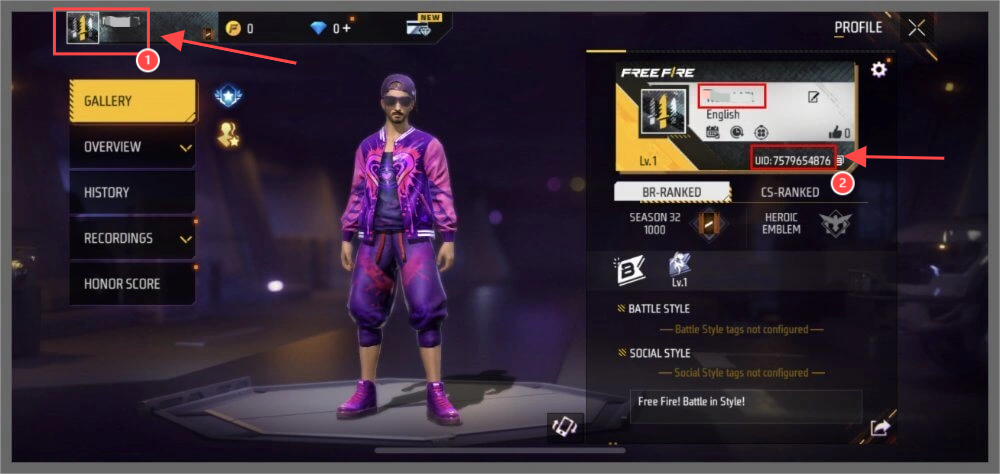
Double-check that you copy the exact numerical ID from your own profile page before placing your order.
How to Top Up Top Top Coins on VGTopup
Recharging your account on VGTopup takes only a few simple steps:
- Select Your Package: Browse the available coin bundles on this page and choose the amount of TopTop coins you want.
- Enter Your Player ID: Paste your TopTop numerical ID into the required account input field.
- Proceed to Checkout: Click the purchase button and select your preferred payment method.
- Complete the Transaction: Follow the on-screen payment instructions to finalize your purchase.
- Check Your In-Game Balance: Open the TopTop app, refresh your wallet or profile tab, and verify your new coin balance.
What Are TopTop Coins and How to Use Them
TopTop is distinct from retail clothing searches or non-gaming apps. It is a dedicated mobile social gaming community. Coins are the primary utility asset inside the TopTop ecosystem, providing multiple gameplay and social benefits:
- Board Game Stakes: Join competitive tables in Ludo, Dominoes, Jackaro, Carrom, and Uno. Higher-tier rooms require coin entry fees and yield larger coin rewards upon winning.
- Voice Room Gifting: Send animated gifts, luxury cars, rockets, and celebratory effects to room hosts and friends in live audio chat channels.
- Profile Customization: Purchase limited-edition avatar frames, chat bubbles, entrance banners, and profile badges that showcase your status in public rooms.
- VIP Level Progression: Spending coins on gifts and games increases your account prestige and elevates your VIP level, granting access to exclusive room privileges.
Safe and Password-Free TopTop Recharge on VGTopup
Account safety is a top priority when purchasing digital game currency. VGTopup operates entirely through non-custodial direct top-up methods:
- No Passwords Required: You never have to share your TopTop account password, Facebook login, Apple ID, or phone verification codes. Your login credentials remain completely in your own hands.
- Direct System Delivery: Coins are credited directly to your account using only the numerical Player ID.
- Transparent Pricing: The price displayed during checkout is what you pay, with no unexpected recurring fees or hidden account charges.
- Dedicated Support: If you ever have a question regarding transaction status or need assistance confirming your Player ID, the VGTopup customer support team is available 24/7 to help.
TopTop Coin Denominations and Usage Guide in 2026
Choosing the right coin package depends on how you plan to participate in the app. Review this usage breakdown to determine which bundle fits your gameplay style:
| Package Tier | Best Suited For | Key In-Game Activities |
|---|---|---|
| Starter Pack | Casual Gamers | Daily Ludo matches, casual Dominoes, entry-level room interaction |
| Popular Pack | Active Players | Mid-tier tournament stakes, sending interactive gifts in audio rooms |
| Elite Pack | Room Hosts & Gifters | High-roller tables, luxury voice room gifts, rapid VIP badge progression |
| Ultimate Pack | Community Leaders | Sponsoring room events, massive gift showers, top ranking on weekly leaderboards |
Note: Exact bundle quantities, regional pricing, and live checkout totals are displayed dynamically in the selection selector above.
Troubleshooting Delivery Delays and Account Balance Sync Issues
While most coin deliveries process within moments of payment confirmation, occasional network or server delays can occur. Follow these troubleshooting steps if you experience any issue:
- Restart the Application: Close the TopTop app completely from your device multitasking menu, wait 10 seconds, and reopen it. This forces the app client to sync with the central game servers.
- Verify Your Player ID: Check your order confirmation email from VGTopup to confirm that the Player ID you entered matches your in-app profile ID exactly.
- Check Connection Stability: Make sure your device has an active internet connection via Wi-Fi or mobile data so that in-game balances update properly.
- Contact Customer Support: If your balance has not updated after a few minutes, copy your VGTopup Order Number and reach out to our 24/7 customer support team for an immediate status review.
Frequently Asked Questions About TopTop Top Up
What is TopTop and what are TopTop Coins used for?
TopTop is a popular social gaming app that combines voice chat rooms with classic board games like Ludo, Dominoes, and Uno. TopTop coins are the in-game currency used to enter ranked game matches, purchase virtual animated gifts for voice room hosts, and unlock exclusive decorative avatar frames and badges.
How do I find my TopTop Player ID to recharge?
Open the TopTop app, tap on the "Me" or Profile tab in the bottom-right corner, and locate the numerical "ID" displayed directly below your profile name. Tap the copy icon next to the number to copy your ID accurately.
Do I need to provide my TopTop password to top up coins?
No. Recharging on VGTopup is 100% password-free. You only need to provide your public numerical Player ID. Never share your password or two-factor authentication codes with anyone.
How long does it take for TopTop Coins to reflect in my game balance?
Coins are delivered automatically to your TopTop account once your payment is confirmed. In most cases, the balance updates almost immediately. Simply refresh your profile or restart the app to see your updated total.
Can I recharge TopTop coins for a friend using their Player ID?
Yes. Because VGTopup only requires a Player ID to credit the coins, you can surprise a friend or room host by entering their numerical Player ID in the order field and completing the payment.
What should I do if my TopTop coins do not appear after payment?
First, restart the TopTop app to ensure your local client refreshes its balance from the server. If the coins do not appear, check your order summary to verify that the Player ID submitted was correct, then contact VGTopup 24/7 customer support with your order number for fast resolution.






























































