


SoMatch Top Up: Quick and Secure Coin Recharge
SoMatch connects users worldwide through interactive voice party rooms, social matching, dynamic messaging, and live group activities. To make the most of these community features, you need SoMatch coins. Coins serve as the primary in-app virtual currency, allowing you to send animated gifts, support room hosts, customize your personal avatar, and participate in special interactive events.
VGTopup provides an efficient, straightforward process to complete your SoMatch top up using only your Player ID. By eliminating the need for login credentials or private passwords, VGTopup ensures your account remains protected while processing orders directly to your game wallet.
What Are SoMatch Coins and How to Use Them
SoMatch coins enable you to access premium social interactions and personalize your presence across the platform. When you hold coins in your balance, you can actively participate in room discussions and stand out among community members.
Core In-App Utilities for SoMatch Coins
- Virtual Gifting in Live Party Rooms: Send animated visual gifts to room hosts and friends during voice chats. Virtual gifts range from small tokens of appreciation to full-screen animated displays that highlight your profile in active rooms.
- Profile Customization and Flair: Purchase limited-edition avatar frames, entrance banners, and display effects to showcase your status and personal style whenever you enter a voice channel.
- Direct Chat and Interaction Prompts: Unlock premium interaction tools and direct greeting features when connecting with new contacts.
- Host and Creator Support: Directly reward content creators, singers, and room hosts who organize engaging community events and discussions.
| Feature | In-App Purpose | Coin Application |
|---|---|---|
| Virtual Gifts | Live voice rooms and direct chat | Send animated presents and support room hosts |
| Profile Customization | Personal avatar and profile display | Equip special avatar frames, badges, and entrance effects |
| Room Interactions | Group voice chats and social games | Trigger on-screen animations and join interactive activities |
| Connection Tools | Messaging and match discovery | Access direct interaction prompts and custom greetings |
How to Find Your SoMatch Player ID
Every SoMatch user has a unique numerical account identifier known as the Player ID (or UID). You only need this number to complete a recharge on VGTopup. Follow these steps to locate your ID correctly:
- Launch the SoMatch application on your mobile phone or tablet.
- Tap the Profile (often labeled Me) icon located at the bottom right corner of the main screen.
- View your profile header, situated right below your display name and avatar photo.
- Locate the numerical sequence labeled ID or UID.
- Tap the copy icon next to the number to copy your exact Player ID to your clipboard, avoiding typing errors.
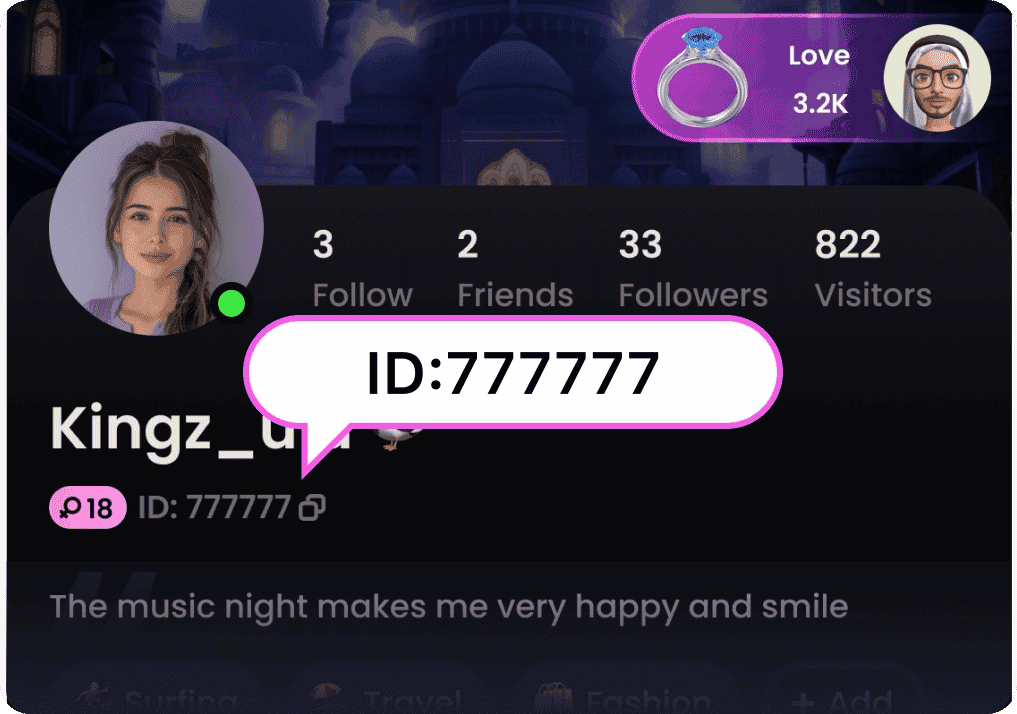
Always double-check your copied Player ID before submitting your order to prevent sending coins to an incorrect user.
How to Top Up SoMatch Coins on VGTopup
Recharging your account on VGTopup requires only a few basic steps. Follow this guide to complete your purchase:
- Select Coin Package: Browse the available coin options on the product catalog and choose the coin denomination you want.
- Enter Player ID: Paste your SoMatch numerical identifier into the designated Player ID field.
- Review Order Details: Confirm that your Player ID is accurate and review the live price shown on the checkout page.
- Choose Payment Method: Select your preferred payment option from the available checkout choices.
- Finalize Payment: Complete the transaction through the secure payment gateway.
- Check In-App Balance: Open SoMatch, go to your profile wallet, and verify your updated coin balance.
Safe and Password-Free SoMatch Recharge
Account security is a top priority when purchasing digital currencies online. VGTopup operates using a Player ID-only delivery system, meaning you never need to share sensitive account information.
- Zero Password Sharing: You do not need to provide your password, email login credentials, or third-party social account links.
- No Verification Codes Required: VGTopup will never ask for SMS verification codes or two-factor authentication prompts.
- Safe from Unauthorized Access: Because your login credentials stay with you, your account remains fully protected against unauthorized logins or compromised passwords.
- Send to Friends Safely: The ID-only structure allows you to surprise friends, streamers, or family members by sending coins straight to their Player ID without needing access to their devices.
Available Payment Options for SoMatch Top-Up
VGTopup accommodates users across various regions with multiple payment methods. Depending on your location and preferred currency, you can select from a wide range of trusted transaction methods directly at checkout.
- Credit and Debit Cards: Major international bank cards supported across regional payment gateways.
- E-Wallets and Digital Payment Solutions: Regional digital wallets for quick mobile processing.
- Direct Online Banking: Secure bank transfer channels specific to supported countries.
Live exchange rates, local pricing, and any applicable transaction fees are calculated and displayed clearly on the checkout page prior to payment confirmation, ensuring full transparency.
Troubleshooting SoMatch Coin Delivery
While coin orders on VGTopup process quickly, occasional network latency or server delays can occur. If your coins do not reflect immediately in your SoMatch app, follow these troubleshooting steps:
- Restart the SoMatch Application: Fully close the SoMatch app from your recent apps switcher and reopen it. This forces the app to refresh your wallet balance with the server.
- Verify the Submitted Player ID: Check your VGTopup order confirmation email or receipt to ensure the Player ID you entered matches your actual in-app UID.
- Confirm Payment Completion: Check your banking or e-wallet account to verify that the transaction was successfully debited and completed rather than pending.
- Allow Server Sync Time: During peak network hours or in-app events, server synchronization can take a few extra minutes.
- Contact VGTopup Support: If your balance does not update after completing the steps above, reach out to VGTopup customer support with your Order ID, payment receipt, and SoMatch Player ID for rapid resolution.
Frequently Asked Questions
What is the SoMatch Player ID and where can I find it?
The SoMatch Player ID is a unique numerical sequence assigned to your account. You can find it by opening the SoMatch app, going to the Profile (Me) tab in the bottom menu, and looking directly beneath your avatar and username. Tap the copy icon next to the number to copy it to your clipboard.
Do I need to provide my SoMatch account password to top up?
No. VGTopup only requires your numerical SoMatch Player ID to credit your coins. You never need to share your password, social login details, or verification codes.
How long does it take for SoMatch coins to be credited?
Coins are typically delivered directly to your SoMatch wallet shortly after payment confirmation. Once the transaction completes, refresh your in-app wallet to see the updated balance.
What can I use SoMatch coins for in the app?
SoMatch coins allow you to send virtual gifts in live voice rooms, unlock unique avatar frames, display special entrance effects, send direct greetings, and support your favorite room hosts and creators.
What should I do if my SoMatch coins do not appear in my balance?
First, close and restart your SoMatch app to refresh your profile. Next, verify that your payment went through and that you entered the correct Player ID. If the coins are still missing, contact VGTopup customer support with your order details and Player ID for assistance.
Can I recharge SoMatch coins for a friend using their Player ID?
Yes. Because top-ups on VGTopup only require a numerical Player ID, you can easily recharge coins for a friend. Simply obtain their SoMatch Player ID, enter it into the Player ID field on VGTopup, and complete the order.
Select Denomination
Tax, payment fees and eligible coupons are calculated at checkout.
| Package | Price |
|---|---|
| SoMatch - SoMatch*10000 | USD 1.13 |
| SoMatch - SoMatch*30000 | USD 3.39 |
| SoMatch - SoMatch*50000 | USD 5.66 |
| SoMatch - SoMatch*70000 | USD 7.92 |
| SoMatch - SoMatch*100000 | USD 11.31 |
| SoMatch - SoMatch*200000 | USD 22.62 |
| SoMatch - SoMatch*500000 | USD 56.56 |
| SoMatch - SoMatch*700000 | USD 79.18 |
| SoMatch - SoMatch*1000000 | USD 113.12 |
| SoMatch - SoMatch*2000000 | USD 226.24 |






























































