



Sawa Play Top Up: Fast, Secure UID In-Game Recharge
Sawa Play, widely known across regional gaming communities under the Sawa Jackaroo umbrella, is a premier online multiplayer card and board gaming platform. Rooted in the traditional strategy mechanics of Jackaroo, Baloot, and social casual games, Sawa Play connects players across the Gulf, Middle East, North Africa, and global communities for real-time multiplayer showdowns, voice room socializing, and competitive room ladders.
To join high-stakes tables, personalize your social profile, and support friends with gifts, maintaining an active balance of in-game resources is essential. VGTopup provides a direct recharge service where you can top up your account balance securely using only your numeric User ID.
What Is Sawa Play and What Are In-Game Coins and Diamonds Used For
Sawa Play operates a dual-currency system designed to balance competitive table gameplay with rich social interactions. Understanding how each currency functions helps you choose the right package when topping up:
- Sawa Play Coins: The primary operational currency for matches. Coins are required as buy-ins and entry stakes for classic Jackaroo tables, casual board sessions, and ranked tournaments. Winning games increases your coin pool, giving you access to higher-tier rooms and master-level competition.
- Sawa Play Diamonds: The premium virtual currency. Diamonds allow you to unlock exclusive cosmetic items, including luxury board skins, custom card backs, animated profile frames, interactive chat gifts, and VIP status privileges. Diamonds can also be converted into coins when you need an immediate boost to enter a high-tier match.
Whether you are aiming to dominate the Jackaroo leaderboards or enhance your presence in community voice chat rooms, having a reliable supply of coins and diamonds keeps your gameplay uninterrupted.
How to Find Your Sawa Play User ID (UID)
VGTopup uses a direct UID delivery method. You never need to provide your account password, email credentials, or phone verification codes. All you need is your unique numeric User ID.
Follow these steps inside the mobile app to locate your UID:
- Open the Sawa Play application on your device.
- Tap your Profile Avatar located in the top-left corner of the main screen.
- In your profile overview window, locate the numeric sequence labeled User ID or ID directly beneath your display name.
- Tap the copy icon next to your ID number to copy it to your clipboard.
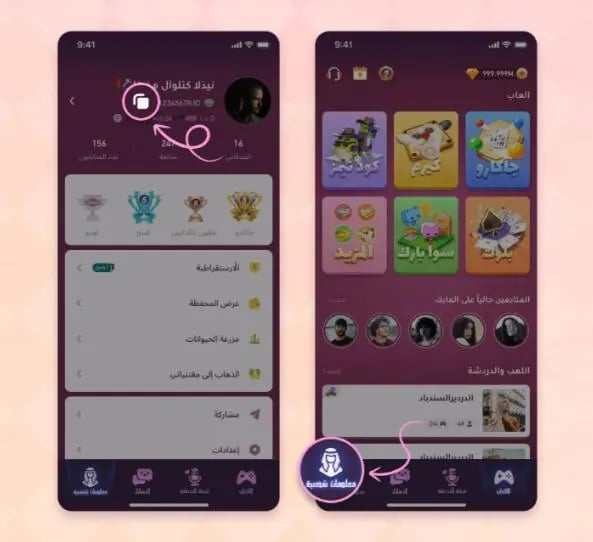
Always double-check the copied numbers before placing an order. Accurate numeric IDs ensure your coins or diamonds credit directly to your account without processing delays.
Step-by-Step Guide to Top Up Sawa Play on VGTopup
Recharging your Sawa Play account on VGTopup is straightforward and takes only a few quick steps:
- Select Your Currency Package: Choose your desired coin or diamond pack from the available options on this page.
- Enter Your User ID: Paste your numeric Sawa Play UID into the
User IDinput field. - Pick Your Payment Method: Choose your preferred regional or international payment option. Live package pricing and exact totals are clearly visible on the live checkout screen.
- Confirm and Pay: Follow the on-screen instructions to finalize your payment securely.
- Check Your In-Game Wallet: Once your transaction is confirmed, the resources are routed straight to your Sawa Play profile. Open the app to view your refreshed balance.
| Currency / Item Type | Primary Use in Sawa Play | Delivery Requirement |
|---|---|---|
| Sawa Play Coins | Table buy-ins, casual card matches, Jackaroo room entry | Numeric User ID (UID) only |
| Sawa Play Diamonds | Exclusive board skins, avatar frames, gifts, VIP status | Numeric User ID (UID) only |
| Direct Top-Up Packs | Immediate balance reload credited straight to game account | Numeric User ID (UID) only |
Account Safety: Why Passwordless UID Recharges Keep Your Profile Secure
Protecting your gaming profile is critical. Many risky online services ask players for account passwords, linked social logins, or verification SMS codes. Handing over login information exposes your account to unauthorized access, permanent password changes, and publisher account flags.
VGTopup prioritizes player safety by enforcing a passwordless top-up system:
- Zero Password Sharing: You only submit your public numeric User ID. Your private login credentials remain strictly in your own hands.
- No Device or IP Conflicts: Account-sharing often triggers security locks when servers detect logins from strange locations. UID top-ups send in-game goods directly through official player routing channels, avoiding login flags.
- Complete Privacy: Your personal contact information, chat histories, and linked social media accounts stay safe.
What if you entered an incorrect User ID?
If you spot an error in your User ID before completing payment, correct the number directly on the checkout screen. If payment has already been completed, the top-up will be processed immediately to the submitted ID. Because digital gaming assets cannot be pulled back once delivered to a player account, reach out to VGTopup customer support immediately with your order receipt so our team can check the processing status of your transaction.
Supported Regional Payment Methods and Smooth Checkout
Sawa Play brings together a massive community of players across Saudi Arabia, the United Arab Emirates, Kuwait, Qatar, Bahrain, Oman, Egypt, and international regions. Players require convenient, localized payment channels to recharge without friction.
VGTopup supports an extensive array of regional credit and debit cards, local digital wallets, and globally recognized payment processors. The exact price for each denomination is listed transparently on the live checkout screen before payment confirmation, ensuring no unexpected fees or currency discrepancies.
Troubleshooting Delivery Delays and Verifying In-Game Balance
Top-ups on VGTopup are processed promptly once payment clears. However, network latency or game server refreshes can sometimes cause a brief visual delay. If your updated balance does not display immediately, follow these troubleshooting steps:
- Restart the Application: Close Sawa Play completely from your mobile multitasking tray and relaunch the game. This prompts the client to fetch updated balance data from the game servers.
- Switch Game Screens: Move from the main lobby into your profile or store tab and return to the home screen to trigger a manual balance refresh.
- Verify Your Order Status: Check your VGTopup order page or email receipt to confirm the order is marked complete and that the UID matches your in-game profile.
- Reach Out to Support: If your balance has not updated after restarting, contact VGTopup 24/7 customer support with your order number and numeric UID for prompt assistance.
Frequently Asked Questions About Sawa Play Top Up
How do I top up Sawa Play with my User ID?
Select your preferred coin or diamond denomination on VGTopup, input your numeric Sawa Play User ID, choose a payment method, and complete the purchase. The currencies are credited directly to your profile without requiring your password.
Where can I find my Sawa Play User ID?
Open Sawa Play, tap your avatar in the top-left corner of the lobby screen, and locate the numeric ID shown beneath your nickname. Tap the copy icon next to it to copy your UID.
Do I need to share my Sawa Play password for a top-up?
No. VGTopup only requires your public numeric User ID. You never need to disclose your password, login email, or authentication codes.
What is the difference between Sawa Play coins and diamonds?
Coins are spent on table entry fees, Jackaroo matches, and competitive card rooms. Diamonds serve as the premium currency used to purchase VIP perks, animated gifts, custom board designs, and profile cosmetics.
Can I top up Sawa Play for a friend's account?
Yes. You can send coins or diamonds to any friend by entering their numeric Sawa Play User ID during the order process on VGTopup.
How long does it take to receive my Sawa Play recharge?
Orders are fulfilled automatically following payment verification. In standard conditions, your purchased coins or diamonds appear in your in-game wallet shortly after completing checkout.
What should I do if my Sawa Play balance does not update after payment?
First, restart the Sawa Play app to trigger an account data sync. If your coins or diamonds still do not appear, check your VGTopup order status and contact our customer support team with your transaction reference number and UID.
Select Denomination
Tax, payment fees and eligible coupons are calculated at checkout.
| Package | Price |
|---|---|
| Sawa Play - 220 Coins | USD 1.90 |
| Sawa Play - 625 Coins | USD 5.22 |
| Sawa Play - 5710 Coins | USD 46.06 |
| Sawa Play - 12830 Coins | USD 103.42 |
| Sawa Play - 37721 Coins | USD 303.28 |






























































