



MEYO Live Top Up Guide: Quick and Secure In-App Credits
MEYO Live connects people worldwide through group voice rooms, real-time video party spaces, and live streaming interaction. To participate actively in community events, send dynamic virtual gifts to your favorite broadcasters, and stand out with premium visual effects, you need a steady balance of in-app coins and credits.
VGTopup provides a direct recharge system designed to deliver MEYO Live coins straight to your account balance. By using your public Player ID alone, you avoid the risks of sharing sensitive account credentials or linking personal payment methods directly inside mobile app stores. Review the live catalog options above to select the coin package that fits your social activity, check real-time rates, and complete your order with fast digital fulfillment.
How to Find Your MEYO Live Player ID
Your MEYO Live Player ID is a unique numeric identifier assigned to your profile. Entering this number correctly ensures that your coins arrive in your account without delays.
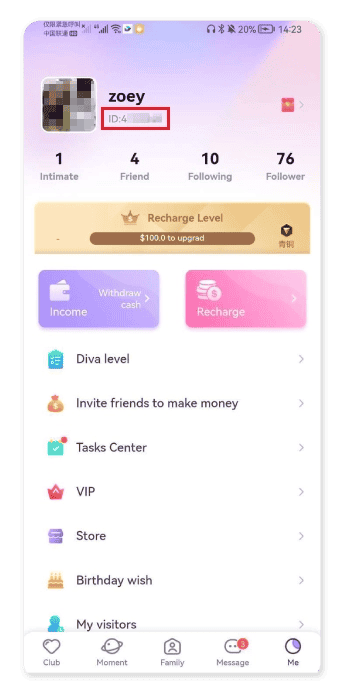
Follow these steps inside the app to locate your ID:
- Launch the MEYO Live application on your Android or iOS device.
- Tap the Profile or Me icon located in the bottom navigation bar.
- Look directly beneath your avatar and display nickname at the top of the profile screen.
- Locate the numeric string labeled ID.
- Tap the copy icon next to the digits to copy your Player ID to your clipboard, or write it down carefully.
Always double-check your ID before pasting it into the checkout field on VGTopup. Because digital recharge credits process automatically, sending coins to a mistyped ID can result in delivery to the wrong user.
How to Top Up MEYO Live on VGTopup
Recharging your account balance on VGTopup takes only a few moments. Follow this simple walkthrough:
- Enter Your Player ID: Paste or type your numeric MEYO Live Player ID into the designated input box on this page.
- Select Your Coin Package: Choose your desired coin denomination from the available options.
- Pick a Payment Method: Select from the available local and global payment solutions shown during checkout.
- Review Order Details: Confirm your Player ID and package selection before confirming payment.
- Complete Checkout: Finalize your transaction. Once confirmed, the system processes your recharge and deposits the coins directly into your MEYO Live balance.
- Check In-App Balance: Open MEYO Live, pull down to refresh your profile page, and verify your updated coin balance.
MEYO Live Currency System: Coins, Diamonds, and VIP Privileges
Understanding how in-app currencies and membership tiers work helps you make the most of your recharges. MEYO Live uses a dual-economy setup for social engagement and creator monetization.
| Currency / Feature | Primary Function | How to Obtain / Use |
|---|---|---|
| Gold Coins | Standard user currency for social interaction | Purchased via direct top up; used for gifts, chat games, and private calls |
| Diamonds / Beans | Host earnings and creator revenue | Earned by streamers from received gifts; converted or cashed out in-app |
| VIP Membership | Exclusive badge status, entry animations, and perks | Unlocked through coin usage or direct tier activation in profile settings |
| Interactive Gifts | Dynamic visual animations sent in live rooms | Purchased with coins to boost host rank and room popularity |
| Match & Message Passes | Direct voice/video matching and instant messaging | Spent per session or message to initiate private social conversations |
Interactive Virtual Gifting
Sending gifts in group voice rooms and live streams is the core social mechanism in MEYO Live. High-tier animated gifts trigger full-screen effects across the entire room, giving your profile prominent visibility among other viewers and elevating your rank on the room contributor leaderboard.
VIP Status and Profile Customization
Active users who maintain VIP tiers gain access to exclusive chat bubbles, custom entrance banners when joining live rooms, special profile frames, and dedicated customer support privileges inside the app. To climb VIP levels, users accumulate spend points by using their coin balance on gifts and room activities.
Private Calls and Match Filters
If you prefer one-on-one audio or video interactions, MEYO Live allows users to spend coins for direct voice matching, private party room hosting, and targeted location filters. Keeping your coin balance topped up ensures you never get disconnected during private conversations.
Account Protection: Direct Player ID Recharge Without Password Sharing
Security is paramount when buying digital currencies online. Traditional top-up methods that require account login credentials, linked social media passwords (such as Google, Facebook, or Apple ID), or remote account access carry significant security risks.
VGTopup operates exclusively through ID-based direct top-up:
- Zero Password Exposure: You never provide passwords, security questions, or two-factor authentication (2FA) verification codes.
- No Account Hijacking Risks: Your account remains fully in your possession at all times. Nobody logs in to your profile to process the transaction.
- Regional Compatibility: The Player ID system supports accounts across multiple global regions, including Southeast Asia, the Middle East (MENA), Latin America, and North America. Ensure your Player ID is entered accurately to match your global profile.
- Clean Checkout Process: Payment processing occurs through encrypted channels, with transparent pricing displayed at checkout before you commit to payment.
Troubleshooting and Order Status Checks
While most recharges process without delay, here is how you can resolve common issues if your balance does not update immediately:
- Restart the MEYO App: Force close the MEYO Live application on your phone and reopen it. A fresh connection to the game server frequently forces the updated coin balance to display.
- Verify the Submitted Player ID: Check your order confirmation receipt on VGTopup to confirm that the Player ID entered matches your current profile ID exactly.
- Check Payment Processing Status: Make sure your selected payment method completed the transaction and that your bank or wallet debited the funds.
- Contact VGTopup Support: If your payment completed but your coins have not arrived after a short waiting period, submit your VGTopup Order ID along with a screenshot of your MEYO Live profile page to customer support for prompt investigation.
Frequently Asked Questions
How do I find my MEYO Live Player ID?
Open the MEYO Live app, tap the Me / Profile tab in the bottom right corner, and look directly below your profile photo and nickname. Your numeric Player ID is displayed there with a convenient one-tap copy button.
Do I need to share my MEYO Live account password for top up?
No. VGTopup only requires your numeric Player ID to deliver coins to your account. You should never share your login credentials, passwords, or verification codes with any third-party top-up service.
How long does it take to receive MEYO Live coins after recharge?
Orders placed on VGTopup process automatically once payment confirmation is received. Under normal operating conditions, your coins are credited directly to your in-app balance within minutes.
What can I purchase with MEYO Live coins and credits?
Coins can be used to send animated virtual gifts to streamers, unlock custom entrance banners, join private voice and video party rooms, access VIP profile frames, and purchase interactive chat tools.
Can I top up MEYO Live for a friend using their Player ID?
Yes. Because the recharge system only requires a valid Player ID, you can top up for friends or family. Simply enter their numeric Player ID into the top-up box, select the package, and complete payment on their behalf.
What should I do if I entered the wrong Player ID during checkout?
Because digital coin deliveries are automated and irreversible once dispatched to the MEYO servers, recharges sent to an existing, valid incorrect ID cannot be refunded or transferred. If you notice a typo immediately before payment processing completes, reach out to VGTopup customer support right away with your order number to check if fulfillment can be redirected.
Select Denomination
Tax, payment fees and eligible coupons are calculated at checkout.
| Package | Price |
|---|---|
| VIP7 DAYS MEYO LIVE | USD 2.86 |
| 490 MEYO LIVE | USD 4.36 |
| 980 MEYO LIVE | USD 8.77 |
| VIP30 DAYS MEYO LIVE | USD 8.82 |
| 1960 MEYO LIVE | USD 17.52 |
| VIP90 DAYS MEYO LIVE | USD 25.14 |
| 4900 MEYO LIVE | USD 43.80 |
| 9800 MEYO LIVE | USD 87.16 |






























































