


Kiti Top Up: Instant Coin Recharge via UID on VGTopup
Kiti is a popular live streaming and interactive video chat platform where users connect with broadcasters from around the world. To fully participate in live rooms, send animated gifts, and support your favorite hosts, you need Kiti coins. Topping up your Kiti account on VGTopup gives you immediate access to in-app balance through a safe and direct system that requires only your User ID (UID).
VGTopup provides direct account replenishment without requiring login credentials or account sharing. Whether you want to participate in live PK battles, send luxury gifts, or activate custom chat highlights, recharging your Kiti wallet takes only a few simple steps.
What Are Kiti Coins and How to Use Them in Live Streams
Kiti coins serve as the primary virtual currency across the Kiti mobile application. When you hold coins in your balance, you gain access to interactive live stream features that help you stand out and directly reward creators.
Primary Utilities of Kiti Coins
- Virtual Gifting: Send standard and animated dynamic gifts directly to broadcasters during live shows. Gifts contribute directly to the host's event rank and performance points.
- Interactive Animations: Trigger high-tier screen effects in popular broadcast rooms that capture the attention of both the streamer and other viewers.
- VIP Access and Exclusive Badges: Unlock supporter badges and gain entry into private or exclusive fan rooms.
- Live Room PK Support: Boost your favorite streamer during head-to-head live battles by sending targeted gifts during scoring rounds.
| Kiti Coin Utility | Purpose in App | Benefit to Streamer & Viewer |
|---|---|---|
| Virtual Gifts | Send digital presents in chat | Rewards host and raises viewer leaderboard rank |
| Interactive Animations | Display full-screen visual effects | High visibility across the live broadcast room |
| Fan Badges | Display dedicated supporter icons | Distinguishes loyal community members |
| PK Battle Boosts | Add points during creator matches | Helps your preferred streamer win live contests |
Where to Find Your Kiti User ID (UID)
To ensure your recharge arrives accurately, you must provide your exact Kiti UID. Your UID is a unique numeric identifier linked directly to your account profile.
Follow these steps to find and copy your UID:
- Open the Kiti app on your mobile device.
- Tap the Profile or My icon located at the bottom right corner of the screen.
- Locate your profile avatar and display name at the top of the screen.
- Directly below your username, you will see your UID (a sequence of numbers).
- Tap the small copy icon next to the UID number to copy it directly to your clipboard.
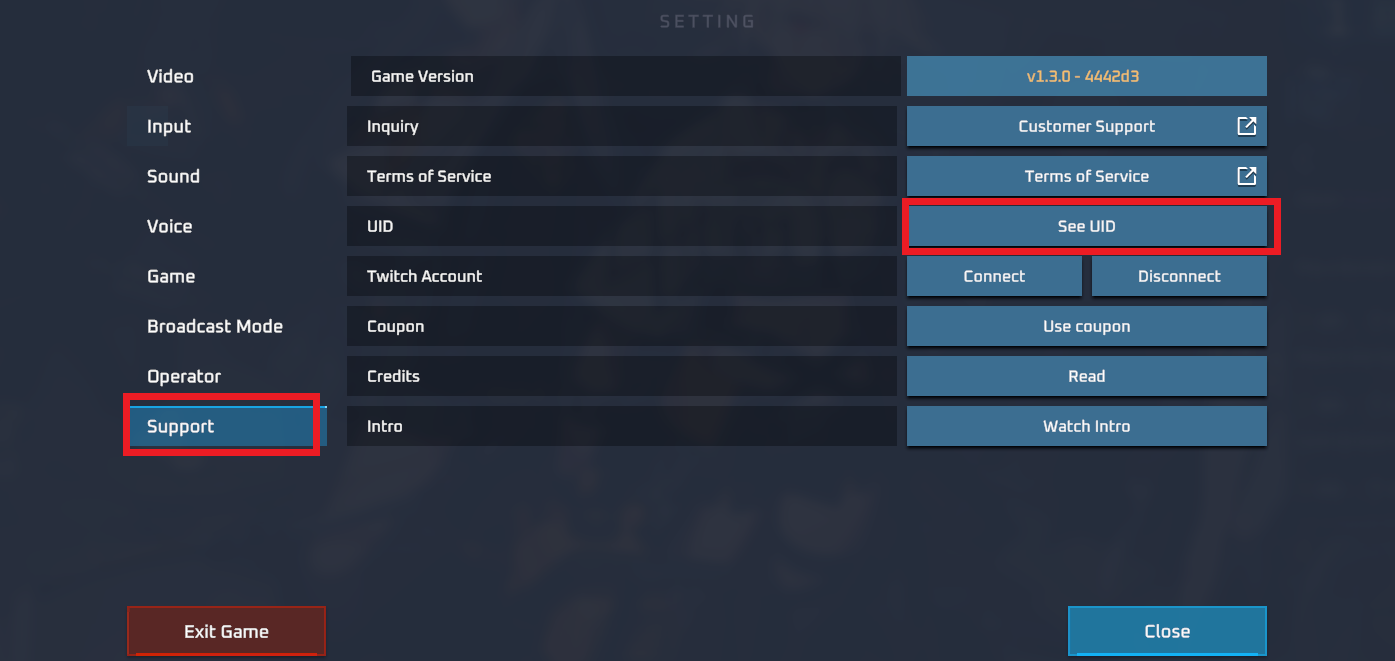
Always copy and paste your UID rather than typing it manually to prevent typos that could result in sending coins to the wrong account.
How to Top Up Kiti Coins on VGTopup Using UID
Recharging Kiti on VGTopup is straightforward and completed in minutes:
- Select Coin Denomination: Browse the available Kiti coin packages on VGTopup and select the amount you wish to purchase.
- Input Your UID: Paste your Kiti User ID into the designated UID field.
- Select Payment Method: Choose from the available local and global payment options presented at checkout.
- Review and Pay: Verify that your UID and selected coin package are correct, then complete the transaction.
- Check Your In-App Balance: Once payment confirmation is received, open the Kiti app and refresh your profile wallet to see your updated coin balance.
Safe and Password-Free Kiti Account Top-Up
Account safety is a top priority when purchasing digital currencies. VGTopup uses a direct UID top-up system, which means:
- Zero Password Requests: You will never be asked for your Kiti account password, email login, or two-factor authentication codes.
- No Account Sharing: Your account remains strictly in your hands at all times, eliminating risks associated with shared credentials.
- Direct Server Delivery: Recharges are processed directly to the account tied to the submitted UID, ensuring your personal data and account integrity remain secure.
Available Global and Local Payment Methods for Kiti Recharge
VGTopup supports a wide selection of payment channels to accommodate buyers from different regions worldwide. You can complete your Kiti coin recharge using major credit cards, debit cards, local e-wallets, online bank transfers, and regional payment solutions.
All real-time pricing and applicable payment channels are clearly displayed directly on the live checkout interface before you complete your purchase. This ensures transparent transactions with no hidden fees.
Kiti Coin Recharge Delivery Time and Verification
Orders placed on VGTopup are processed automatically once payment clears. In most cases, Kiti coins are credited to your account shortly after payment confirmation.
To verify your coin delivery:
- Open the Kiti app.
- Go to your Profile page.
- Tap on Wallet or My Coins.
- Check your current total to confirm the new coins have been credited.
If you were already inside a live stream when the order completed, exit the live room and reopen the app to refresh your cached wallet balance.
Troubleshooting Kiti Recharge and Missing Coins
If your coins do not appear in your balance after payment, follow these troubleshooting steps:
- Restart the Kiti App: Close the application completely from your device's background tasks and restart it to fetch updated server data.
- Verify Your UID Submission: Check your VGTopup order confirmation email and confirm that the UID entered matches your actual Kiti profile UID.
- Check Transaction Status: Ensure your payment went through completely on your bank or payment app statement.
- Contact Support: If the balance does not update after checking these details, contact VGTopup customer support with your order number and Kiti UID for quick assistance.
Frequently Asked Questions About Kiti Top Up
What information is required to top up Kiti coins on VGTopup?
You only need to provide your Kiti User ID (UID) and choose your desired coin package. You do not need to provide passwords, phone numbers, or social login credentials.
Where can I find my Kiti UID?
Open the Kiti app, go to your Profile page, and look directly beneath your profile picture and nickname. Your numeric UID is displayed there with a copy button.
How fast are Kiti coins delivered after completing the top-up?
Coins are processed automatically once payment confirmation is received, crediting directly to your Kiti account.
Is it safe to recharge Kiti balance without sharing my password?
Yes. Because the recharge system only requires your public UID, your account credentials remain completely private and secure.
Can I buy Kiti coins for another streamer using their UID?
Yes. You can recharge coins for any creator or friend by entering their specific Kiti UID into the player ID field during checkout on VGTopup.
What should I do if my Kiti coin balance has not updated?
First, restart your Kiti app to refresh your wallet balance. If the coins still do not show, check your order receipt to confirm the UID was correct, and contact VGTopup support with your order ID for immediate verification.

































































