



Yami Star Top Up: What Are Yami Star Coins and In-App Uses
Yami Star is a popular interactive voice chat and social entertainment app where users join audio rooms, sing karaoke, participate in games, and build communities. Within the platform, Yami Star Coins serve as the primary virtual currency required to access premium social features, support room hosts, and personalize your profile presence.
Recharging Yami Star coins allows you to:
- Send Animated Virtual Gifts: Express appreciation to streamers and room creators by sending standard gifts, 3D animated effects, and full-screen luxury gifts during live voice streams.
- Climb Room Leaderboards: Gifting coins increases your contributor ranking in individual rooms and platform-wide daily, weekly, and monthly contributor charts.
- Participate in In-Room Games: Join interactive audio room mini-games and community activities that require coin entries.
- Unlock Noble Status: Accumulate spent coins to qualify for Noble VIP tiers, gaining exclusive profile decorations, special chat bubbles, and priority entrance effects.
- Support Content Creators: Help your favorite voice hosts reach event milestones and unlock official platform rewards.
All denominations, package sizes, and real-time prices are displayed directly on the live VGTopup checkout menu above.
How to Top Up Yami Star Coins on VGTopup
Completing a Yami Star recharge on VGTopup takes only a few quick steps. Follow this guide to ensure your coins reach your account promptly:
- Select Your Coin Package: Browse the denomination list and click on the amount of Yami Star coins you want to purchase.
- Enter Your Yami Star UID: Input your numeric User ID into the designated
UIDfield. Make sure to double-check the numbers to avoid sending coins to the wrong account. - Proceed to Checkout: Click the purchase button to open the checkout screen.
- Choose Your Preferred Payment Method: Select an available payment channel that suits your region and complete the transaction.
- Track Your Order: Monitor your order status in real time. Once processed, open your Yami Star app to view your updated coin balance.
How to Locate Your Yami Star User ID (UID)
To ensure your coins are delivered accurately, you must provide your exact numeric User ID. You do not need to share your account nickname or login email.
- Launch the Yami Star app on your mobile device.
- Tap the Profile (or Me) icon located in the bottom right corner of the home screen.
- Locate your numeric User ID (UID) displayed directly underneath your profile avatar and username.
- Tap the Copy icon next to your UID to copy the digits directly to your clipboard.
- Paste the numeric string into the UID field on VGTopup.
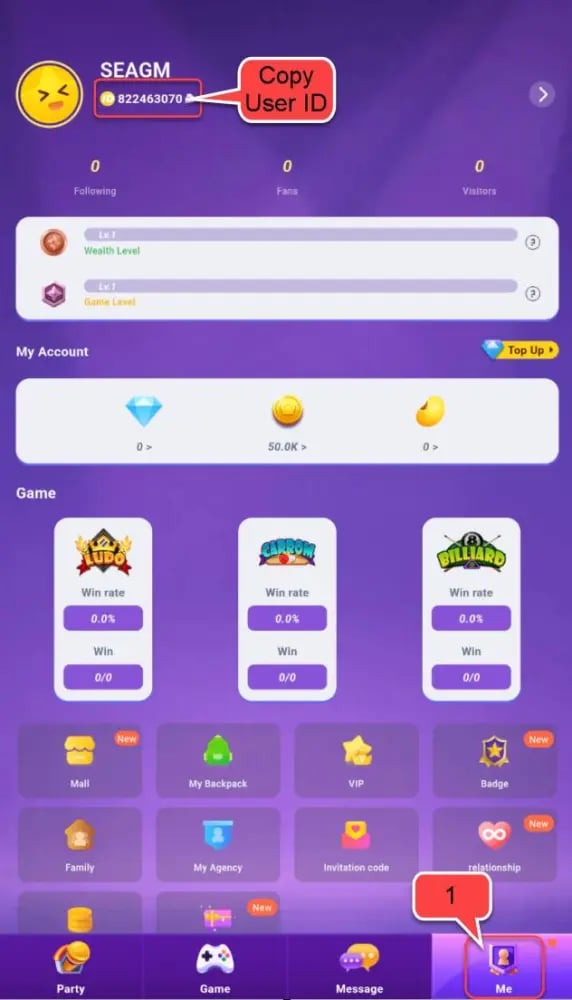
Always use the copy button rather than typing the numbers manually to prevent mistyping errors.
Unlocking Noble Status and Room Entrance Privileges
In Yami Star, purchasing and spending coins contributes directly toward your VIP progression and Noble ranking. Holding a Noble title distinguishes your profile inside crowded voice rooms and provides distinct visual perks.
Noble Privilege Breakdown
| Privilege Category | Perk Details | In-App Benefit |
|---|---|---|
| Room Entrance | Custom arrival banner and sound effect | Alerts all room participants when you enter a chat |
| Microphone Frame | Glowing avatar borders on mic seats | Highlights your presence while speaking on stage |
| Chat Customization | Unique chat bubble colors and fonts | Makes your text messages stand out in public room chat |
| Noble Badge | Permanent tier icon on profile page | Displays your status across all platform leaderboards |
| Exclusive Gifts | Access to Noble-only gifting animations | Unlocks special gift items restricted from regular users |
| Seat Protection | Priority seating in crowded party rooms | Prevents lower-tier users from kicking or muting you |
Maintaining active coin usage keeps your Noble perks refreshed and unlocks higher reward tiers during seasonal community events.
Security Guarantee: ID-Only Recharge Without Password
Account safety is a core priority when buying digital game currency. VGTopup processes all Yami Star recharges strictly via public User ID (UID).
- No Passwords Required: You will never be asked for your account password, linked phone number, SMS verification code, or social login credentials.
- Zero Risk of Account Takeover: Because we only submit transactions via your public UID, your private login credentials remain entirely secure on your personal device.
- Direct Server Credit: Orders are processed directly to the account tied to the specified numeric ID.
- Safe for Gifting: Because only the UID is needed, you can easily top up coins for friends, family, or room hosts without needing access to their personal devices.
Never share your password or one-time verification codes with anyone offering coin top-ups.
Troubleshooting Delivery and Verifying Coins in Yami Star
If you have completed your purchase on VGTopup and want to verify your balance, follow these troubleshooting and verification steps:
- Refresh the App Wallet: Open Yami Star, go to your Profile / Me page, tap on Wallet or My Coins, and drag down on the screen to force a server refresh.
- Restart the Application: Completely close the Yami Star app from your recent apps switcher and reopen it to reload your profile data.
- Check In-App Transaction History: Go to your Wallet settings and view your recharge log to confirm recent balance updates.
- Verify the Submitted UID: Check your VGTopup order receipt to confirm that the numeric UID entered during checkout matches your profile ID.
- Contact Support with Your Order ID: If your coins have not appeared after completing these steps, reach out to the 24/7 VGTopup customer support team with your order number for fast assistance.
Frequently Asked Questions About Yami Star Recharge
Where can I find my Yami Star User ID (UID)?
You can find your UID by opening Yami Star, tapping the Profile icon in the bottom right corner, and looking directly beneath your avatar. Tap the copy icon next to the number to copy your UID.
Do I need to share my Yami Star password to recharge coins?
No. VGTopup only requires your numeric User ID (UID) to complete the transaction. We never request passwords, verification codes, or personal account logins.
What are Yami Star Coins used for?
Yami Star Coins are used to purchase animated virtual gifts for voice room hosts, join in-room interactive mini-games, unlock Noble privileges, and gain custom entrance animations and avatar frames.
How fast will the Yami Star Coins be credited to my account?
Orders placed on VGTopup are processed quickly once payment confirmation is received. You can view your live order status on the order tracking page.
Can I top up Yami Star coins for a friend using their UID?
Yes. Simply enter your friend's numeric Yami Star UID in the UID field at checkout instead of your own. The coins will be delivered directly to their in-app wallet upon payment completion.
What should I do if my Yami Star coins have not arrived?
First, restart your Yami Star app and check your in-app wallet balance. If the balance has not updated, verify that the UID on your purchase confirmation is correct, then contact VGTopup 24/7 customer support with your order number for prompt resolution.
Select Denomination
Tax, payment fees and eligible coupons are calculated at checkout.
| Package | Price |
|---|---|
| Yami Star - Yami Star*10000000 | USD 2.16 |
| Yami Star - Yami Star*50000000 | USD 10.80 |
| Yami Star - Yami Star*100000000 | USD 21.60 |
| Yami Star - Yami Star*5000000 | USD 1.08 |

































































