

Infinite Borders Top Up: Direct Jade Recharges for Eastern Strategy
Infinite Borders is a seasonal strategy title where tacticians clash across vast territory grids, recruit historical commanders, and manage expansive military alliances. Success on the battlefield demands careful planning, resource development, and rapid military expansion. Jade serves as the primary premium currency in Infinite Borders, giving lords the ability to summon elite generals, speed up municipal expansion, and acquire tactical packs.
Securing an Infinite Borders top up through VGTopup ensures you receive your Jade directly into your game account using only your unique Player ID. By eliminating the need for login credentials or private passwords, VGTopup offers a direct, secure, and straightforward purchasing path for players across global servers.
What is Infinite Borders Jade and What Is It Used For?
Jade is the core resource used to advance your military standing and secure high-tier commanders. Because seasons in Infinite Borders operate on strict timelines and competitive territorial races, having an immediate reserve of Jade allows you to execute critical maneuvers without unnecessary delays.
Primary Uses for Infinite Borders Jade
- Summoning Legendary Generals: Draw high-rarity officers from recruitment banners to build specialized vanguard, center, and rear army compositions.
- Fast-Tracking Construction: Reduce the wait times required to build main city facilities, fortress outposts, and defensive structures during war declarations.
- Purchasing Exclusive Bundles: Acquire special seasonal supply boxes, skill conversion items, and specialized growth packs.
- Resetting Tactics and Skills: Reallocate skill points, convert tactical scrolls, and experiment with different general pairings to counter rival alliances.
- Converting to Decrees and Gold: Replenish crucial operational supplies when managing multi-front defensive operations.
| Jade Application | Strategic In-Game Benefit | Priority Level |
|---|---|---|
| General Recruitment | Acquire 5-star commanders for competitive army builds | High |
| Building Speed-Ups | Establish advanced command outposts ahead of rival alliances | High |
| Skill Point Conversion | Maximize tactic levels on core combat units | Medium |
| Seasonal Supply Bundles | Stock up on rare materials and specialized march skins | Medium |
How to Find Your Infinite Borders Player ID
To complete an order on VGTopup, you only need to provide your numeric Player ID. Finding your Player ID takes only a few seconds inside the game interface.
- Launch Infinite Borders on your mobile device or desktop emulator.
- Select your active server and enter your current game world.
- Tap your character avatar located in the upper-left corner of the main screen.
- In the profile overview window, locate your Player ID listed beneath your lord's name.
- Tap the copy icon next to your Player ID to ensure exact entry during checkout.
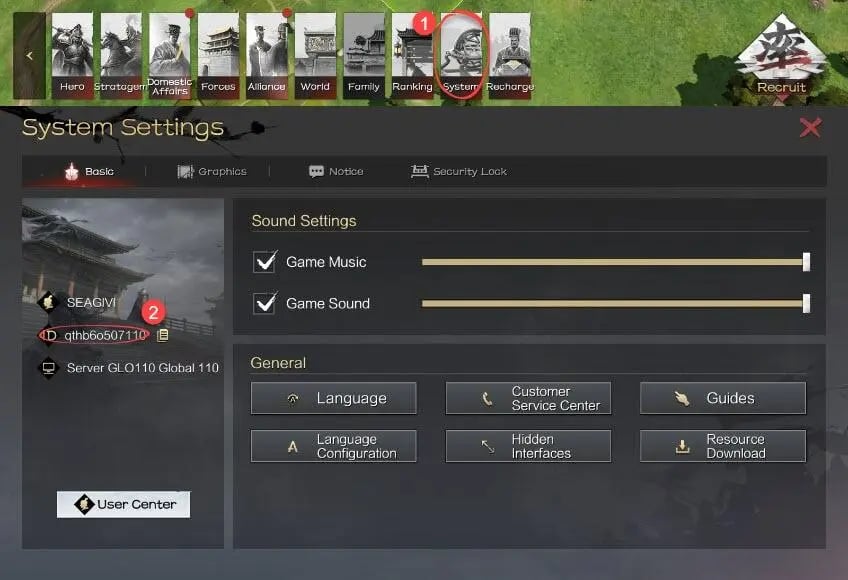
Always double-check your copied Player ID before finalizing your order to make sure the Jade is credited to the correct profile.
Step-by-Step Guide: How to Top Up Infinite Borders on VGTopup
Recharging your account on VGTopup follows a straightforward, automated procedure designed for rapid fulfillment.
- Select Your Jade Pack: Choose the Jade denomination that matches your current tactical needs from the catalog.
- Enter Your Account Information: Paste your copied Player ID into the designated input field on the product page.
- Review Current Rates: Check the live product rates displayed directly on the VGTopup checkout page.
- Choose Payment Option: Select your preferred localized payment method from the available checkout list.
- Complete Checkout: Finalize your payment through our encrypted processing gateway.
- Receive Your Jade: Return to Infinite Borders and check your in-game mailbox or Jade balance directly.
Safe & Secure Infinite Borders Recharge with Player ID Only
Account safety is a core priority when buying in-game currency. Unlike third-party services that demand your account login, Google Play credentials, or social media passwords, VGTopup operates strictly through direct-to-account Player ID fulfillment.
Why Player ID Top-Ups Protect Your Account
- Zero Password Sharing: You never expose your login credentials, personal data, or private verification codes.
- No Account Sharing Risks: Your account remains strictly in your hands without risking security lockouts or unauthorized device logins.
- Direct System Fulfillment: The Jade is routed straight to your account database entry through verified game channels.
- Complete Peace of Mind: Your payment details and personal profile remain protected by industry-standard encryption at every stage.
Supported Payment Methods and Global Server Availability
VGTopup provides access to Infinite Borders recharges across active global game servers. Because tactical wars feature players from multiple continents, our checkout system supports an array of regional and international payment options.
Live exchange rates, localized currencies, and verified payment gateways appear automatically on the checkout page depending on your location. Whether you are funding an ongoing seasonal campaign or preparing for an upcoming alliance reset, VGTopup lets you complete your transaction smoothly in your preferred currency.
Infinite Borders Jade Delivery and Order Status Tracking in 2026
All Infinite Borders orders placed on VGTopup enter an automated queue system designed to process deliveries promptly upon payment confirmation in 2026. You can monitor the progress of your transaction directly through the VGTopup order history page.
How to Confirm Your Jade Delivery
- Check Order Status: Once payment is complete, visit your VGTopup account dashboard to verify that your order status marks as completed.
- Log Into Infinite Borders: Open the game and check your current Jade counter at the top of the interface.
- Refresh Your Client: If the balance has not updated immediately, restart your game app or trigger a server refresh by visiting the alliance or map screen.
- Contact Support if Needed: If your order status is completed but your balance has not refreshed after restarting, provide your VGTopup order number and Player ID to our 24/7 customer support team for prompt assistance.
Frequently Asked Questions About Infinite Borders Top Up
How do I top up Jade in Infinite Borders?
Select your preferred Jade package on VGTopup, enter your game Player ID in the input field, choose a payment method, and complete the checkout. The Jade will be credited directly to your character.
Where can I find my Infinite Borders Player ID?
Open Infinite Borders, click your lord avatar in the top-left corner of the screen, and copy the numeric Player ID displayed under your character profile.
Do I need to provide my game password to top up Infinite Borders Jade?
No. VGTopup only requires your public Player ID. We never ask for passwords, login credentials, or verification codes.
What in-game items can I buy with Infinite Borders Jade?
You can use Jade to recruit 5-star generals, purchase seasonal supply packs, speed up fortress and city upgrades, convert skill points, and buy tactical utility items.
Can I recharge Infinite Borders for a friend using their Player ID?
Yes. As long as you have your friend's correct Player ID, you can enter their details during checkout to send Jade directly to their account as a gift or alliance support.
What should I do if my Infinite Borders Jade recharge has not arrived?
First, restart the game client to refresh your balance. If the Jade does not reflect within a few moments, check your VGTopup order tracking page and reach out to our 24/7 customer support team with your order number for immediate verification.
Select Denomination
Tax, payment fees and eligible coupons are calculated at checkout.
| Package | Price |
|---|---|
| Infinite Borders - Infinite Borders - 300 Jades Tribute Pack | USD 4.07 |
| Infinite Borders - Infinite Borders - 720 Jades | USD 8.15 |
| Infinite Borders - Infinite Borders - 1440 Jades | USD 16.32 |
| Infinite Borders - Infinite Borders - 3790 Jades | USD 40.81 |
| Infinite Borders - Infinite Borders - 7150 Jades | USD 81.63 |
| Infinite Borders - Infinite Borders - 14350 Jades | USD 163.26 |
| Infinite Borders - Infinite Borders - 28310 Jades | USD 326.53 |
| Infinite Borders - Infinite Borders - 288 Jades | USD 3.26 |