
How to Top Up NIU CHAT Balance Online
To get your NIU CHAT top up completed quickly, follow our direct UID recharge process on VGTopup. Top-ups add balance directly to your account without requiring login details.
- Select the NIU CHAT balance denomination or package you wish to purchase from the selection menu.
- Enter your NIU CHAT User ID (UID) accurately in the provided field.
- Select your preferred payment channel from the checkout options available for your location.
- Review your order details, confirm the purchase, and complete the transaction.
- Open the NIU CHAT mobile application on your Android or iOS device to verify that your new balance has been credited.
| Recharge Step | Action Required | Details Needed |
|---|---|---|
| 1. Select Package | Choose your desired balance bundle | Package size shown on checkout |
| 2. Input UID | Type or paste your numeric ID | NIU CHAT UID |
| 3. Payment | Pick a supported payment channel | Billing details |
| 4. Confirmation | Finalize order | Order receipt & balance check |
Step-Step Guide to Finding Your NIU CHAT UID
Finding your NIU CHAT User ID is straightforward and requires only access to your installed app. You do not need to link third-party social profiles or open external account settings.
- Launch the NIU CHAT application on your smartphone.
- Tap the Profile icon (labeled "Me" or represented by a user avatar) located on the bottom navigation bar.
- View your profile overview page. Your UID is displayed directly beneath your profile picture and nickname.
- Tap the copy icon next to your numeric UID to copy it directly to your clipboard, preventing manual typing mistakes.
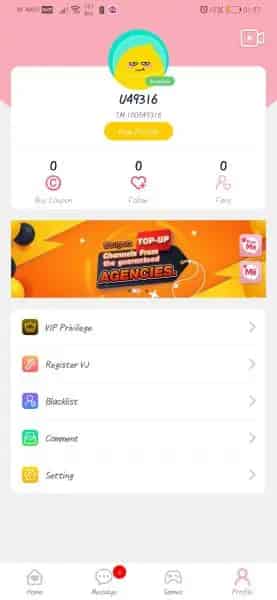
Ensure that you paste the exact numeric sequence into the UID field on VGTopup before confirming your order.
Account Safety: UID-Only Checkout Without Passwords
Security is a fundamental priority for mobile community members. When you purchase an online recharge through VGTopup, you never need to hand over your NIU CHAT login credentials, social login tokens, or account passwords.
- Zero Login Sharing: Transactions require only your public UID. Your account remains fully in your control at all times.
- Protection Against Compromise: Because no passwords or private verification codes are ever requested, your account cannot be accessed or modified by third parties.
- Safe Gifting: Because only a UID is needed, you can securely top up friends, family members, or favorite community hosts without asking for their login details.
Available Payment Methods for NIU CHAT Recharge
VGTopup accommodates global and regional buyers by offering multiple payment options. Depending on your geographical region, you can finalize your NIU CHAT recharge using various trusted transaction methods:
- Major credit and debit cards
- Regional electronic wallets and digital payment services
- Direct online banking gateways and localized checkout options
Live prices, local currency conversions, and available payment methods are displayed directly on the live checkout interface. Select your country or currency preference at checkout to see real-time payment options tailored to your location.
NIU CHAT Premium Features and Voice Room Benefits
NIU CHAT is a vibrant voice chat and social audio platform where users interact in themed chat rooms, host live discussions, sing karaoke, and play interactive party games. Having an active balance unlocks essential room features:
- Animated Virtual Gifts: Send special gifts to room creators and friends during live voice broadcasts to show support and climb room contributor leaderboards.
- Custom Room Decorations: Personalize voice rooms with customized wallpapers, distinct speaker badges, and audio effects.
- VIP Badges and Chat Bubbles: Stand out in crowded group voice channels with exclusive username styling, animated chat bubbles, and unique profile rings.
- Room Entry Effects: Announce your arrival inside popular voice rooms with exclusive entrance animations and banner alerts.
- Interactive Community Games: Participate in mini-games and social challenges hosted inside active voice rooms.
Order Status and Delivery Troubleshooting
Most orders placed on VGTopup process automatically once your payment is confirmed. If your NIU CHAT balance does not appear immediately, use these troubleshooting steps to check your order:
- Restart the NIU CHAT App: Close the application completely on your device, clear it from recent apps, and reopen it to force a server synchronization of your wallet balance.
- Check Your VGTopup Order Status: Review your order confirmation page or order history on VGTopup to ensure your payment status is marked as completed.
- Verify the Submitted UID: Check your purchase receipt to confirm that the UID entered matches your actual in-app UID.
- Contact Customer Support: If your payment cleared and your UID was accurate but your balance has not updated, reach out to the VGTopup customer support team with your order ID for swift assistance.
Frequently Asked Questions
How do I find my NIU CHAT UID?
Open the NIU CHAT app, navigate to the "Me" or Profile section in the bottom menu, and locate the numeric UID shown beneath your profile nickname. Tap the copy icon beside the number to copy it to your clipboard.
Do I need to share my NIU CHAT password to top up?
No. You never need to share your account password, email, or login credentials. VGTopup requires only your public NIU CHAT UID to credit your balance directly.
How long does the NIU CHAT top up delivery take?
Digital deliveries are processed promptly once payment verification succeeds. In most situations, balance is credited shortly after checkout. If high server traffic causes a slight delay, restarting your app will update your balance.
What payment methods are supported for NIU CHAT recharge?
VGTopup supports an array of global payment channels, including credit/debit cards, regional e-wallets, and localized online payment services. Available payment options and real-time prices are clearly displayed on the checkout page.
Can I top up NIU CHAT for a friend using their UID?
Yes. You can top up any active NIU CHAT account by entering the recipient's UID at checkout. The balance will be sent directly to their in-app wallet without requiring their login information.
What should I do if I entered the wrong UID during checkout?
Because digital top-ups are processed immediately using the UID provided, orders sent to an existing valid UID cannot be reversed. If you notice an error before the order completes or if you typed an invalid non-existent ID, contact VGTopup support immediately with your transaction receipt.
Select Denomination
Tax, payment fees and eligible coupons are calculated at checkout.
| Package | Price |
|---|---|
| NIU CHAT - NIU CHAT*1000000 | USD 7.92 |
| NIU CHAT - NIU CHAT*5000000 | USD 39.60 |
| NIU CHAT - NIU CHAT*10000000 | USD 79.20 |
| NIU CHAT - NIU CHAT*50000000 | USD 396.00 |
| NIU CHAT - NIU CHAT*500000 | USD 3.96 |