
How to Top Up Gala Star with UID on VGTopup
Topping up your Gala Star account on VGTopup is straightforward, direct, and fast. You only need your player UID to complete your order without sharing private login credentials. Follow these simple steps to recharge your account:
- Select the Gala Star product or denomination you wish to purchase on the VGTopup order page.
- Enter your Gala Star UID into the required input field.
- Double-check your entered UID to ensure the balance is routed to the correct account.
- Click to proceed to checkout and select your preferred payment method from the available live options.
- Complete the payment process.
- Open your Gala Star application to verify that your account balance has updated.
Order Information Summary
| Order Detail | Requirement / Status |
|---|---|
| Required Player Input | Gala Star UID (Numerical ID) |
| Account Password Needed | Never required |
| Applicable Platform | Gala Star Mobile App |
| Pricing & Currency | Displayed live at VGTopup checkout |
| Fulfillment Method | Direct direct-to-UID balance delivery |
How to Find Your Gala Star Player UID
Your Gala Star User Identification number (UID) is a unique sequence of numbers assigned to your specific game profile. You must enter this exact ID so that the top-up reaches your character.
Follow these steps inside the game to locate and copy your UID:
- Open the Gala Star app on your mobile device.
- Log in to your main profile.
- Tap on your avatar icon located in the upper-left or profile corner of the main lobby screen.
- Open your personal profile details or user settings screen.
- Look for the numerical UID string displayed directly under or next to your in-game name.
- Tap the copy icon next to your UID to save it to your device clipboard, or carefully write down the numbers.
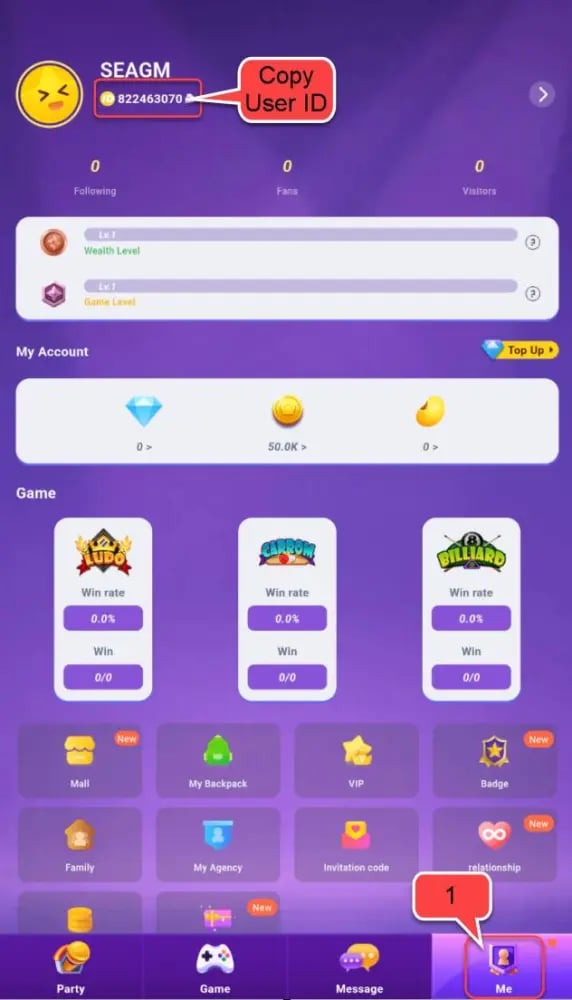
Always paste the copied UID directly into the VGTopup order box to prevent typos or mistyped digits.
Understanding Gala Star: Separate from Unrelated Crypto Platforms
Players searching for Gala Star recharges often encounter confusing web search results related to generic Gala tokens, blockchain launchers, or Web3 game portals.
Gala Star is an independent mobile gaming application with its own dedicated in-game economy. This top-up service on VGTopup is designed exclusively for the Gala Star mobile title. You do not need a crypto wallet, Web3 extension, or blockchain account to recharge your balance here. Recharges are processed strictly using your standard in-app player UID.
Secure Gala Star Recharge: No Account Password Required
Account safety is a top priority when purchasing digital game items. VGTopup operates on a UID-only direct recharge workflow:
- Zero Password Sharing: You will never be asked for your login password, social login access, verification codes, or personal security questions.
- No Account Takeover Risk: Because third parties never access your login details, your account stays completely within your control.
- Direct Delivery: Orders are credited straight to the server registry using your public user ID.
Never share your password or security credentials on third-party forms. A legitimate Gala Star recharge only requires your visible player UID.
Available Payment Options for Gala Star Balance
VGTopup provides players around the globe with a wide selection of payment options to ensure a smooth checkout experience. Because available payment channels and currency conversions vary by region, real-time rates and localized processors are displayed live on the checkout screen.
You can review total amounts, payment methods, and local currency support before confirming your order. The VGTopup storefront automatically updates payment gateway availability so you can choose the option that suits you best.
Troubleshooting Gala Star Top Up and Delivery Issues
If you experience any delay or issue with your recharge, use the following troubleshooting checklist:
1. Balance Did Not Update Immediately
- Completely close the Gala Star application on your device.
- Clear your game cache or ensure your internet connection is stable.
- Relaunch the app and log back in to check your refreshed in-game wallet or mailbox.
2. Typo in Submitted UID
- If you entered an incorrect UID during checkout, contact VGTopup customer support immediately.
- Provide your order number, the incorrect UID submitted, and your correct UID.
- If the order has not yet been processed by the system, support will assist in updating your details.
3. Payment Completed but Order Pending
- Check your email receipt or order history on VGTopup to confirm your payment cleared successfully.
- Allow a few minutes for server synchronization during peak hours.
- Contact VGTopup support with your payment transaction ID if your balance does not appear after standard processing.
Benefits of Topping Up Gala Star
Recharging your Gala Star balance provides multiple advantages inside the game:
- Unlock Exclusive Items: Gain instant access to premium outfits, avatar decorations, special emotes, and limited-edition event content.
- Accelerate In-Game Progression: Acquire useful items and resource packs that help you progress faster through challenges.
- Participate in Live Events: Ensure you have enough resources ready to join seasonal 2026 events and limited-time game modes.
- Enhance Social Interaction: Stand out among friends and community members with unique profile customizations and in-app perks.
Frequently Asked Questions About Gala Star Top Up
Where can I find my Gala Star UID for top up?
Open the Gala Star app, tap your profile avatar on the home screen, and check under your display name. You will see a numerical UID with a copy button next to it.
Do I need to provide my account password to top up Gala Star?
No. Recharges on VGTopup only require your numerical UID. You should never share your account password or two-factor authentication codes.
How do I top up Gala Star balance on VGTopup?
Select the desired pack on the VGTopup Gala Star page, paste your player UID into the input field, proceed to checkout, and complete your payment using your preferred payment method.
What payment methods can I use for Gala Star recharge?
VGTopup supports multiple localized payment channels and international options. Live payment methods, regional currencies, and final prices are displayed directly on the checkout screen.
What should I do if I entered an incorrect UID during checkout?
Contact VGTopup customer support as soon as possible with your order receipt and your correct player UID. If the delivery has not yet completed, our team can assist in correcting your order.
How can I check if my Gala Star top up was successful?
After your payment is confirmed on VGTopup, restart your Gala Star mobile app. Your updated balance or items will reflect in your in-game profile or system mailbox.
Select Denomination
Tax, payment fees and eligible coupons are calculated at checkout.
| Package | Price |
|---|---|
| Gala Star - Gala Star*10000 | USD 2.59 |
| Gala Star - Gala Star*15000 | USD 3.89 |
| Gala Star - Gala Star*20000 | USD 5.19 |
| Gala Star - Gala Star*25000 | USD 6.49 |
| Gala Star - Gala Star*50000 | USD 12.98 |
| Gala Star - Gala Star*100000 | USD 25.95 |
| Gala Star - Gala Star*500000 | USD 129.75 |
| Gala Star - Gala Star*1000000 | USD 259.51 |
| Gala Star - Gala Star*5000 | USD 1.30 |