



Gimme Top Up: What is Gimme and What Are Coins Used For?
Gimme is a live video streaming and social chat application where users connect with broadcasters, creators, and friends across the globe. The platform offers real-time video streaming, 1-on-1 private video calls, audio party rooms, and direct messaging.
In-app coins serve as the central virtual currency within the Gimme ecosystem. When you purchase coins through a Gimme top up, you gain access to several premium interactive features:
- Virtual Gifting: Send animated digital gifts to streamers during live broadcasts to show support, trigger on-screen effects, and rise through the fan leaderboard.
- Private Video Calls: Connect directly with your favorite hosts and content creators in dedicated 1-on-1 calls billed per minute using your coin balance.
- Room Upgrades and Interactive Games: Participate in interactive mini-games within live rooms and access exclusive party room features.
- VIP Status and Avatar Badges: Active coin spenders unlock unique profile borders, entry effects when entering live rooms, and custom chat bubbles that help your messages stand out.
Maintaining an active coin balance ensures uninterrupted interaction during live shows and direct calls. VGTopup provides a direct channel to reload your balance without interrupting your sessions.
How to Top Up Gimme Account via UID on VGTopup
Recharging your Gimme account on VGTopup takes only a few quick steps. Because the process uses direct UID delivery, you never have to share login credentials.
Follow these step-by-step instructions:
- Select the Gimme coin denomination you wish to purchase from the package list above.
- Enter your Gimme User ID (UID) in the required field.
- Double-check your entered UID to prevent sending coins to an incorrect profile.
- Choose your preferred payment method from the available checkout options.
- Complete the payment through our secure payment gateway.
- Once the transaction confirms, the coins credit directly to your Gimme account balance.
How to Locate Your Gimme User ID (UID)
To ensure your Gimme recharge arrives safely, you need your unique account identifier. Follow these steps on your mobile device to copy your UID directly from the app:
- Open the Gimme app on your smartphone or tablet.
- Tap the Profile or Me icon located in the bottom right corner of the main navigation bar.
- On your profile page, locate your avatar and display name at the top.
- Directly below or next to your username, you will see your numeric UID (User ID).
- Tap the copy icon next to the number, or write down the exact digits.
- Paste the UID into the player ID field on VGTopup during checkout.
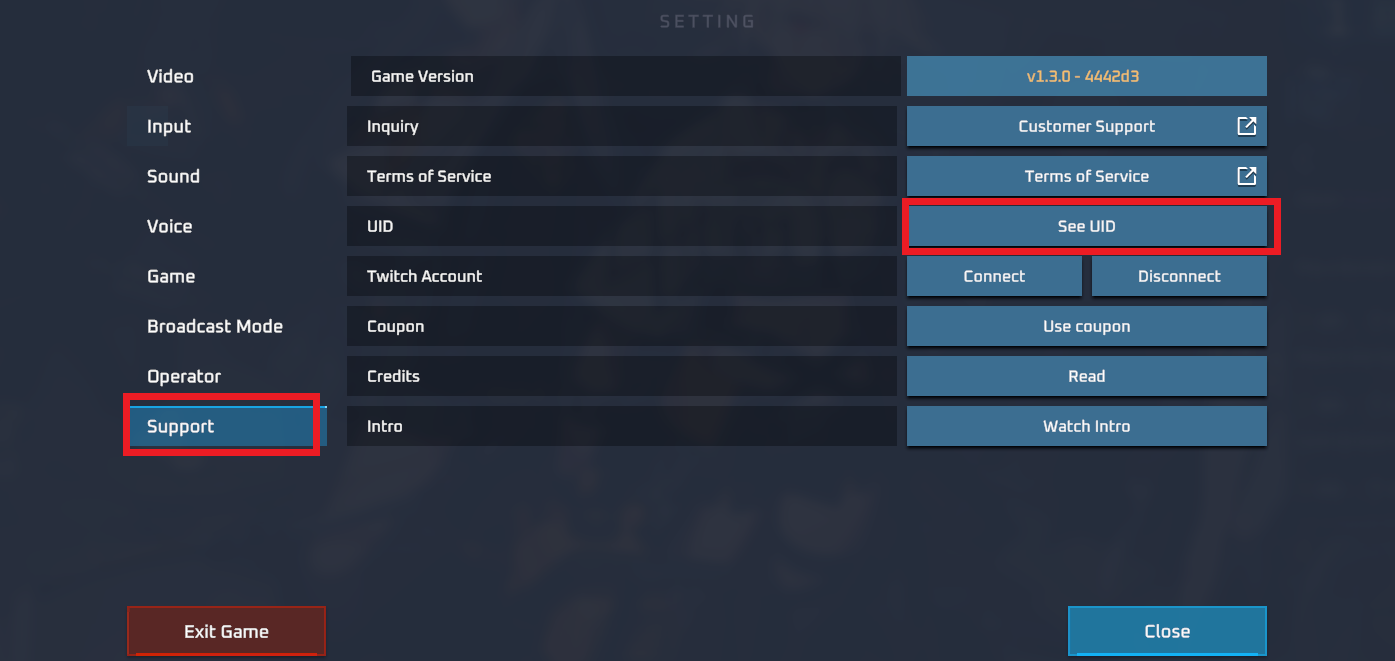
Make sure you copy the numeric UID rather than your custom display name. Display names can change or contain special characters, whereas the UID is unique and permanent to your specific account.
Safe and Secure Recharge: No Account Password Required
Account security is essential when buying in-app currency online. VGTopup operates strictly through direct server API integration using only your Gimme UID.
Key security protections include:
- Zero Password Requirements: You will never be asked for your Gimme login password, phone verification codes, linked email passwords, or third-party login tokens (such as Google or Apple credentials).
- Direct Server Crediting: The coins deposit straight into the profile linked to the provided UID on official game servers.
- Data Privacy: Your profile identifier is used exclusively to fulfill the top up order and is not stored for unauthorized access.
- Encrypted Checkout: All financial transactions process through encrypted checkout channels to keep your payment details protected.
By using UID-only fulfillment, your account remains completely in your control at all times.
Available Gimme Top Up Packages and Pricing in 2026
VGTopup offers a range of Gimme coin packs suited for casual social interactions or active live stream support. Coin pricing depends on selected pack sizes and current currency exchange rates.
| Package Option | Primary In-App Use Case | Delivery Method |
|---|---|---|
| Small Coin Packs | Quick text tips, sending low-tier interactive gifts, short audio chats | Direct UID Credit |
| Medium Coin Packs | Extended 1-on-1 video calls, multi-gift combos, joining private rooms | Direct UID Credit |
| Large Coin Packs | High-tier animated entrance gifts, room leaderboard pushes, VIP perks | Direct UID Credit |
| Custom / Bulk Packs | Heavy live stream gifting, sustained creator support, top rankings | Direct UID Credit |
Note: Exact pricing, coin amounts, and regional currency conversions are updated in real time on the checkout panel above. Check the live selector for the latest 2026 rates and payment options available for your location.
Troubleshooting Common Gimme Top Up Issues
If you experience an issue after placing a Gimme order, follow these practical troubleshooting steps:
- Refresh the Gimme Application: Sometimes the in-app coin display does not update immediately while the app remains open in the background. Close the Gimme app completely, wait 30 seconds, and relaunch it.
- Check Your In-App Transaction History: Navigate to the coin wallet or balance section in your Gimme profile settings to view recent transaction logs.
- Verify the Submitted UID: Review your VGTopup order confirmation receipt to confirm the UID submitted matches your current profile ID.
- Check Payment Completion: Ensure your chosen payment provider completed the transaction and that funds were deducted from your account.
- Contact Support with Order Details: If your balance does not update, reach out to VGTopup customer support with your Order ID, submitted UID, and proof of payment.
Frequently Asked Questions About Gimme Top Up
How do I find my Gimme UID for top up?
Open the Gimme app, go to your profile by tapping the icon in the bottom right corner, and look right below your avatar and username. You will find a string of numbers labeled UID. Copy these digits directly into the UID input field on VGTopup.
Do I need to provide my Gimme account password to recharge?
No. VGTopup requires only your Gimme UID to deliver your coin purchase. Never share your password, SMS codes, or private login credentials with anyone.
How long does it take for Gimme coins to reflect in my account?
Top-up orders are processed electronically right after your payment clears. In most instances, coins credit to your Gimme account shortly after checkout completes. Restart your app if you do not see the new balance right away.
What should I do if my Gimme top up does not arrive?
First, verify that your payment was successfully processed by your bank or payment provider. Next, fully close and restart the Gimme app to refresh your wallet. If the coins still do not show up, check your VGTopup order history to make sure the UID you entered was accurate, then contact VGTopup customer support with your order number for fast assistance.
Can I recharge a Gimme account for a friend using their UID?
Yes. Because VGTopup only requires a numeric UID, you can send coins to any friend or creator on Gimme. Ask them for their exact UID from their profile page, enter it during checkout on VGTopup, select the desired pack, and complete the order. The coins will be deposited directly to their account.
What payment methods can I use for Gimme top up?
VGTopup supports multiple local and international payment methods, including credit and debit cards, e-wallets, and regional banking solutions. Check the payment selection list on the checkout page to view all available payment options for your country.
Select Denomination
Tax, payment fees and eligible coupons are calculated at checkout.
| Package | Price |
|---|---|
| Gimme - Gimme*15000 | USD 1.70 |
| Gimme - Gimme*20000 | USD 2.26 |
| Gimme - Gimme*25000 | USD 2.83 |
| Gimme - Gimme*50000 | USD 5.66 |
| Gimme - Gimme*100000 | USD 11.32 |
| Gimme - Gimme*500000 | USD 56.60 |
| Gimme - Gimme*1000000 | USD 113.20 |
| Gimme - Gimme*10000 | USD 1.13 |

































































