



Binmo Top Up: Voice Chat Rooms and In-App Coin Recharge
Binmo is an interactive group voice chat application designed for real-time socializing, community audio rooms, and interactive entertainment. Inside the app, users join voice rooms, chat with friends, host audio events, play social mini-games, and send virtual gifts to creators and room hosts. Sending gifts, upgrading room perks, and entering special event rooms requires Binmo in-app coins.
VGTopup provides a direct recharge service for Binmo users worldwide. By submitting your user ID (UID), you can top up your coin balance directly without logging into third-party interfaces or sharing personal credentials. Live pricing, coin pack options, and available payment methods are visible on the VGTopup checkout screen, ensuring a clear and quick transaction.
What Is Binmo Voice Chat and In-App Recharge
Binmo focuses entirely on group audio communication and live room interactions. It is important to distinguish Binmo from unrelated financial trading platforms with similar-sounding names, such as Binomo. Binmo is purely a social entertainment app where users communicate through audio streams, join themed audio spaces, and exchange animated gifts.
In-app coins serve as the primary virtual currency on the Binmo platform. When you hold coins in your account, you can:- Send animated gifts to room hosts, broadcasters, and friends to show support.- Purchase room entrance effects, badges, and profile frames to customize your appearance.- Participate in room games and community challenges during live events.- Support your favorite rooms during competitive audio rankings and leaderboards.
Purchasing your coins through an external top-up platform like VGTopup lets you fund your account directly via your public UID. This keeps your Binmo account secure while giving you access to diverse payment options across different regions.
How to Find Your Binmo UID
Every registered Binmo account has a unique numeric User ID (UID). Because VGTopup only requires your UID to send coins to your balance, finding and entering the correct ID is the only step required before checkout.
Follow these steps to copy your Binmo UID directly from the app:1. Open the Binmo application on your mobile device.2. Tap the Profile or Me icon located in the bottom right corner of the main screen.3. Your profile overview page will appear, showing your avatar, nickname, and account details.4. Locate the ID line displayed directly beneath your display name.5. Tap the copy icon next to the number or write down the exact sequence of digits.
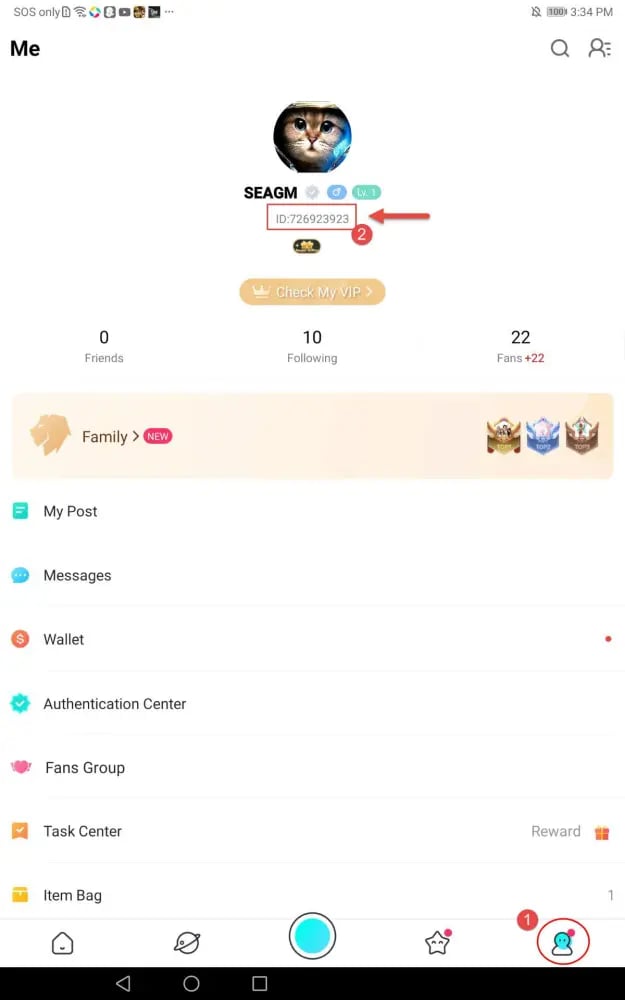
Double-check the copied digits before pasting them into VGTopup. Coins transfer instantly based on this identifier, so entering the right number ensures your balance updates without delay.
Step-by-Step Guide to Top Up Binmo on VGTopup
To complete your coin recharge on VGTopup, follow this standard checkout process:
- Select Your Package: Review the available coin denominations listed on the live VGTopup page and select the amount you want to purchase.
- Enter Your Binmo UID: Paste your numeric user ID into the UID field. Make sure there are no spaces or extra characters attached.
- Select Your Payment Method: Choose your preferred regional or international payment option from the checkout list.
- Review Order Summary: Verify the UID, coin package, and total displayed amount.
- Complete Payment: Follow the secure payment processor prompts to finalize the transaction.
- Check Your In-App Balance: Open Binmo, head to your wallet or profile screen, and confirm that your new coins have arrived.
| Step | Action Required | Verification Point |
|---|---|---|
| 1. Select Denomination | Choose coin pack on live page | Check pack size on VGTopup |
| 2. Input UID | Paste your account ID number | Compare with in-app Profile ID |
| 3. Payment Option | Select preferred payment channel | View live checkout total |
| 4. Confirm & Pay | Complete checkout on processor | Receive order confirmation |
| 5. Account Check | Re-open Binmo profile wallet | Verify updated coin balance |
Safe Checkout: Why You Never Need to Share Your Password
Account security is essential when buying digital currency. VGTopup operates strictly on a direct-to-ID delivery model. This means you will never be asked to provide your Binmo login password, verification codes (OTP), linked phone numbers, or social media login details.
Using only your public UID provides several security advantages:- Zero Risk of Account Takeover: Since no login credentials or session tokens change hands, your personal account remains completely in your control.- No Third-Party Access: No external operator logs into your profile to send coins manually. The system processes the order via the platform's direct account identifier.- Private Data Protection: Your personal chats, friend lists, and account settings remain completely confidential.- Scam Prevention: Beware of any service asking for passwords or SMS codes. Legitimate top-ups only require the public ID found on your profile screen.
Available Global and Local Payment Methods for Binmo Recharge
VGTopup supports a wide selection of payment solutions to accommodate users from various regions. Depending on your location, you can choose from global credit cards, debit cards, digital wallets, bank transfers, and regional payment gateways.
All available payment channels and current conversion rates appear directly on the live checkout interface. Select the channel most convenient for your currency and location. Every payment route is encrypted with standard security protocols to ensure that your financial details remain protected throughout the checkout process.
Frequently Encountered Binmo Top-Up Issues and Solutions
While direct top-ups process smoothly in most cases, occasional issues can occur due to user input errors or temporary network delays. Here is how to handle the most common situations:
- Coins Have Not Arrived Immediately: In high-traffic periods, minor processing delays can happen. Close the Binmo app completely, restart it, and check your profile coin balance again. If the balance has not updated after a short wait, check your VGTopup order status to ensure the payment succeeded.
- Wrong UID Entered During Order: Because coins are credited automatically based on the entered UID, transactions sent to an existing incorrect account cannot be reversed once processed. Always double-check your UID before finalizing payment. If you realize an error before the order completes processing, contact VGTopup customer support immediately with your order number.
- Payment Completed but Order Shows Pending: If your bank debited the funds but the order status is still processing, the payment gateway may be confirming the transaction. Keep your transaction receipt or reference ID handy. VGTopup support can check the status using your order reference.
- Confusion with Similar Platform Names: Ensure you are using the Binmo voice chat app ID, not an ID from unrelated apps like Binomo. The two services are completely separate companies and systems.
Frequently Asked Questions
Where can I find my Binmo UID for a top-up?
Open the Binmo app, tap the Profile (or Me) icon at the bottom right corner, and look directly under your nickname. Your numeric UID is listed there with a copy button next to it.
Do I need to share my Binmo account password to recharge?
No. VGTopup only requires your Binmo UID. You should never share your account password, email login, or SMS verification codes with anyone.
How fast will the coins appear in my Binmo account after purchase?
Once your payment is confirmed through the live checkout, coins are delivered directly to your account. You can verify the new balance by opening your Binmo profile or wallet page.
What payment options can I use to buy Binmo coins on VGTopup?
VGTopup offers a variety of payment methods including credit and debit cards, e-wallets, and regional payment solutions. Check the live checkout page to see the specific payment channels available in your country.
What should I do if I entered the wrong Binmo UID during checkout?
If you entered an incorrect UID and the order has already been delivered, the transfer cannot be recalled. If the order is still pending, contact VGTopup customer support immediately with your order ID and the correct UID to request a correction before delivery completes.
Is Binmo top-up on VGTopup safe and secure in 2026?
Yes. In 2026, VGTopup continues to use direct UID-based delivery and encrypted checkout processing. You do not need to share passwords or account credentials, keeping your Binmo account completely safe.
Select Denomination
Tax, payment fees and eligible coupons are calculated at checkout.
| Package | Price |
|---|---|
| Binmo - Binmo*10000 | USD 3.53 |
| Binmo - Binmo*15000 | USD 5.30 |
| Binmo - Binmo*20000 | USD 7.06 |
| Binmo - Binmo*25000 | USD 8.83 |
| Binmo - Binmo*50000 | USD 17.66 |
| Binmo - Binmo*100000 | USD 35.31 |
| Binmo - Binmo*500000 | USD 176.55 |
| Binmo - Binmo*1000000 | USD 353.11 |
| Binmo - Binmo*5000 | USD 1.77 |

































































