



Fast and Direct Yudo Chat Top Up via Player ID
Yudo Chat is a social voice and matching application designed to bring people together through real-time voice calls, group chat rooms, and interactive social features. To start direct 1-on-1 conversations, join premium voice rooms, send animated gifts, and highlight your profile, you need Yudo Chat coins.
VGTopup provides a direct recharge system that credits coins straight to your Yudo account using only your numeric Player ID. You never have to share passwords, verify email codes, or link social logins. Select your desired coin bundle, enter your Player ID, and complete your order through the secure checkout system.
How to Find Your Yudo Chat Player ID
Finding your Player ID inside the Yudo Chat app takes only a few seconds. Follow these steps before placing your order:
- Open the Yudo Chat app on your mobile device.
- Tap the Profile or Me icon located in the bottom navigation bar.
- Look directly beneath your profile picture and nickname at the top of the screen.
- Locate the numeric string labeled ID or UID.
- Tap the copy icon next to the number to copy your Player ID to your clipboard.
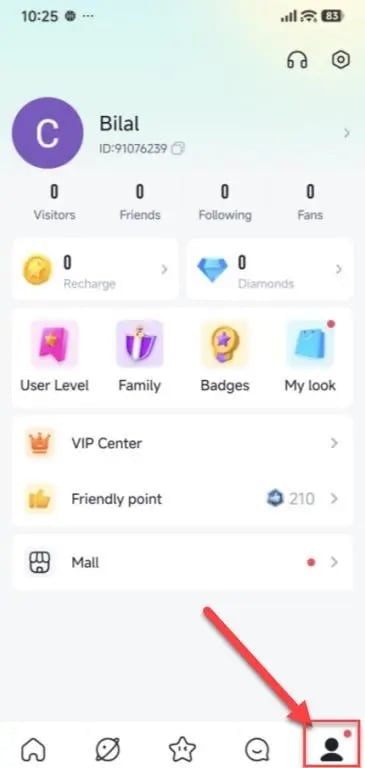
Make sure to paste your exact ID into the input field on this page so your coins route to the correct account without delay.
Step-by-Step Guide to Top Up Yudo Chat on VGTopup
Recharging your balance on VGTopup is straightforward. Follow this quick walkthrough:
- Select Your Package: Review the available Yudo Chat coin amounts displayed in the catalog above and pick the bundle that fits your needs.
- Enter Your Player ID: Type or paste your numeric Yudo Chat Player ID into the designated input box.
- Confirm Details: Double-check your entered ID to ensure every digit is correct.
- Proceed to Checkout: Click the buy button and choose your preferred payment option on the checkout page.
- Receive Your Coins: Once payment confirmation finishes, open your Yudo Chat app and check your updated coin balance in your profile wallet.
Benefits and Uses of Yudo Chat Coins
Yudo Chat coins act as the central currency for all interactive features across the platform. Having a ready supply of coins allows you to participate actively in community rooms and connect privately with creators.
| Coin Use Case | In-App Function | User Advantage |
|---|---|---|
| 1-on-1 Voice Calls | Connect directly with selected users | Private, uninterrupted voice conversations |
| Virtual Gifting | Send animated gifts in live rooms | Support room hosts and boost your intimacy level |
| Match Requests | Initiate priority matching queues | Quick connections with active chat partners |
| Profile Customization | Unlock room entry effects and avatar frames | Stand out across public voice channels |
1. Direct Voice Calls and Chat Matching
Coins allow you to place private voice calls to other users on the platform. If you want to spend time talking with specific users outside public rooms, maintaining an active coin balance keeps your calls connected without sudden interruptions.
2. Live Virtual Gifting
Sending gifts is the primary way to interact with room hosts, celebrate special moments, and climb room contributor leaderboards. Higher-tier gifts feature custom animations that show across the entire room, giving your profile immediate recognition.
3. Profile Enhancements
Active users can use coins to access decorative frames, custom chat bubbles, and premium entry banners. When you enter a popular voice channel, special effects notify the room host and audience of your arrival.
Why Buy Yudo Chat Coins on VGTopup
VGTopup focuses on direct, secure digital game and app recharges. Here is why users choose VGTopup for their Yudo Chat recharges:
- Strictly Password-Free: We only require your public Player ID. We will never ask for your account password, email access, or verification codes.
- All Packages on One Screen: Browse all available coin denominations in a single consolidated interface without switching between disconnected item pages.
- Transparent Live Pricing: Current rates and available payment options display directly on the live checkout screen before you pay.
- Reliable Order Processing: Direct integration ensures your coins transfer directly to your Yudo account as soon as payment is confirmed.
Troubleshooting Yudo Chat Top Up Delivery and ID Errors
If you experience any delay or have questions about your order, use these practical troubleshooting tips:
- Check App Wallet Balance: After completing payment, return to the Yudo Chat app, navigate to your profile, and pull down to refresh the screen. Sometimes the wallet balance updates only after a fresh server sync.
- Restart the App: If your coins do not appear immediately, completely close the Yudo Chat app from your phone's app switcher and reopen it.
- Verify Player ID Accuracy: Always check that the ID pasted into the order form matches the ID shown in your Yudo profile. Mistyped IDs can result in coins being credited to another user.
- Contact Customer Support: If your order shows complete on VGTopup but your balance remains unchanged after restarting, contact VGTopup customer support with your order number and Player ID for assistance.
Frequently Asked Questions
How do I top up coins for Yudo Chat?
Select your preferred coin bundle from the catalog on VGTopup, enter your Yudo Chat Player ID in the required field, and proceed to checkout to complete your payment.
Where can I locate my Yudo Chat Player ID?
Open Yudo Chat, go to the profile tab (labeled Me or Profile), and look directly beneath your avatar. Your numeric ID is displayed there alongside a quick copy button.
Do I need to provide my Yudo Chat password for recharging?
No. VGTopup uses direct ID recharge. You only need to provide your numeric Player ID. Never share your password or login credentials with anyone.
What can I use Yudo Chat coins for?
You can use coins to initiate 1-on-1 voice calls, send animated virtual gifts to room hosts, unlock custom avatar frames, and access interactive features inside chat rooms.
What should I do if I submit an incorrect Player ID?
Double-check your Player ID carefully before completing checkout. Because digital recharges process automatically to the ID submitted, orders sent to an existing incorrect account cannot be reversed. If you notice a typo immediately before payment completes, contact VGTopup support right away.
How are Yudo Chat coins delivered to my account?
Coins are delivered directly to your Yudo Chat account balance over the network. Once your payment succeeds, the coins appear in your in-app wallet automatically.
Select Denomination
Tax, payment fees and eligible coupons are calculated at checkout.
| Package | Price |
|---|---|
| Yudo Chat - Yudo Chat*30000 | USD 1.07 |
| Yudo Chat - Yudo Chat*50000 | USD 1.78 |
| Yudo Chat - Yudo Chat*70000 | USD 2.49 |
| Yudo Chat - Yudo Chat*100000 | USD 3.55 |
| Yudo Chat - Yudo Chat*200000 | USD 7.11 |
| Yudo Chat - Yudo Chat*500000 | USD 17.77 |
| Yudo Chat - Yudo Chat*700000 | USD 24.87 |
| Yudo Chat - Yudo Chat*1000000 | USD 35.53 |
| Yudo Chat - Yudo Chat*2000000 | USD 71.06 |
| Yudo Chat - Yudo Chat*5000000 | USD 177.66 |
| Yudo Chat - Yudo Chat*10000000 | USD 355.32 |






























































