



Yohoo Star Top Up Guide: Instant Coin Delivery via UID
Yohoo star is an interactive voice chat and social audio party platform where users connect across live audio rooms, host community events, sing karaoke, and play interactive games. Coins serve as the primary currency within the Yohoo star ecosystem, allowing you to send animated virtual gifts, activate VIP privileges, customize chat rooms, and support your favorite room creators.
VGTopup provides a direct, UID-based Yohoo star top up service. By entering your numerical User ID, coins are sent straight to your in-app wallet without requiring passwords or third-party account logins. Whether you are hosting a lively voice party or cheering on friends on stage, topping up through VGTopup keeps your account loaded and ready.
Where to Find Your Yohoo Star UID in the App
Your Yohoo star User ID (UID) is a unique numeric identifier linked to your profile. You only need this number to complete a top-up on VGTopup.
Follow these steps to locate and copy your UID:
- Open the Yohoo star application on your mobile device.
- Tap the Profile or Me icon located in the bottom-right corner of the main screen.
- Look beneath your avatar image and display name on the profile page.
- Find the label marked ID: followed by your unique number.
- Tap the Copy icon next to your ID number to copy it to your clipboard.
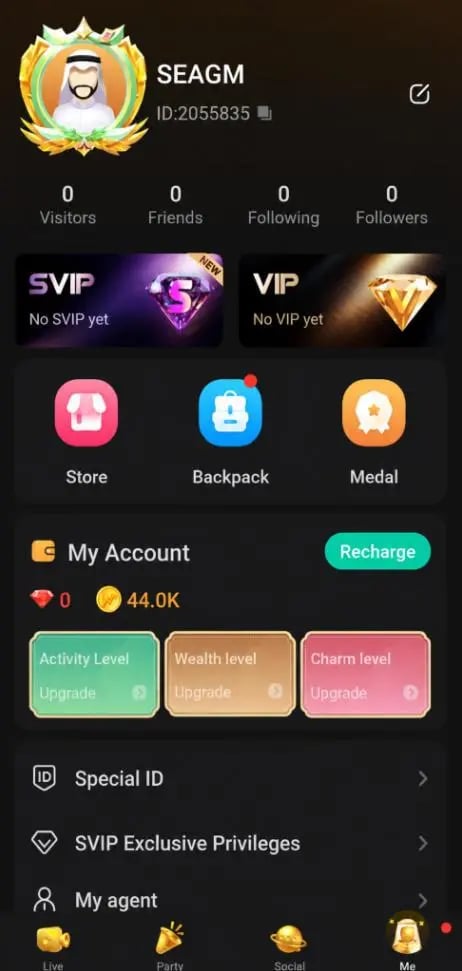
Using the copy feature ensures that you do not mistype any digits when placing your order.
How to Top Up Yohoo Star Coins Using UID
Recharging your Yohoo star balance on VGTopup is straightforward and requires only a few moments:
- Select Your Coin Package: Choose the number of Yohoo star coins you wish to purchase from the product catalog. The live checkout interface shows current package tiers and pricing.
- Input Your User ID: Paste your numeric Yohoo star UID into the required player ID field on the page.
- Select a Payment Channel: Pick your preferred payment method from the available local and global options provided at checkout.
- Complete Checkout: Review your UID and order details, then proceed to finalize the payment.
- Check Your In-App Balance: Open Yohoo star and check your profile wallet. Your new coin balance will be ready for immediate use in any chat room.
| Coin Utility | In-App Benefit | Delivery Method |
|---|---|---|
| Virtual Gifts | Send animated roses, sports cars, and luxury gifts to mic hosts | Direct UID Crediting |
| VIP Memberships | Display VIP badges, unique profile frames, and special chat bubbles | Direct UID Crediting |
| Room Customization | Unlock custom room themes, sound effects, and pinned listings | Direct UID Crediting |
| Interactive Games | Join room minigames, lucky draws, and community challenges | Direct UID Crediting |
What You Can Unlock with Yohoo Star Coins: VIP Perks & Virtual Gifts
Coins give you full access to social and audio features across the Yohoo star app. Here is a breakdown of how you can use your balance:
1. Animated Virtual Gifts and Host Support
Voice rooms thrive on interaction. Coins allow you to send small tokens of appreciation like flowers and hearts, or extravagant full-screen animated gifts like luxury yachts, sports cars, and fireworks. Gifting boosts the host's room ranking on the discovery page and raises your own contributor rank on the daily and weekly leaderboards.
2. VIP Nobility and Status Badges
Activating VIP tiers with coins awards unique cosmetic enhancements that make you stand out whenever you enter a room:* Exclusive Entry Animations: Announce your arrival with custom entrance banners and sound alerts.* Profile and Avatar Frames: Display glowing decorative borders around your avatar.* Distinct Chat Bubbles: Highlight your text messages inside active voice rooms with unique fonts and backgrounds.* Anti-Kick Privileges: Maintain your seat in popular public party rooms.
3. Voice Party Room Upgrades
If you host your own audio party rooms, coins allow you to unlock premium room wallpapers, expand the number of open microphone slots, and feature your room higher on the regional explore feed to attract new listeners.
Safe Checkout: Why Password-Free Top-Up Protects Your Account
Account safety is essential when purchasing digital currency. VGTopup uses an UID-only recharge method for Yohoo star, ensuring your personal data and login credentials remain completely private.
- No Password Sharing: You will never be asked to share your account password, email login, or phone number verification codes (OTP).
- No Account Linking Required: You do not need to link your Google, Apple, or social media accounts to third-party tools.
- Protection Against Phishing: Because transactions process directly via public player IDs, your account remains secure from unauthorized access.
- Gift Friends Easily: Since only a UID is required, you can recharge coins for friends, family members, or room hosts as a surprise without ever accessing their personal devices.
Supported Payment Options and Live Checkout on VGTopup
VGTopup provides access to secure payment methods tailored to international and regional buyers. The live checkout screen dynamically updates to show supported payment channels, local currency conversions, and final totals before you pay.
All transactions are processed through encrypted payment gateways to ensure fast, reliable order handling. Simply choose your package, verify your UID, select your preferred payment route on the live checkout interface, and complete your order.
Troubleshooting Common Yohoo Star Recharge and Delivery Questions
If you experience any delay or question regarding your top-up, use the following tips to verify your order status:
- Balance Sync Delay: Under normal network conditions, coins credit directly to your account. If your balance does not update right away, force-close the Yohoo star app, reopen it, and check your wallet under the Me tab.
- Double-Check Your UID: Orders process automatically to the exact UID submitted during checkout. If you entered the wrong UID, the order will credit that specific account. Always verify that your copied ID matches the profile ID in your app before submitting payment.
- Order Support: If your payment is completed but your coins have not appeared after restarting the app, locate your VGTopup Order ID in your order history and reach out to customer support along with your Yohoo star UID for swift assistance.
Frequently Asked Questions
How do I find my Yohoo star UID for top up?
Open the Yohoo star app, go to the Me or Profile tab in the bottom right corner, and find the number displayed next to ID: below your avatar. Tap the copy icon to copy your UID accurately.
Do I need to share my Yohoo star account password to recharge?
No. VGTopup only requires your numeric Yohoo star UID to deliver coins. You should never share your account password or SMS verification codes with anyone.
What are Yohoo star coins used for in the voice chat party app?
Coins are used to send animated virtual gifts to room hosts, unlock VIP aristocracy perks, purchase avatar frames, upgrade chat room features, and participate in community audio events.
How long does it take for Yohoo star coins to appear in my account?
Coins are credited directly to your Yohoo star account once your payment is confirmed at checkout. Restarting the Yohoo star app will refresh your wallet balance immediately.
Can I top up Yohoo star coins for a friend using their UID?
Yes. You only need your friend's numeric Yohoo star UID. Enter their ID into the player ID field on VGTopup, select the desired coin package, and complete payment. The coins will credit directly to their profile.
What should I do if my Yohoo star coins have not arrived after payment?
First, close and restart your Yohoo star app to refresh your profile data. If the balance still does not reflect your purchase, check your VGTopup order status, keep your Order ID ready, and contact customer support with your UID for verification.
Select Denomination
Tax, payment fees and eligible coupons are calculated at checkout.
| Package | Price |
|---|---|
| Yohoo star - Yohoo star*50000 | USD 1.92 |
| Yohoo star - Yohoo star*100000 | USD 3.84 |
| Yohoo star - Yohoo star*500000 | USD 19.20 |
| Yohoo star - Yohoo star*1000000 | USD 38.40 |
| Yohoo star - Yohoo star*5000000 | USD 192.02 |
| Yohoo star - Yohoo star*10000000 | USD 384.03 |
| Yohoo star - Yohoo star*25000 | USD 0.96 |

































































