



Tumile Top Up: Get Coins for Live Video Chat
Tumile connects people across the globe through real-time 1v1 live video chat, instant messaging, and interactive video matching. To start direct video calls, apply custom search preferences, and send virtual gifts to your favorite creators, you need Tumile coins.
A Tumile top up on VGTopup allows you to reload your account balance quickly and securely. By providing only your Tumile Player ID, you can top up coins directly without ever exposing your account login credentials or personal passwords. Browse available coin packages, check live rates on our checkout page, and enjoy uninterrupted connections worldwide.
What Are Tumile Coins and How to Use Them
Coins serve as the primary premium in-app currency within Tumile. Having an active coin balance unlocks the full interactive feature set of the platform:
- Direct Video Calling: Initiate private 1v1 video chats with specific users without waiting for random match queues.
- Extended Conversations: Keep high-energy conversations going when free matching time runs out.
- Custom Match Preferences: Select specific gender and region filters to connect with people from countries or communities that interest you.
- Interactive Virtual Gifts: Send animated gifts, stickers, and celebratory tokens during calls to support hosts and break the ice.
- Profile Customization: Unlock special entrance animations, high-visibility frames, and custom badges that make your profile stand out.
Tumile VIP Perks, Match Filters, and Virtual Gifting Explained
Using Tumile coins gives you access to specialized features that enhance your overall social experience on the platform.
Region and Gender Matching Filters
Standard matching pairs you randomly across global servers. By spending coins on filter preferences, you can narrow down matches by country, language, or gender. This ensures your matches fit your communication preferences and timezone availability.
VIP Status and Profile Flair
Frequent users can activate VIP privileges using coins. VIP status grants unique profile borders, distinct entrance banner effects when entering chat rooms, and priority placement in active discovery lists. Other users instantly recognize your VIP standing.
Sending Virtual Gifts
Virtual gifts range from friendly introductory emojis to elaborate 3D animated displays. Sending gifts during a live call increases your intimacy score with conversation partners and shows genuine appreciation to talented broadcasters.
Tumile Coin Packages and Feature Usage (2026)
| Coin Package Tier | Primary In-App Purpose | Best Suited For |
|---|---|---|
| Starter Pack | Quick greetings, profile stickers, short calls | Casual users trying direct calls |
| Popular Pack | Filtered matching by region and gender | Regular chat users wanting specific matches |
| Advanced Pack | Sending animated gifts and extended video chats | Active socializers and content supporters |
| VIP Tier Pack | Long-duration calls, VIP badges, premium gifts | Power users and daily community regulars |
Note: Exact coin quantities and real-time prices are displayed directly on the live checkout screen at VGTopup.
How to Find Your Tumile Player ID in the App
To ensure your coins arrive directly to your account, you must enter your exact Player ID (UID). Finding your ID takes only a few seconds:
- Open the Tumile app on your iOS or Android device.
- Tap the Profile / Me icon located in the bottom-right corner of the main screen.
- Your Player ID is displayed right under your profile photo and display name.
- Tap the copy icon next to your Player ID or note down the numeric string accurately.
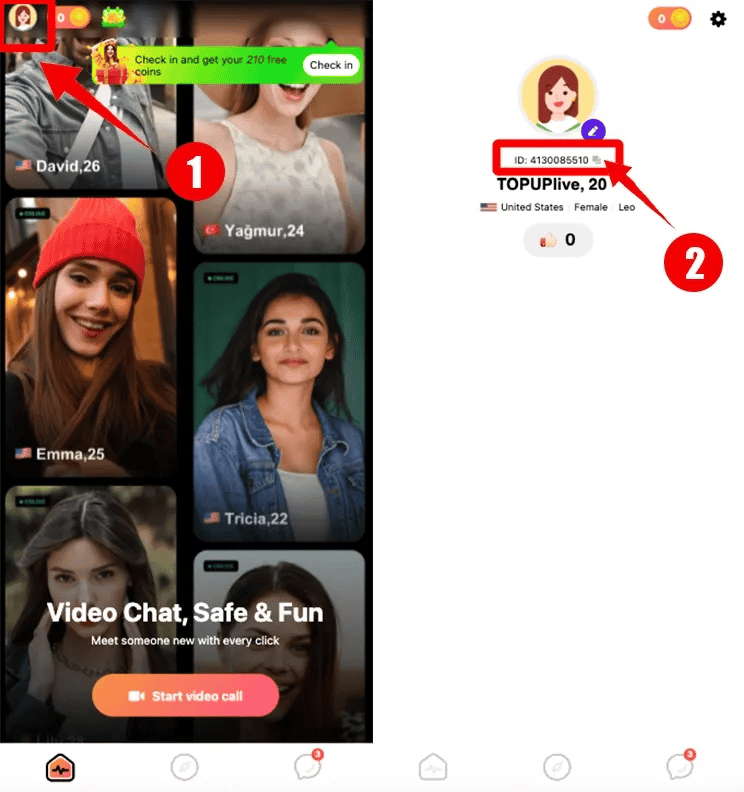
Make sure to double-check the digits before placing an order to avoid delivery delays.
How to Top Up Tumile Coins Using Player ID on VGTopup
Recharging your Tumile coin balance on VGTopup is simple and straightforward:
- Select Your Coin Amount: Choose the coin denomination that matches your chat and gifting needs from the catalog above.
- Enter Your Player ID: Input your numeric Tumile Player ID into the designated input field.
- Review Order Details: Verify that the entered Player ID is correct.
- Select Payment Option: Choose your preferred payment method on the secure checkout screen.
- Complete Checkout: Finalize the payment. Once verified, the coins are processed and credited directly to your Tumile balance.
- Check Your App Balance: Open Tumile and verify your updated coin count in your user profile.
Safe and Secure Tumile Recharge: No Account Password Needed
Account safety is essential when purchasing digital goods online. VGTopup relies strictly on Player ID-based crediting, which offers major security advantages:
- Zero Password Requirements: You will never be asked for your Tumile password, linked social media credentials, or verification codes.
- No Account Sharing: Your account remains entirely in your hands. You never need to hand over temporary access to third parties.
- Server-Direct Delivery: Transactions are credited through standard account identification, keeping your account compliant and safe from security flags.
- Encrypted Checkout: All payment transactions on VGTopup are protected with industry-standard encryption protocols.
Troubleshooting Delivery and Payment Issues for Tumile Top-Ups
While most coin recharges are completed rapidly, here are steps to take if you experience an unexpected delay:
1. Coins Not Appearing Immediately
- Close the Tumile app completely and restart it from your app drawer.
- Check your profile screen to see if the balance has refreshed.
- Ensure your mobile device has an active internet connection.
2. Incorrect Player ID Entered
- If you accidentally submitted the wrong Player ID, contact VGTopup customer support immediately with your order number.
- If the order has not yet been processed by the system, our support team can help correct the account ID.
3. Payment Processing Checks
- Check your email for an order confirmation receipt from VGTopup.
- If your payment method shows a pending charge but no order confirmation arrived, verify your payment provider status before re-ordering.
Frequently Asked Questions
What can you buy with Tumile coins?
Tumile coins are used to start direct 1v1 video chats, extend conversation times, apply regional and gender matchmaking filters, send animated gifts to broadcasters, and unlock special VIP profile badges.
How do I find my Tumile Player ID?
Open the Tumile app, go to the profile section ("Me") in the bottom right corner, and locate the numeric ID shown directly beneath your avatar and nickname. You can copy it with one tap.
Do I need to share my Tumile password to top up coins?
No. VGTopup only requires your numeric Player ID to credit your account. You should never share your account password or login credentials with anyone.
How long does it take for Tumile coins to be credited to my account?
Orders placed on VGTopup are processed promptly once payment verification is complete. In most cases, your coins will reflect on your profile balance shortly after purchase.
Can I top up Tumile coins for a friend using their Player ID?
Yes. As long as you have your friend's correct numeric Tumile Player ID, you can enter it at checkout on VGTopup to send coin packages directly to their account as a gift.
What should I do if my Tumile coins do not appear after purchase?
First, restart your Tumile app to refresh the server connection. If your balance still does not update, reach out to the VGTopup support team with your order confirmation number for prompt assistance.
Select Denomination
Tax, payment fees and eligible coupons are calculated at checkout.
| Package | Price |
|---|---|
| tumile 650 coins | USD 3.26 |
| tumile 1250 coins | USD 6.26 |
| tumile 1800 coins | USD 8.59 |
| tumile 3500 coins | USD 15.55 |
| tumile 7000 coins | USD 30.63 |
| tumile 15000 coins | USD 66.36 |
| tumile 300 coins | USD 67.62 |
| tumile 35000 coins | USD 155.93 |






























































