

What is Nivi Top Up and How It Works
A Nivi top up is a direct digital service that adds credits, tokens, or balance directly to your Nivi account. Instead of linking credit cards directly inside the mobile application or dealing with complicated gift card redemptions, a balance reload allows you to credit your account using only your unique user identifier (UID).
When purchasing credits through VGTopup, the process sends digital funds directly to your user profile via server-side crediting. You do not need to share passwords or link third-party social logins. This method offers an efficient, direct way to replenish your in-app currency for premium features, virtual gifts, or special profile perks.
It is also helpful to distinguish this service from unrelated entities. Search results occasionally display references to foreign toll management firms (such as Nivi SpA) or regional apparel brands (such as NiVi clothing). This page provides dedicated digital balance top-ups exclusively for users of the Nivi mobile entertainment and social platform.
How to Find Your Nivi UID
To ensure your purchase credits properly to your profile, you must provide your exact Nivi UID during checkout. Finding your UID inside the app takes only a few seconds.
- Open the Nivi application on your mobile device.
- Log in to your personal account.
- Tap your Profile or My Account icon located in the navigation bar.
- Look directly below your display name or avatar, where your numeric UID is listed.
- Tap the copy icon beside your UID or write the numbers down accurately.
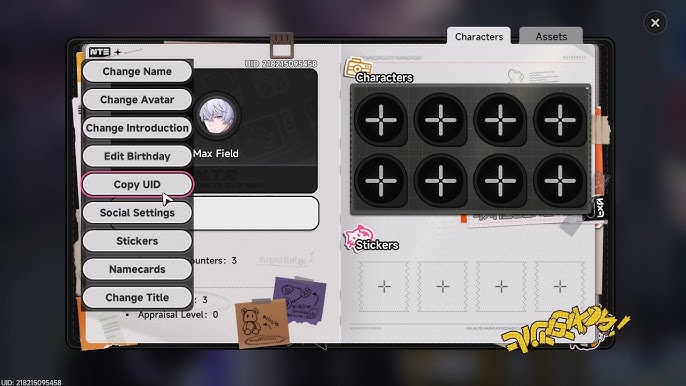
Double-check the digits before submitting your order on VGTopup to prevent delivery delays or misdirected balances.
Step-by-Step Guide to Recharge Nivi on VGTopup
To buy Nivi balance quickly and securely, follow these straightforward steps:
- Select Your Desired Product Value: Browse the Nivi product catalog on VGTopup and pick the balance denomination you want to add to your account.
- Enter Your Account UID: Paste your numeric user ID into the UID input field on the order page.
- Select Your Payment Method: Choose from available global and local payment channels displayed on the checkout screen.
- Confirm Order Details: Check that your UID and selected denomination match your requirements.
- Complete the Transaction: Follow the on-screen prompts through the secure checkout flow.
- Receive Your Balance: Once your payment is verified, the balance credits directly to your in-app wallet. You can verify the updated funds inside the Nivi app immediately.
Nivi Recharge Overview and Specifications
| Specification | Details |
|---|---|
| Service Type | Direct Account Top Up / In-App Balance Recharge |
| Account Identifier Required | Nivi User ID (UID) only |
| Password Requirement | Never required |
| Platform Delivery | Direct server-to-account crediting |
| Pricing and Denominations | Live catalog rates displayed on VGTopup checkout |
| Support Availability | 24/7 customer service assistance |
Is Nivi Top Up Safe and Secure?
Security is a core priority when topping up digital credits. Ordering your Nivi recharge through VGTopup is fully safe for several specific reasons:
- Zero Password Requirement: You only need to provide your public UID. VGTopup never requests your password, verification codes, or private login credentials, completely eliminating the risk of account compromise.
- Encrypted Payment Gateways: All checkout transactions are processed through encrypted financial gateways, keeping your payment data shielded from unauthorized access.
- Official Server Crediting: Funds are processed straight to your player profile, ensuring that credited balances remain fully compliant with app terms of service.
Accepted Payment Methods for Nivi Balance Recharge
VGTopup provides access to multiple payment solutions so you can complete your order smoothly, regardless of where you are located. Available options include:
- Major credit cards and debit cards
- Regional electronic wallets and digital payment services
- Direct online banking and local transfer options
All real-time exchange rates, processing fees, and package totals are clearly displayed directly on the live checkout screen before you pay, ensuring full pricing transparency with zero unexpected deductions.
Common Mistakes When Topping Up Nivi and How to Avoid Them
To ensure your balance reaches your account without delay, avoid these frequent errors:
- Submitting a Nickname Instead of a Numeric UID: In-app display names can change and are not unique. Always submit the official numeric UID copied directly from your profile settings.
- Manually Retyping Long ID Strings: Manual typing often introduces typos or transposed numbers. Use the built-in copy function inside the Nivi app to capture the exact string.
- Closing the Payment Window Prematurely: Wait for the payment gateway to finalize and redirect back to VGTopup to ensure instant payment confirmation.
- Checking the Wrong Account: If you run multiple accounts, make sure the UID you provide belongs to the active account you currently want to credit.
Frequently Asked Questions
Is Nivi top up on VGTopup safe and legitimate?
Yes. VGTopup uses standard server-direct crediting methods and secure, encrypted payment processing. Because the process only requires your public UID, your account credentials remain completely private.
What information do I need to provide for a Nivi recharge?
You only need to provide your Nivi numeric User ID (UID) and select your desired balance package. No personal passwords or sensitive login credentials are ever requested.
Do I need to share my Nivi account password to top up?
No. You should never share your account password. VGTopup processes your Nivi recharge using your public UID alone, keeping your private login data safe.
Where can I find my Nivi UID in the app?
Open the Nivi app, navigate to your personal profile tab, and locate the numeric sequence displayed beneath your display name or profile image. Tap the copy icon to copy it to your clipboard.
How long does it take for Nivi balance to reflect after payment?
Under normal operating conditions, your balance is credited immediately once your payment is confirmed by the processing gateway. You can open the Nivi app to verify your updated balance.
What should I do if I entered the wrong Nivi UID?
If you realize you entered an incorrect UID, contact VGTopup customer support right away with your order number. Please note that if an order has already been processed and credited to the submitted UID, completed digital deliveries cannot be reversed or transferred.
Select Denomination
Tax, payment fees and eligible coupons are calculated at checkout.
| Package | Price |
|---|---|
| Nivi - Nivi*10000 | USD 2.06 |
| Nivi - Nivi*15000 | USD 3.08 |
| Nivi - Nivi*20000 | USD 4.11 |
| Nivi - Nivi*25000 | USD 5.14 |
| Nivi - Nivi*50000 | USD 10.28 |
| Nivi - Nivi*100000 | USD 20.56 |
| Nivi - Nivi*500000 | USD 102.82 |
| Nivi - Nivi*1000000 | USD 205.64 |
| Nivi - Nivi*5000 | USD 1.03 |