



CHATI Top Up: Recharge In-App Voice Chat Balance
CHATI is an interactive audio entertainment platform where users join live voice chat rooms, meet new people, play casual mini-games, and share social moments. Active participation in group voice rooms often involves sending dynamic animated gifts, customizing user profiles, and accessing exclusive chat room features. To enjoy these social privileges, users need in-app balance.
A CHATI top up on VGTopup provides a quick, safe, and direct way to add credits to your account. You do not need to share sensitive account details or link your social profiles. By supplying your numeric CHATI User ID (UID), you can select your chosen denomination and complete your order smoothly.
Overview of CHATI Voice Chat App and In-App Perks
CHATI is built specifically for group voice socializing, live room hosting, and real-time social networking. It is distinct from enterprise communication tools or business software. In CHATI, community engagement revolves around lively voice rooms where creators, hosts, and members interact in real time.
Recharging your CHATI account balance allows you to:
- Send Animated Gifts: Show appreciation to room hosts, broadcasters, and friends by sending virtual gifts such as sparkling effects, luxury cars, yachts, and celebratory animations.
- Equip VIP Badges & Entrance Effects: Stand out in crowded voice rooms with custom entrance banners, glowing microphone frames, and profile nameplates.
- Join Premium Chat Activities: Participate in community room events, interactive games, and seasonal ranking competitions.
- Support Favorite Content Creators: Help room broadcasters climb regional leaderboards and achieve community milestones.
Where to Locate Your CHATI UID in the Profile
To ensure your balance is credited to the correct account, you must enter your exact CHATI UID during checkout. Finding your UID inside the app takes only a few seconds.
- Open the CHATI application on your mobile device.
- Tap the Profile (or Me) icon located at the bottom-right corner of the screen.
- Your numeric UID is displayed directly beneath your profile avatar and display name.
- Tap the copy icon next to your UID to copy it directly to your clipboard.
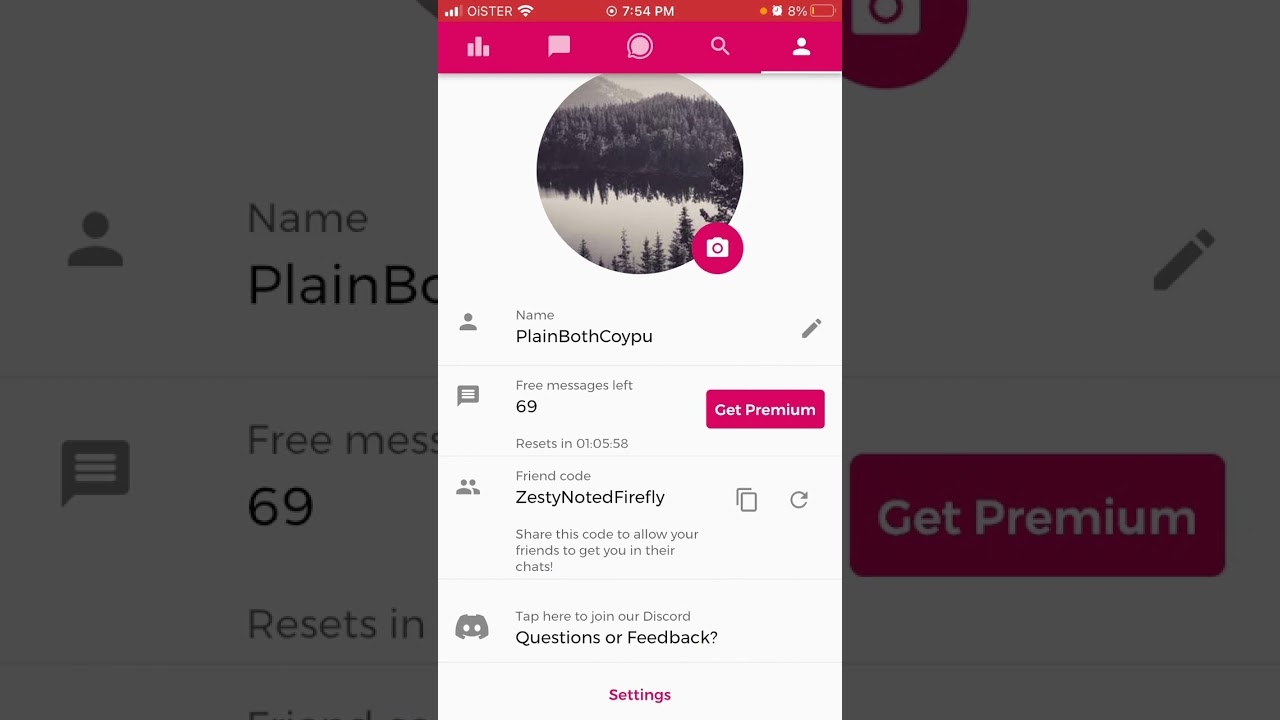
Double-check the copied number before entering it on VGTopup. Always avoid typing the ID manually if possible to eliminate the chance of typos.
Step-by-Step Guide to CHATI Top Up on VGTopup
Recharging your CHATI balance on VGTopup is straightforward and requires only a few steps:
- Select Your Item: Choose the amount or package you want to purchase from the product catalog.
- Enter Your UID: Paste your numeric CHATI UID into the designated player ID field.
- Review Order Information: Ensure the entered ID accurately matches your CHATI profile.
- Proceed to Checkout: Choose your preferred payment option from the available regional methods.
- Complete Payment: Once your transaction is confirmed, the credits will be delivered directly to your CHATI account.
CHATI Top Up Quick Reference
| Specification | Details |
|---|---|
| Application | CHATI (Social Voice Chat & Entertainment) |
| Identifier Required | CHATI User ID (Numeric UID) |
| Account Password | Not Required |
| Delivery Method | Direct Account Crediting |
| Order Processing | Instant automated delivery upon payment confirmation |
| Customer Support | 24/7 assistance on VGTopup |
Safe Checkout: Zero Account Password Required
Account safety is a core priority when topping up online. VGTopup uses direct ID crediting for all CHATI transactions. This means you will never be asked for your account password, SMS verification codes, or third-party login credentials (such as Google, Facebook, or Apple ID).
Because recharge orders require only your public numeric UID, your personal account information remains completely confidential. You never need to hand over account access or risk your personal profile data to add balance.
Supported Payment Methods and Live Order Summary
VGTopup provides multiple secure payment channels designed to support buyers across different regions. Supported options include major debit and credit cards, local digital wallets, instant bank transfers, and convenient regional payment processors.
All exchange rates, localized pricing, and available payment methods are calculated live on the checkout panel. Check the live order summary on this page to view real-time totals in your local currency before completing your purchase.
Troubleshooting and Delivery Support for CHATI Recharge
Orders placed on VGTopup are processed automatically once your payment clears. If your in-app balance does not update immediately, use the following checklist:
- Refresh the Application: Close the CHATI app completely and reopen it to force a server sync of your wallet balance.
- Verify Order Status: Check your VGTopup order history to confirm that payment processing is complete.
- Confirm Your UID: Make sure the UID entered during checkout matches the UID on your current CHATI profile.
If you entered an incorrect UID or encounter any delay with your order, contact the VGTopup customer support team immediately. Provide your Order ID and transaction receipt so the support team can assist you without delay.
Frequently Asked Questions
What is the CHATI app?
CHATI is a mobile voice entertainment and social networking application. It allows users to join group audio rooms, chat with friends, play casual games, and exchange virtual gifts in real time.
How do I find my CHATI UID for top up?
Open the CHATI app, navigate to your Profile (Me) tab at the bottom-right corner, and locate the numeric UID shown directly below your profile picture. Tap the copy icon to copy it.
Do I need to provide my CHATI account password to top up?
No. Top-ups on VGTopup require only your CHATI numeric UID. You should never share your account password or verification codes with anyone.
Which payment methods are accepted for CHATI recharge?
VGTopup supports various payment methods, including credit and debit cards, digital e-wallets, and regional online banking channels. Available options for your country are displayed in the live checkout section.
How fast will the CHATI balance arrive after payment?
Delivery is automated. Once your payment is successfully verified, the balance is credited directly to your CHATI account within moments.
What should I do if I entered the wrong UID during recharge?
If you realize you entered an incorrect UID, contact VGTopup customer support immediately with your Order ID. If the order has not yet been processed by the system, our team will assist you in correcting the account details.
Select Denomination
Tax, payment fees and eligible coupons are calculated at checkout.
| Package | Price |
|---|---|
| CHATI - CHATI*10000 | USD 1.12 |
| IMU CHAT - IMU CHAT*15000 | USD 1.51 |
| CHATI - CHATI*15000 | USD 1.67 |
| IMU CHAT - IMU CHAT*20000 | USD 2.02 |
| CHATI - CHATI*20000 | USD 2.23 |
| IMU CHAT - IMU CHAT*25000 | USD 2.52 |
| CHATI - CHATI*25000 | USD 2.79 |
| IMU CHAT - IMU CHAT*50000 | USD 5.04 |
| CHATI - CHATI*50000 | USD 5.57 |
| IMU CHAT - IMU CHAT*100000 | USD 10.08 |
| CHATI - CHATI*100000 | USD 11.15 |
| IMU CHAT - IMU CHAT*500000 | USD 50.42 |
| CHATI - CHATI*500000 | USD 55.75 |
| IMU CHAT - IMU CHAT*1000000 | USD 100.85 |
| CHATI - CHATI*1000000 | USD 111.49 |
| IMU CHAT - IMU CHAT*10000 | USD 1.01 |

































































