



Wasla Chat Top Up: Direct UID Balance for Live Voice Rooms
Wasla Chat is a popular social audio platform and voice chat community built for interactive group conversations, live audio rooms, casual gaming, and virtual gifting. Users connect in themed voice rooms to chat, sing, play interactive mini-games, and build online social circles across regions.
Wasla coins are the core digital currency within the application. Using Wasla coins, you can support your favorite room creators, send animated gifts during live voice sessions, customize your chat presence with special bubble effects, and increase your profile wealth level. To maintain your voice room activity and participate in special in-app events, keeping a steady balance of coins is essential.
Why Get a Wasla Chat Recharge on VGTopup
Buying Wasla coins through VGTopup provides a straightforward, secure order process without unnecessary steps:
- Direct Account Credit: Coins are added straight to your account balance using your unique Wasla Chat User ID (UID), with no manual voucher redemption required.
- Password-Free Account Safety: Top-ups only require your numeric UID. You never have to share your account password, SMS codes, or third-party login credentials.
- Real-Time Checkout: Current pricing and available payment methods for your region display live during checkout.
- Dedicated Customer Support: Our help desk is available to assist with order inquiries, delivery verification, and checkout questions.
How to Top Up Wasla Chat Coins Online
Adding coins to your Wasla Chat balance takes only a few quick steps:
- Select the Wasla coin package you want to purchase from the product options above.
- Enter your Wasla Chat User ID (UID) accurately in the required player field.
- Verify your UID details and proceed to the checkout screen.
- Choose your preferred payment method from the available regional options.
- Complete the payment. Your coins will be credited directly to your Wasla Chat account balance.
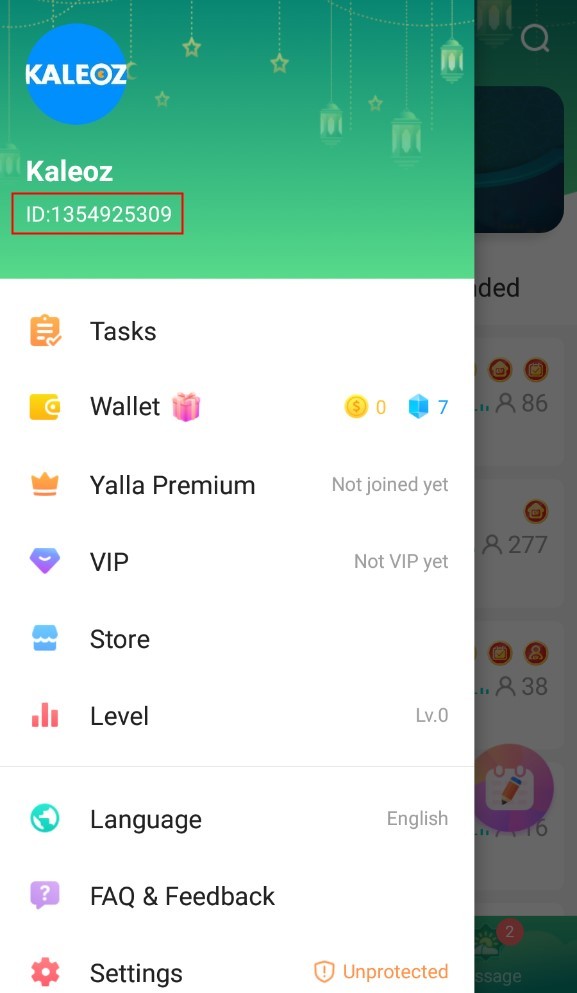
How to Find Your Wasla Chat User ID (UID)
To ensure your coin order reaches the correct profile, make sure to enter your exact Wasla Chat UID during checkout. Follow these steps to locate your ID:
- Open the Wasla Chat application on your mobile device.
- Log into your account and tap the profile tab ("Me" / Avatar icon) in the bottom-right corner of the home screen.
- On your profile page, look directly below your avatar and nickname.
- Locate your numeric ID / UID.
- Tap the copy icon next to the number or write it down carefully to paste into the VGTopup order field.
What Can You Do with Wasla Chat Coins?
Wasla coins unlock a wide range of social features, room interactions, and profile enhancements across the platform:
- Voice Room Gifting: Send animated virtual gifts to room hosts, friends, and guest speakers during live audio broadcasts to show appreciation and boost room rankings.
- Wealth and Level Upgrades: Accumulate wealth experience points by spending coins, unlocking higher account levels and exclusive visual profile ranks.
- Room Entrance Effects: Announce your arrival in voice rooms with custom vehicle animations, spotlight effects, and banners.
- Avatar Frames and Chat Bubbles: Personalize your public identity with distinct profile borders and custom chat bubbles that highlight your messages in group conversations.
- Interactive Room Mini-Games: Join in-room games, lucky draws, and interactive activities hosted by room owners.
| Feature / Utility | Coin Benefit | In-App Impact |
|---|---|---|
| Virtual Gifting | Send animated gifts to room hosts | Supports creators and raises room popularity ranks |
| Wealth Badges | Accumulate spent coins for rank tiers | Displays elite badges next to your username |
| Entrance Effects | Custom vehicle and arrival animations | Announces your arrival in public and private voice rooms |
| Avatar Frames | Exclusive decorative borders | Personalizes your profile picture and room seat |
| Custom Bubbles | Distinct chat text borders | Highlights your text messages in public room chat feeds |
Safe ID-Based Top-Ups: No Account Passwords Required
Account safety is essential when purchasing in-app currency online. VGTopup uses direct UID delivery, offering clear security advantages:
- No Sensitive Credentials Needed: We never request your Wasla password, Apple ID, Google account, or social media logins.
- Zero Risk of Account Compromise: Because your login details stay completely private, your personal messages, contact lists, and room ownership remain untouched.
- Convenient Gifting for Friends: Because only the UID is needed, you can easily top up coins for friends, family members, or your favorite room creators as a gift without needing direct access to their devices.
Troubleshooting Wasla Chat Recharge Issues
If you experience any delay or issue after finishing your Wasla Chat coin purchase, follow these troubleshooting recommendations:
- Restart the Wasla App: Close Wasla Chat completely from your phone's background app manager and reopen it. Check your coin balance in your profile tab.
- Verify Payment Confirmation: Check your payment provider receipt to confirm that the transaction was successfully processed and settled.
- Check Your UID Entry: If you entered an incorrect UID, contact VGTopup customer support immediately with your order number. Please note that if coins have already been credited to an existing, valid UID entered by mistake, the transaction cannot be reversed.
- Temporary Network Delays: During peak hours or major in-app events, delivery processing may experience a brief delay. If your coins do not appear within a short window, reach out to our customer support team for an order status check.
Frequently Asked Questions About Wasla Chat Top Up
What is a Wasla Chat UID and where can I find it?
Your Wasla Chat UID is a unique numeric identifier assigned to your account upon registration. You can find it by opening the Wasla Chat app, navigating to the "Me" or Profile tab in the bottom-right corner, and looking directly beneath your display name.
How do I top up Wasla Chat coins using my UID?
Select your desired coin package on the VGTopup product page, enter your Wasla Chat UID in the required field, and proceed to checkout. Complete the payment using your preferred payment method, and your coins will be credited directly to your account.
Do I need to provide my Wasla account password to recharge?
No. VGTopup only requires your Wasla Chat UID to credit your coins. You should never share your account password, SMS verification codes, or personal login information with anyone.
What can I use Wasla Chat coins for in the app?
Wasla Chat coins are used to send animated virtual gifts in voice rooms, purchase profile avatar frames and custom chat bubbles, unlock special room entrance animations, and increase your profile wealth level.
How long does it take for Wasla coins to appear in my account?
Orders are processed promptly after payment confirmation. In most cases, coins reflect in your in-app wallet shortly after completing the transaction. Restarting the Wasla Chat app helps refresh your displayed balance.
What happens if I enter the wrong Wasla UID during checkout?
Always double-check your UID before finalizing payment. If the entered UID does not exist, the delivery will fail and can be resolved through customer support. If you accidentally provide a valid UID belonging to another user and the transaction finishes, the coins cannot be retrieved or transferred.
Select Denomination
Tax, payment fees and eligible coupons are calculated at checkout.
| Package | Price |
|---|---|
| Wasla Chat - Wasla Chat*10000 | USD 2.70 |
| Wasla Chat - Wasla Chat*15000 | USD 4.06 |
| Wasla Chat - Wasla Chat*20000 | USD 5.41 |
| Wasla Chat - Wasla Chat*25000 | USD 6.76 |
| Wasla Chat - Wasla Chat*50000 | USD 13.52 |
| Wasla Chat - Wasla Chat*100000 | USD 27.04 |
| Wasla Chat - Wasla Chat*500000 | USD 135.19 |
| Wasla Chat - Wasla Chat*1000000 | USD 270.39 |
| Wasla Chat - Wasla Chat*5000 | USD 1.35 |

































































