



What is Hoby Chat and How Does Hoby Chat Top Up Work?
Hoby Chat is an interactive group voice chat and entertainment platform where users from across the globe gather in live audio rooms, share music, play social games, and build communities. Within the Hoby Chat ecosystem, virtual coins serve as the primary in-app currency. Users spend these coins to interact with broadcasters, send animated gifts, stand out in voice rooms, and unlock exclusive account privileges.
A Hoby Chat top up adds virtual coins directly to your account balance. Once purchased, coins reflect in your in-app wallet and remain available until you spend them. Because coin balances tie directly to your unique user ID (UID), the top-up process on VGTopup does not require logging into your private account or sharing any personal passwords.
How to Find Your Hoby Chat UID in the App
Your Hoby Chat User ID (UID) is a unique numeric identifier assigned to your account upon registration. Entering the correct UID is essential to ensure your coin balance arrives in your wallet immediately.
Follow these quick steps to find and copy your UID:
- Open the Hoby Chat application on your mobile device.
- Tap the Profile or Me tab located in the bottom-right corner of the main screen.
- Look directly beneath your profile picture and display name to view your numeric UID.
- Tap the Copy icon next to the number to copy your UID directly to your clipboard.
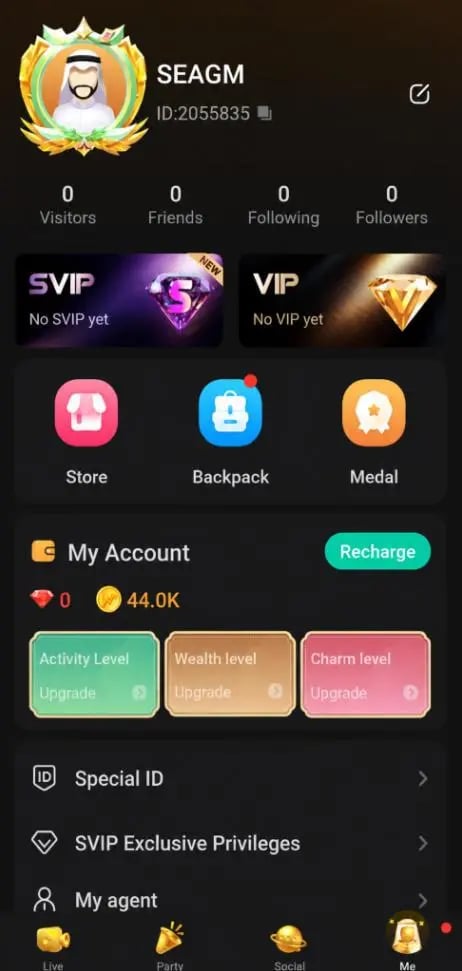
Always double-check your copied numbers before completing checkout to prevent sending balance to an incorrect profile.
Step-by-Step Guide to Top Up Hoby Chat Balance on VGTopup
Recharging your Hoby Chat account through VGTopup is straightforward and designed for quick processing. Follow this walkthrough to complete your order:
- Select Your Package: Browse the available coin denominations listed on the VGTopup product page and pick the amount you wish to purchase.
- Enter Your User ID: Paste your copied Hoby Chat numeric UID into the designated account field.
- Review Current Pricing: Check the live product rates shown on the order summary screen before proceeding.
- Choose a Payment Method: Pick your preferred payment option from the available regional and global options supported on VGTopup.
- Complete Checkout: Finalize your payment through the secure payment gateway.
- Check Your In-App Wallet: Reopen Hoby Chat, pull down to refresh your profile page, and verify your updated coin balance.
Uses of Hoby Chat Coins: Premium Gifts, Badges, and Room Perks
Hoby Chat coins unlock a wide range of social features, room customization options, and interactive tools. Having a funded coin balance allows you to participate actively in popular voice parties and show appreciation to your favorite creators.
Hoby Chat Coin Utilities
| Feature Category | In-Game Utility | Primary Benefit |
|---|---|---|
| Live Room Gifting | Send 2D and 3D animated gifts to room hosts and speakers | Boosts host ranking and displays your name across the room |
| Entrance Effects | Unlock custom vehicle animations when joining rooms | Makes a grand entrance in crowded audio channels |
| Profile Customization | Purchase special avatar frames and custom chat bubbles | Distinguishes your account in public chat feeds |
| VIP & Noble Status | Activate tiered badges and room moderation privileges | Grants priority mic access and unique profile flares |
| Interactive Mini-Games | Use coins to participate in community room games | Engages friends and unlocks special event prizes |
Supporting Room Broadcasters
Virtual gifting is the core social dynamic of Hoby Chat. Sending high-tier animated gifts triggers screen-wide special effects that notify everyone in the room, placing you at the top of the room's contributor leaderboard.
Standing Out in Popular Rooms
Rooms with dozens of active listeners move fast. Equipping entrance animations, glowing avatar frames, and custom chat bubbles ensures that other users and room owners notice your arrival and messages instantly.
Safe and Secure Recharge: Why Direct UID Checkout Protects Your Account
Account safety is a top priority when purchasing digital currencies online. Direct UID top-ups provide the safest transaction model for voice chat platforms for several reasons:
- Zero Password Sharing: You only supply your public numeric UID. VGTopup will never ask for your account password, email credentials, phone verification codes, or third-party login tokens.
- No Risk of Account Takeover: Because your login credentials remain completely in your hands, your private messages, friend lists, and account settings stay fully protected.
- Direct System Crediting: Payments trigger automated balance delivery straight to your registered account on the game servers, eliminating intermediate voucher redemption steps.
- Safe for Gifting Friends: You can easily surprise friends, room hosts, or community members with coins simply by entering their UID at checkout without needing access to their devices.
Hoby Chat Coins Top-Up FAQ
How do I find my Hoby Chat UID for top-up?
Open the Hoby Chat app and tap the Me or Profile icon in the bottom-right corner. Your numeric UID is displayed directly beneath your avatar and display name. Tap the copy icon next to the number to copy it to your clipboard.
Do I need to share my Hoby Chat password to recharge coins?
No. Recharging through VGTopup only requires your numeric UID. You should never share your account password, verification SMS codes, or login credentials with anyone.
How long does it take for Hoby Chat coins to arrive after checkout?
Balance crediting begins automatically as soon as your payment is confirmed on VGTopup. In most cases, your coins reflect in your Hoby Chat wallet shortly after completing the transaction. Reopening the app or refreshing your profile page helps display the updated balance.
What can I do with Hoby Chat coins and balance?
Hoby Chat coins allow you to send animated gifts to room hosts, activate special room entrance vehicles, buy decorative avatar frames, join interactive voice room games, and unlock VIP nobility badges.
What should I do if my Hoby Chat balance is not updated after payment?
First, restart the Hoby Chat app or log out and log back in to force an account balance refresh. If the coins still do not appear, locate your order ID on VGTopup and contact 24/7 customer support with your payment receipt and entered UID for quick assistance.
Can I top up Hoby Chat coins for a friend using their UID?
Yes. You can top up any user's balance by entering their numeric Hoby Chat UID on VGTopup. Ensure you confirm their exact UID before placing the order, as direct top-ups process instantly to the designated account.
Select Denomination
Tax, payment fees and eligible coupons are calculated at checkout.
| Package | Price |
|---|---|
| Hoby Chat - Hoby Chat*20000 | USD 33150845.13 |
| Hoby Chat - Hoby Chat*25000 | USD 41438556.42 |
| Hoby Chat - Hoby Chat*50000 | USD 82877112.83 |
| Hoby Chat - Hoby Chat*100000 | USD 162850.26 |
| Hoby Chat - Hoby Chat*500000 | USD 814251.31 |
| Hoby Chat - Hoby Chat*1000000 | USD 1628502.62 |
| Hoby Chat - Hoby Chat*5000000 | USD 8142513.08 |
| Hoby Chat - Hoby Chat*15000 | USD 24863133.85 |

































































