



Sala Live Top Up for Streaming and Gifting
Sala Live is a popular live streaming and social entertainment platform where users connect with broadcasters, participate in interactive audio chat rooms, and enjoy community events. Live streaming is fueled by real-time engagement, and in-app currencies like coins and diamonds play a central role in how viewers interact with their favorite creators.
When you buy Sala Live coins, you gain direct access to virtual gifts, visual effects, and room privileges. Sending gifts during live broadcasts allows you to show appreciation to streamers, boost their ranking on platform leaderboards, and highlight your profile in busy chat streams. Whether you want to send entry effects, gift luxury animated items, or unlock custom badges in voice party rooms, keeping your account funded ensures uninterrupted participation.
VGTopup provides an instant top-up service designed specifically for Sala Live users. By using direct Player ID crediting, you receive your coins without sharing account credentials or dealing with complicated redemption codes.
Step-by-Step Guide: How to Recharge Sala Live on VGTopup
Recharging your Sala Live account takes only a few moments. Follow these straightforward steps to complete your transaction:
- Select Your Currency Pack: Browse the available Sala Live coin denominations on the product page and choose the amount you wish to purchase. Current pricing and pack options are displayed directly on the selection panel.
- Enter Your Sala Live Player ID: Input your numeric account Player ID into the required field. Make sure to double-check this number to prevent crediting the wrong profile.
- Proceed to Checkout: Click the purchase button to move to the secure payment screen.
- Choose a Payment Method: Select your preferred payment option from the supported global methods provided by VGTopup.
- Complete Payment and Receive Coins: Once payment authorization is confirmed, the order processing system automatically credits the coins directly to your Sala Live account. You can verify the updated balance directly in the app.
How to Find Your Sala Live Player ID (UID)
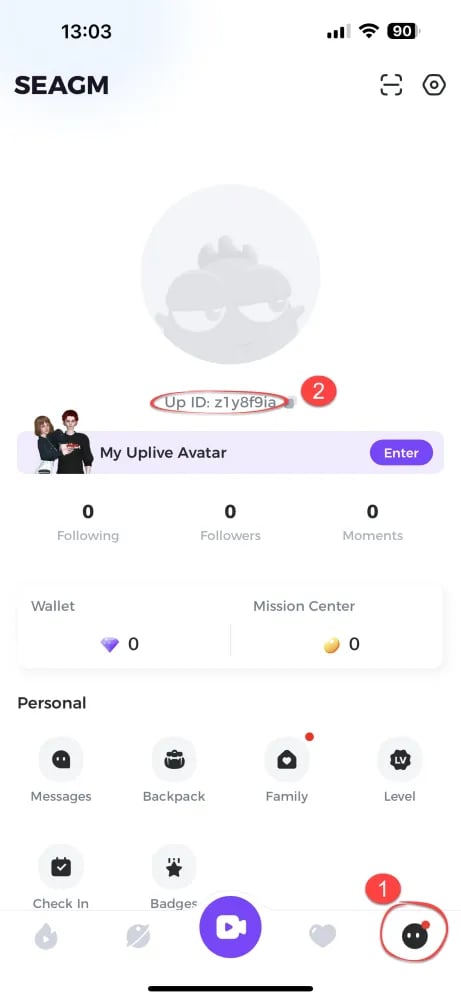
To ensure your coins reach your profile without delay, you must provide your exact Sala Live Player ID. The Player ID is a unique numeric identifier linked permanently to your account.
Follow these steps to locate your UID inside the application:
- Launch the Sala Live app on your mobile phone or tablet.
- Tap the Profile or Me tab located in the bottom-right corner of the home screen.
- Your avatar, nickname, and account details will appear on the main profile screen.
- Locate the numeric string labeled ID or UID displayed directly underneath your username.
- Tap the copy icon next to the number to copy your Player ID to your clipboard, then paste it directly into the player field on VGTopup.
Sala Live Coins vs Diamonds: Currency Overview
Sala Live features distinct in-app currencies designed for viewers and creators. Understanding how they work helps you maximize your spending on the platform.
| Currency | Primary Function | How to Obtain | Key Uses |
|---|---|---|---|
| Sala Live Coins | Viewer currency used for spending and gifting | Direct purchase on VGTopup via Player ID | Buying animated gifts, room entry effects, VIP badges, and chat perks |
| Sala Live Diamonds | Creator and reward currency | Earned through receiving gifts or creator events | Exchanging for platform rewards or withdrawal by authorized broadcasters |
Coins serve as the primary fuel for social interaction. When you send gifts using coins, the broadcaster receives diamonds. This dynamic powers creator earnings and helps streamers maintain active, engaging broadcasts.
Why Recharge Sala Live on VGTopup: ID-Only Security
Account safety is essential when purchasing digital currencies online. VGTopup operates on a strict ID-only recharge model, ensuring your personal data and account integrity remain protected at all times.
- Zero Password Sharing: You never have to share your Sala Live login credentials, phone numbers, or social login details. Only your public Player ID is required to process the top up.
- Automated Direct Delivery: Orders are processed through automated fulfillment channels that credit coins directly to the entered UID, eliminating delays caused by manual voucher inputs.
- Encrypted Transactions: Payment gateways on VGTopup use industry-standard encryption protocols to safeguard your financial information during checkout.
- Reliable Order Tracking: Check your transaction history and delivery status directly through your VGTopup account dashboard.
Troubleshooting Delayed Coins and Order Issues
While most Sala Live top-ups process automatically within minutes, occasional network delays can happen. If your coin balance has not updated after payment, follow these troubleshooting steps:
- Refresh the App: Fully close the Sala Live application and restart it. Sometimes the local client cache requires a restart to display the new balance.
- Check Your Profile ID: Review your order confirmation receipt on VGTopup to confirm that the Player ID you entered matches your in-app UID.
- Verify Payment Status: Ensure the funds were deducted from your payment provider and that you received an order confirmation email from VGTopup.
- Contact Customer Support: If your balance does not update after checking these steps, reach out to VGTopup customer support. Provide your VGTopup order number, the Sala Live Player ID used for the order, and proof of payment. The support team will investigate the delivery status and resolve the issue.
Frequently Asked Questions About Sala Live Top Up
What details do I need to top up Sala Live on VGTopup?
You only need your Sala Live Player ID (UID) and your selected payment method. You do not need to provide passwords, phone numbers, or third-party login credentials.
Where can I find my Sala Live Player ID?
Open Sala Live, tap the "Me" or Profile icon in the bottom navigation menu, and find the numeric UID displayed right below your nickname. You can tap the copy icon next to it for quick entry.
Do I need to provide my Sala Live password to recharge?
No. VGTopup will never ask for your account password. Recharges are delivered directly via public Player ID, keeping your login credentials completely safe.
How long does it take for Sala Live coins to be credited to my account?
Most orders are processed automatically and credited within a few minutes after payment verification. During peak platform traffic or payment gateway maintenance, delivery may take slightly longer.
Can I recharge Sala Live coins for another player or friend?
Yes. Because the top-up process only requires a Player ID, you can enter any valid user's Sala Live UID at checkout to send coins directly to their account as a gift.
What should I do if my Sala Live top-up has not arrived?
Restart your Sala Live application to refresh the balance. If the coins are still missing, check your order receipt on VGTopup to confirm the UID was correct, then contact VGTopup customer support with your order number for fast resolution.
Select Denomination
Tax, payment fees and eligible coupons are calculated at checkout.
| Package | Price |
|---|---|
| Sala Live - Sala Live*10000 | USD 1.08 |
| Sala Live - Sala Live*30000 | USD 3.23 |
| Sala Live - Sala Live*50000 | USD 5.38 |
| Sala Live - Sala Live*70000 | USD 7.53 |
| Sala Live - Sala Live*100000 | USD 10.76 |
| Sala Live - Sala Live*200000 | USD 21.52 |
| Sala Live - Sala Live*500000 | USD 53.80 |
| Sala Live - Sala Live*700000 | USD 75.32 |
| Sala Live - Sala Live*1000000 | USD 107.60 |
| Sala Live - Sala Live*2000000 | USD 215.19 |






























































