


Pawa Live Top Up: Fast, Safe, and Direct to Your Account
Pawa Live connects users around the globe through interactive voice chat rooms, live audio broadcasting, and social community spaces. To participate actively in these live rooms, send special gifts, and support your favorite broadcasters, you need in-app coins.
VGTopup provides a straightforward Pawa Live coin top up service designed for quick transactions. By using only your unique numerical User ID (UID), your coins are credited directly to your in-game balance without sharing private account login details. Select your package, enter your UID, complete your payment, and get back to your favorite voice rooms in moments.
What Is Pawa Live and How Do Coins Work?
Pawa Live is a social entertainment and live voice streaming platform where creators host themed voice rooms, musical performances, casual discussions, and gaming sessions. Within the app, coins serve as the primary virtual currency.
Coins allow you to:
- Send Animated Virtual Gifts: Show appreciation to room hosts and speakers with custom digital presents ranging from flowers to luxury visual effects.
- Enter with Custom Flair: Activate exclusive entrance banners and sound effects when joining active voice parties.
- Access VIP Privileges: Unlock premium chat bubbles, profile frames, and special room badges that distinguish your account.
- Participate in Community Events: Back your favorite creators during seasonal ranking battles, PK competitions, and leaderboard events in 2026.
Because coins are tied directly to your Pawa Live profile, topping up through a reliable platform ensures you never miss a moment during time-limited room events.
How to Top Up Pawa Live Coins on VGTopup
Completing a Pawa Live recharge on VGTopup takes just a few clicks. Follow these steps to top up:
- Select Your Coin Package: Browse the available coin denominations listed on the live product page and choose the amount that fits your needs.
- Enter Your Pawa Live UID: Type your numerical User ID accurately into the UID input field.
- Proceed to Checkout: Click the buy button and choose your preferred payment method on the secure checkout screen.
- Finalize Payment: Complete the transaction through the payment gateway.
- Check Your In-App Balance: Open the Pawa Live app, head to your profile or wallet, and confirm your updated coin total.
Live pricing and active payment channels are displayed in real time on the checkout interface.
How to Find Your Pawa Live UID in the App
Your Pawa Live UID is a unique series of numbers assigned to your account upon registration. You do not need to share your phone number, email, or password to recharge.
To locate your UID:
- Open the Pawa Live app on your mobile device.
- Tap the Profile (or Me) icon located in the bottom-right corner of the main screen.
- Locate your profile avatar and display name at the top of the screen.
- Your UID is displayed directly underneath your username.
- Tap the copy icon next to your UID or write down the numbers carefully before entering them on VGTopup.
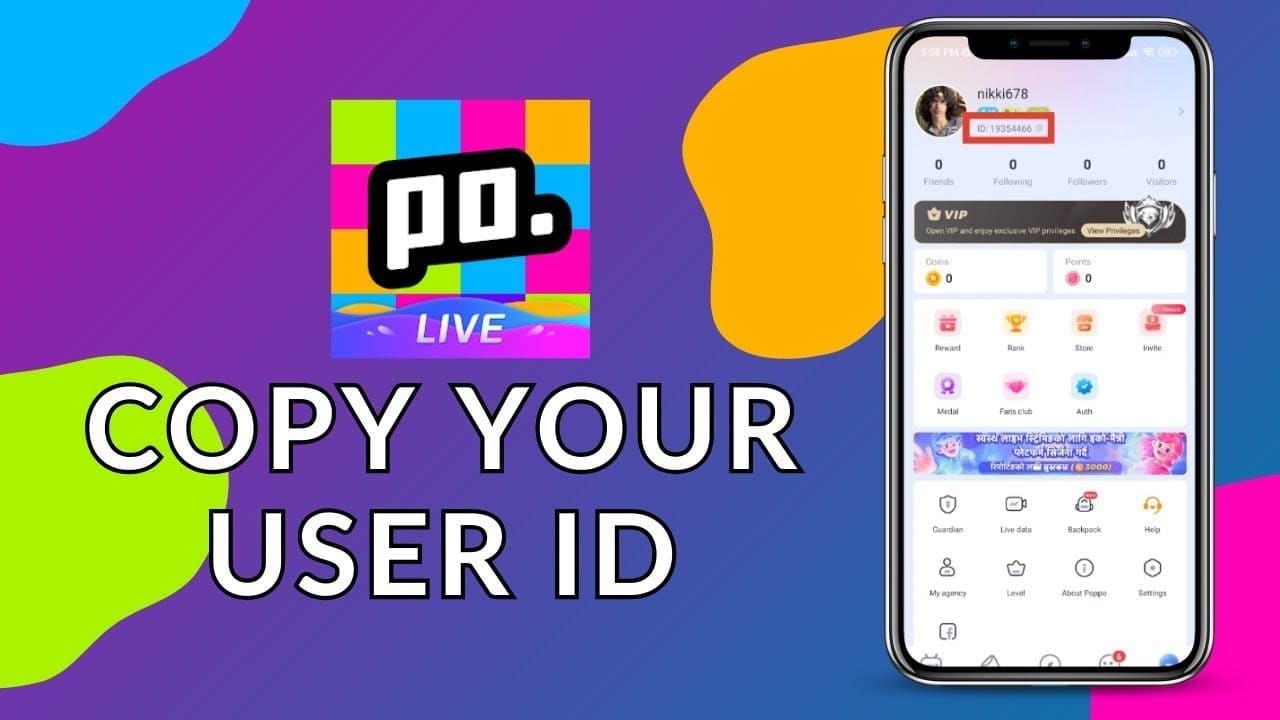
Double-check that the copied UID matches your profile exactly so that the coins deliver to the correct account without delay.
Why Choose UID Top Up Over Account Sharing
Safety is essential when purchasing digital currency online. Direct UID recharges offer substantial advantages over third-party account logins:
| Feature | Direct UID Top Up on VGTopup | Account Login / Credential Sharing |
|---|---|---|
| Password Required | No (Never required) | Yes (High risk) |
| Account Privacy | Full privacy; personal chats remain secure | Risk of unauthorized profile access |
| Risk of Account Ban | Minimal; standard direct credit system | High risk due to suspicious IP logins |
| Delivery Speed | Fast automated direct delivery | Manual login delays |
| Ease of Use | Simply paste your copied UID | Requires verification codes and passwords |
Using VGTopup eliminates the danger of unauthorized password disclosure. Your login credentials stay private on your device at all times.
What Can You Buy with Pawa Live Coins?
Once your Pawa Live recharge is credited, you can spend your coins across multiple in-app features:
- Host Gifts: Send dynamic micro-gifts or massive full-screen animations to creators on the mic.
- Special Room Badges: Display exclusive icons next to your name during live conversations.
- Seat Locks and Room Perks: Support room hosts to gain privileged seating or moderator status in community lounges.
- Profile Customization: Personalize your avatar with animated borders, unique chat fonts, and luxury title cards.
Order Processing Time and Delivery Help for Pawa Live
Orders placed on VGTopup are processed automatically once payment verification finishes. In most cases, your coins appear in your Pawa Live wallet shortly after completing checkout.
If your coins do not display immediately:
- Refresh the App: Completely close the Pawa Live app from your recent apps switcher and reopen it.
- Check Your In-App Wallet: Navigate to your profile tab and tap on your wallet to force a server sync.
- Verify Your Order Status: Check your VGTopup order confirmation to ensure the payment succeeded and verify that the submitted UID was correct.
- Reach Out to Support: If the balance remains unchanged after a few minutes, contact VGTopup customer support with your Order ID and UID for prompt assistance.
Frequently Asked Questions About Pawa Live Top Up
How do I top up Pawa Live coins on VGTopup?
Select the coin pack you want to buy, enter your Pawa Live UID in the player field, click buy, and complete checkout using your preferred payment method. The coins credit directly to your account.
Where can I find my Pawa Live UID?
Open the Pawa Live app, tap the profile icon in the lower right corner, and look below your profile nickname. You will see your numerical UID alongside a copy button.
Do I need to give my Pawa Live password to complete a top up?
No. VGTopup only requires your public Pawa Live UID. You should never share your account password or SMS login codes with anyone.
How long does it take for Pawa Live coins to arrive?
Coin delivery begins automatically as soon as your payment clears. Most recharges arrive within moments after transaction confirmation.
What can I use Pawa Live coins for inside the app?
You can use coins to send animated gifts to room hosts, unlock exclusive entrance banners, purchase decorative profile frames, and participate in competitive room events.
What should I do if my Pawa Live top-up does not show up?
First, restart the Pawa Live app and check your wallet balance. If the coins still do not show, check your VGTopup order history to confirm payment status, then contact VGTopup support with your order number for fast resolution.
Select Denomination
Tax, payment fees and eligible coupons are calculated at checkout.
| Package | Price |
|---|---|
| Pawa Live - Pawa Live*20000 | USD 1.46 |
| Pawa Live - Pawa Live*25000 | USD 1.83 |
| Pawa Live - Pawa Live*50000 | USD 3.66 |
| Pawa Live - Pawa Live*100000 | USD 7.31 |
| Pawa Live - Pawa Live*500000 | USD 36.56 |
| Pawa Live - Pawa Live*1000000 | USD 73.13 |
| Pawa Live - Pawa Live*5000000 | USD 365.63 |
| Pawa Live - Pawa Live*15000 | USD 1.10 |






























































