



Hapi Arabic Top Up: Instant Voice Room Coins via UID
Hapi Arabic connects voice chat enthusiasts across Saudi Arabia, the United Arab Emirates, Kuwait, Qatar, Egypt, and the broader Middle East. Users gather in live audio rooms to share conversations, host karaoke sessions, celebrate special occasions, and support their favorite broadcasters. In-app coins serve as the central currency powering interactions throughout the entire platform.
A direct Hapi Arabic top up on VGTopup allows you to reload your balance securely without sharing sensitive account credentials. By providing your public User ID (UID), you can top up your account balance directly and return to your favorite voice channels without interruption.
What Are Hapi Arabic Coins and How to Use Them
Hapi Arabic coins unlock the full social experience within the platform. Whether you are hosting your own channel or participating as a listener, coins allow you to interact dynamically with creators and room members.
| Feature / In-App Item | Coin Utility & Benefit |
|---|---|
| Animated Virtual Gifts | Send dynamic presents such as luxury sports cars, yachts, and celebratory fireworks to broadcasters on mic. |
| Voice Room Audio Boosts | Increase channel popularity metrics to rank your audio room higher in the live discovery tab. |
| VIP Profile Frames | Equip custom avatar borders, entrance banners, and exclusive room join animations. |
| Interactive Mini-Games | Participate in community room activities and interactive audio challenges with other participants. |
| Special Chat Bubbles | Highlight text messages in active voice room chats with colored text and custom badges. |
Animated Virtual Gifts
Broadcasters and mic hosts receive gifts during live audio streams. Sending higher-tier gifts displays full-screen animations across the room, increasing your social standing and boosting the host's leaderboard ranking.
Voice Room Audio Boosts
Room owners use coins to activate room rockets and audio boosts. These items push the room to the top of the category index, attracting new listeners and expanding community reach during peak hours.
VIP Status and Visual Customization
Coins enable you to acquire exclusive avatar frames, glowing badges, entrance effects (such as driving a supercar onto the stage), and colored chat dialogue bubbles that make your profile stand out immediately.
How to Find Your Hapi Arabic UID in the App
Finding your Hapi Arabic UID takes only a few seconds. Follow these steps on your mobile device before placing your order:
- Open the Hapi Arabic app on your phone or tablet.
- Tap the Profile / Me (أنا) icon in the bottom navigation bar.
- Look directly under your profile photo and nickname near the top of the screen.
- Locate the numerical string labeled ID or UID.
- Tap the copy icon next to the number to copy it to your clipboard.
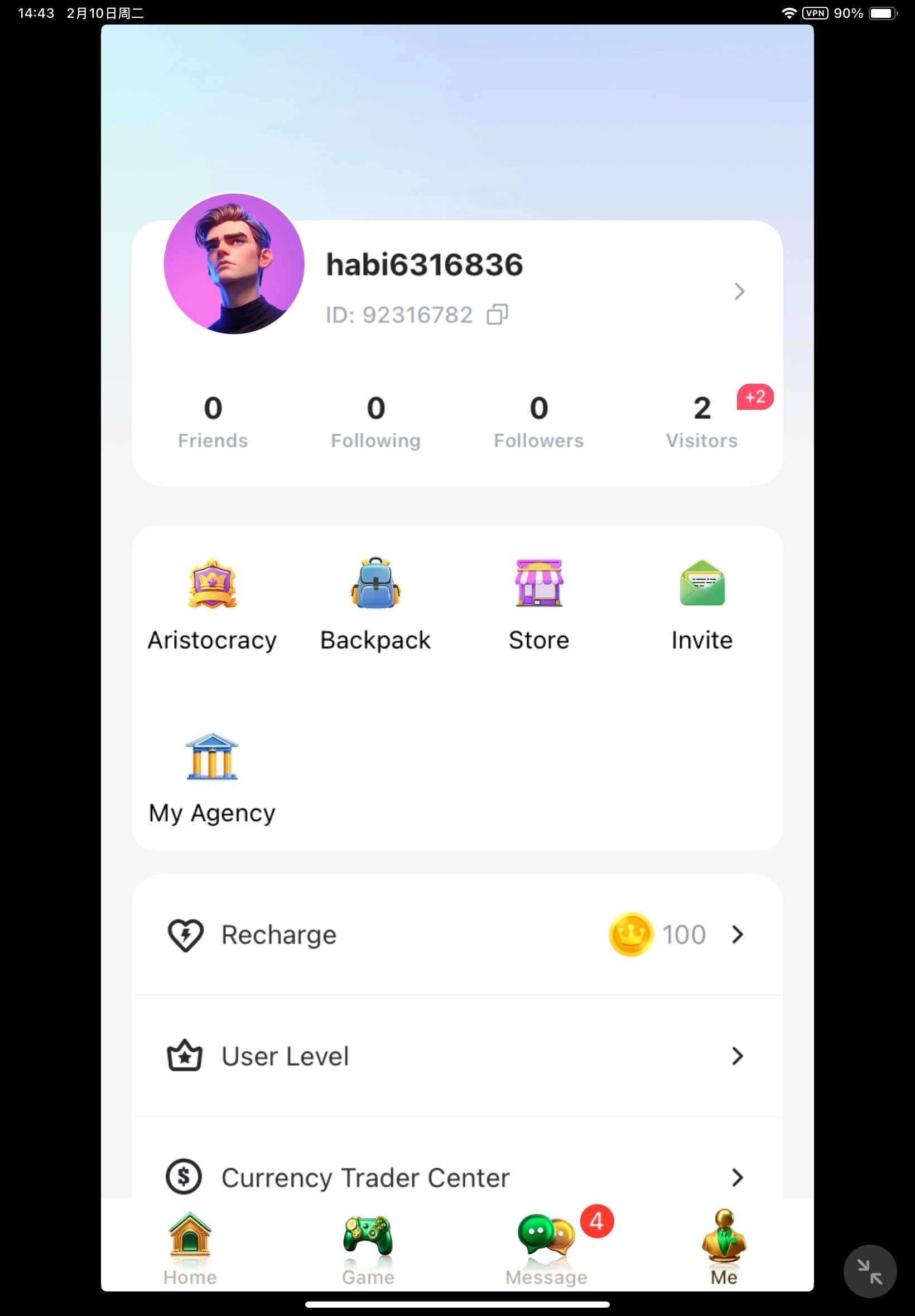
Make sure to copy the exact numeric digits. Entering the correct UID ensures direct and accurate delivery to your profile.
Step-by-Step Guide: How to Top Up Hapi Arabic on VGTopup
Ordering coins on VGTopup is straightforward and does not require account passwords. Follow this simple walkthrough:
- Select Your Coin Package: Browse the available coin bundles on VGTopup and choose the amount you wish to purchase. Current pricing and bundle sizes are always displayed on the live checkout page.
- Enter Your UID: Paste or type your Hapi Arabic UID into the designated player ID field. Double-check the numbers to avoid sending coins to an unintended account.
- Proceed to Checkout: Select your preferred payment method from the available options.
- Complete Payment: Follow the on-screen instructions to finalize the transaction securely.
- Receive Your Coins: Once payment is confirmed, the system delivers the coins directly to your in-app wallet via your UID.
Fast and Secure Coin Delivery: No Passwords Required
Account safety is essential when purchasing digital credits. VGTopup uses a direct UID-only recharge process, ensuring you never have to share login credentials, phone numbers, or passwords.
- Zero Account Sharing: Your login information remains completely private. Only your public numerical UID is used to route the order.
- Encrypted Transactions: Checkout sessions are protected with industry-standard encryption protocols to safeguard your personal payment details.
- Direct System Fulfillment: Orders route directly through verified digital channels to ensure prompt credit to your account balance.
How to Check Your Updated In-App Coin Balance
After completing your purchase on VGTopup, confirm your new coin total directly inside the app:
- Open the Hapi Arabic application.
- Tap the Profile / Me tab in the bottom right corner.
- Select Wallet or My Coins (محفظتي / العملات).
- View your updated balance on the screen.
If the total does not reflect your new coins immediately, swipe down on the screen to refresh the page or close the application completely and relaunch it to clear the local cache.
Common Top-Up Issues and Troubleshooting Tips
Temporary Balance Refresh Delays
During periods of high server traffic, visual updates inside the app wallet may take a short moment to reflect. Close the app from your device's multitasking menu and reopen it. You can also check your in-app transaction history under the wallet tab to confirm the latest incoming credit.
Incorrect UID Submissions
Because direct top-up orders are processed automatically based on the UID provided at checkout, orders sent to an existing incorrect account cannot be retrieved or reassigned. Always verify each digit of your UID before submitting your order. If you realize an error occurred before your order completes processing, contact VGTopup customer support immediately with your order ID.
Regional Compatibility
Ensure you are using the official Hapi Arabic (Hapi عربي) client. Accounts registered across Gulf and Arab community regions—including Saudi Arabia, UAE, Kuwait, Oman, Bahrain, Qatar, Jordan, Iraq, and Egypt—are fully compatible with standard UID coin recharges.
Frequently Asked Questions
How do I find my Hapi Arabic UID?
Open the Hapi Arabic app, tap the Profile (Me) icon at the bottom of the screen, and locate the numeric ID displayed directly beneath your profile avatar and username. Tap the copy icon next to it to copy your UID.
Do I need to share my Hapi Arabic password for top up?
No. VGTopup requires only your numerical UID to complete the coin recharge. You should never share your account password, SMS verification codes, or private login credentials.
How long does it take to receive Hapi Arabic coins after payment?
Coin recharges are processed automatically once payment confirmation is received. Most orders reflect in your in-app wallet shortly after completing checkout.
What can I purchase with Hapi Arabic coins?
Coins allow you to send animated gifts to room hosts, purchase VIP entrance effects, equip exclusive avatar frames, customize your chat text, and boost the ranking of your voice rooms on the platform.
What should I do if I entered the wrong Hapi Arabic UID during checkout?
If you entered an incorrect UID, reach out to VGTopup customer support as quickly as possible with your order reference number. If the order has already been processed by the automated delivery system, completed transfers cannot be reversed.
Is Hapi Arabic coin recharge supported across all Arab and Gulf regions?
Yes. The UID top-up service supports Hapi Arabic accounts created throughout the Middle East, North Africa, and the Gulf region, including Saudi Arabia, UAE, Kuwait, Qatar, Egypt, and international accounts using the Hapi Arabic app.
Select Denomination
Tax, payment fees and eligible coupons are calculated at checkout.
| Package | Price |
|---|---|
| Hapi Arabic - Hapi Arabic*10000000 | USD 9.27 |
| Hapi Arabic - Hapi Arabic*50000000 | USD 46.35 |
| Hapi Arabic - Hapi Arabic*100000000 | USD 92.70 |
| Hapi Arabic - Hapi Arabic*5000000 | USD 4.64 |

































































