



Halla Live Top Up: What Are In-App Coins Used For?
Halla Live is an interactive voice-streaming and social entertainment platform where users join live audio chat rooms, participate in multi-guest discussions, play party games, and support broadcasters. In-app coins serve as the primary virtual currency across the Halla Live ecosystem, giving you full access to premium interactive features.
When you recharge Halla Live coins, you can spend them on several in-app utilities:
- Virtual Gifts for Room Hosts: Send animated gifts, luxury vehicle effects, and custom gift boxes to room admins and featured speakers during live sessions.
- Profile Badges and VIP Status: Unlock VIP tiers, custom chat bubble styles, and distinct entrance banners that display whenever you enter a voice room.
- Avatar Frames and Room Themes: Personalize your profile and custom party rooms with limited-edition decorative frames and background effects.
- Community Ranking and Leaderboards: Gifting coins increases your contributor score on daily, weekly, and monthly room leaderboards, granting higher visibility within the community.
- Interactive Mini-Games: Participate in room events, community challenges, and party activities that require coin entries.
To view current pack quantities and rates, check the live checkout menu on VGTopup before placing your order.
How to Find Your Halla Live UID
To complete a direct top-up, you only need to provide your numeric Halla Live User ID (UID). You do not need to provide your account password, email, or linked social media login.
Follow these steps to locate your UID inside the app:
- Open the Halla Live application on your mobile device and log into your account.
- Tap the Profile (often labeled Me) icon located in the bottom-right corner of the home screen.
- Your profile page will load, displaying your avatar, display name, and account details.
- Locate your UID (a sequence of numbers) printed directly below your display name and avatar.
- Tap the small Copy icon next to the number to copy your UID directly to your clipboard.
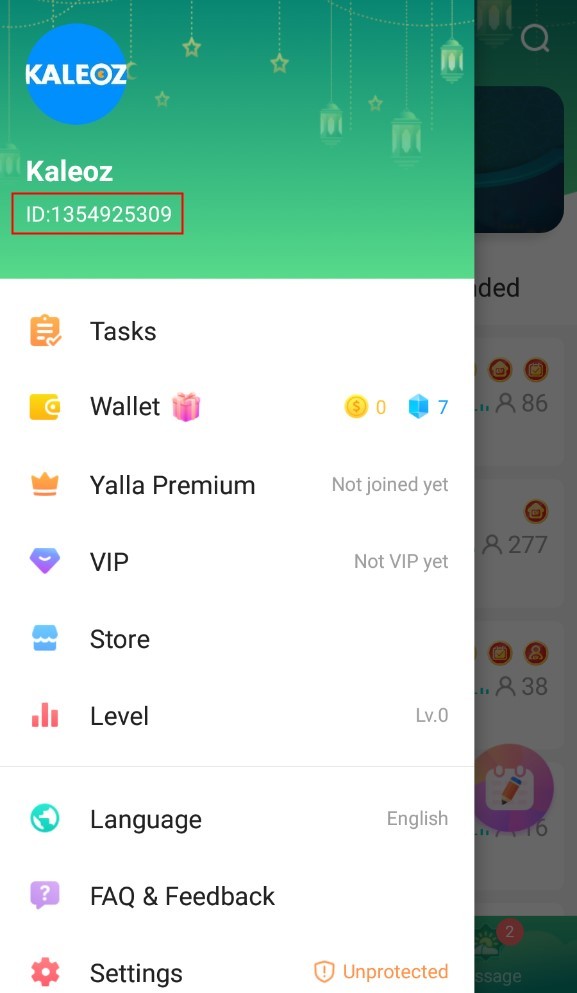
Paste this copied UID into the player ID field on VGTopup to prevent manual typing errors.
Step-by-Step Guide: How to Top Up Halla Live on VGTopup
Recharging your Halla Live balance on VGTopup is straightforward and requires only a few clicks. The table below outlines the basic order details required during checkout.
| Order Field | Required Information | Purpose |
|---|---|---|
| Product | Halla Live Coins | Select your desired coin package |
| Player UID | Numeric Halla Live UID | Identifies your destination account |
| Security Info | None | No passwords or login credentials required |
| Delivery Method | Direct System Top-Up | Automatic balance update to your app profile |
Follow this walkthrough to complete your recharge:
- Select Your Package: Choose the coin denomination you want to purchase on this VGTopup product page. Current pricing is displayed directly on the package selection card.
- Enter Your UID: Paste your numeric Halla Live UID into the designated account field.
- Verify Your Details: Check the pasted number against your Halla Live profile to ensure complete accuracy.
- Proceed to Checkout: Select your preferred payment channel and click the purchase button.
- Complete the Transaction: Follow the on-screen payment gateway prompts to finalize payment.
- Check Your In-App Balance: Open Halla Live, visit your profile wallet, and verify that your new coin balance has updated.
Security and Privacy: Why Direct UID Top-Up Requires No Password
Account safety is a major priority when buying virtual currencies online. VGTopup uses direct-to-account UID processing for Halla Live recharges, eliminating the risks associated with account sharing.
- No Login Credentials Required: You never have to share your password, linked Google ID, Apple ID, Facebook credentials, or phone verification codes.
- Protection Against Account Takeover: Because you never provide login details, your account cannot be accessed, modified, or transferred by third parties.
- Zero Account Sharing Penalties: Traditional login sharing can trigger suspicious activity flags or temporary account locks from app security filters. Direct UID recharges deposit funds without logging into your profile.
- Encrypted Checkout: All order information and payment processing on VGTopup are handled over secure, encrypted communication protocols.
Supported Payment Methods for Halla Live Recharge in 2026
VGTopup supports an array of secure global and local payment options to ensure convenient transactions for international users in 2026.
Available payment categories include:
- Credit and Debit Cards: Visa, Mastercard, and other major card networks.
- E-Wallets and Digital Payment Gateways: Popular regional digital wallets for quick mobile authorization.
- Online Banking and Direct Bank Transfers: Localized direct debit and instant bank payment channels depending on your country of residence.
Payment options and exact currency conversions automatically adjust based on your selected billing location. Review your preferred payment gateway directly at the checkout step before confirming your transaction.
Delivery Time and What to Do If Your Coins Do Not Appear
Halla Live direct top-ups are processed automatically upon payment confirmation. In most cases, your coins reflect in your in-app wallet shortly after checkout completion.
If you have completed your payment but do not see your coins immediately, follow these troubleshooting steps:
- Restart the Halla Live App: Force close the Halla Live application on your mobile device and restart it. This forces the app to refresh its data connection with the server and update your displayed balance.
- Check Your Order Status on VGTopup: Log into your VGTopup account and visit your order history to confirm that your transaction status shows as completed.
- Verify the Submitted UID: Check your order confirmation receipt to verify that the UID you entered matches your in-app profile number.
- Contact Customer Support: If your order status is marked completed but your balance has not updated after restarting the app, reach out to the VGTopup customer support team. Provide your order number, the submitted UID, and your payment receipt for rapid verification and assistance.
Frequently Asked Questions About Halla Live Top Up
Where can I find my Halla Live UID?
Open the Halla Live app, tap the profile icon in the bottom-right corner, and look below your profile avatar and username. Your UID is the numeric sequence displayed there. Tap the copy icon next to it to copy it to your clipboard.
Do I need to share my Halla Live password to complete a top-up?
No. VGTopup uses direct UID recharge. You only provide your public UID. You should never disclose your password, SMS verification codes, or external login credentials.
How long does it take for Halla Live coins to arrive after payment?
Coins are credited automatically to your account as soon as payment is confirmed by the gateway. Reopening your Halla Live app allows your refreshed balance to appear.
Can I recharge Halla Live coins for a friend using their UID?
Yes. Because the top-up process only requires a UID, you can purchase coins for any friend, content creator, or family member by entering their numeric UID in the account field during checkout.
What should I do if I entered an incorrect UID during checkout?
Top-up systems credit the account number provided immediately upon payment. If you realize you entered the wrong UID, contact VGTopup customer support immediately with your order ID. If the order has not yet been processed by the automated system, support will attempt to assist you.
What payment methods are supported for Halla Live top up on VGTopup?
VGTopup supports major international credit and debit cards, digital e-wallets, and localized online banking channels in 2026. The full list of available gateways and real-time prices appears during the checkout process.
Select Denomination
Tax, payment fees and eligible coupons are calculated at checkout.
| Package | Price |
|---|---|
| Halla Live - Halla Live*15000 | USD 1.60 |
| Halla Live - Halla Live*20000 | USD 2.14 |
| Halla Live - Halla Live*25000 | USD 2.67 |
| Halla Live - Halla Live*50000 | USD 5.34 |
| Halla Live - Halla Live*100000 | USD 10.68 |
| Halla Live - Halla Live*500000 | USD 53.39 |
| Halla Live - Halla Live*1000000 | USD 106.78 |
| Halla Live - Halla Live*10000 | USD 1.07 |






























































