



Elelive Top Up for Instant Elecoins Delivery
Elelive is one of the most popular interactive live-streaming platforms in Southeast Asia, connecting viewers with talented hosts, musicians, dancers, and gaming creators across Malaysia, Singapore, Taiwan, and Indonesia. To interact with your favorite broadcasters, join in-stream activities, and send animated gifts, you need Elecoins—the platform's official in-app virtual currency.
Performing an Elelive top up on VGTopup gives you direct access to Elecoins without dealing with complicated exchange rates or app-store payment blocks. Whether you want to send a grand virtual entrance gift to a top host, boost your fan club ranking, or join seasonal community events, adding Elecoins to your account ensures you never miss a moment of the live action.
How to Buy Elelive Elecoins on VGTopup
To recharge your account quickly and safely, follow these straightforward steps on VGTopup:
- Select the Elecoins denomination you wish to purchase from the list on the product page.
- Enter your numeric EleLive ID in the required player field.
- Double-check your entered ID to prevent sending coins to another user.
- Click Buy Now or add the item to your cart and proceed to checkout.
- Select your preferred payment method available for your region and complete the payment.
- Your Elecoins will be credited directly to your Elelive account once the transaction is verified.
Live pricing and active coin packages are displayed directly on the live checkout interface so you can choose the exact bundle that fits your budget.
How to Find Your EleLive ID
To ensure your Elecoins arrive at the right account, you only need to provide your unique numeric user ID. You do not need to share your phone number, email, or password.
Follow these quick steps inside the Elelive mobile app:
- Open the Elelive app on your Android or iOS device.
- Tap the Profile / Me tab located in the bottom-right corner of the home screen.
- Locate your profile avatar at the top of the screen.
- Your EleLive ID is the numeric sequence displayed right under your nickname.
- Tap the copy icon or manually type these numbers into the VGTopup order field.
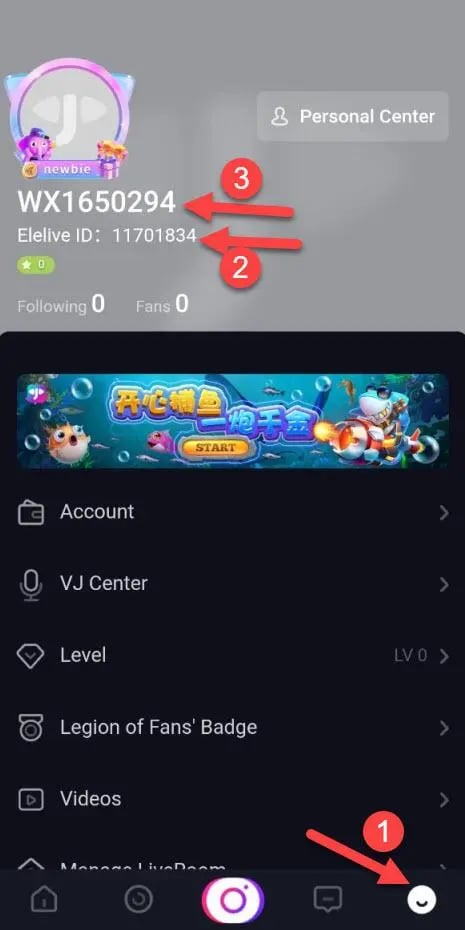
Always make sure to copy the numeric ID exactly as shown to avoid any delivery delays.
Why Choose VGTopup for Elelive Recharge Online
VGTopup provides a streamlined, dependable checkout process built specifically for live-streaming fans across international regions:
- ID-Only Direct Crediting: You only need to enter your EleLive ID. We never ask for your account password, private security codes, or social media logins, keeping your personal profile 100% secure.
- Transparent Live Pricing: Check live package rates directly on the checkout screen with no hidden transaction fees.
- Multiple Regional Payment Options: Choose from a broad range of convenient local and international payment methods suited for your location.
- 24/7 Dedicated Customer Support: If you ever have a question regarding order status or payment processing, our customer service team is available around the clock to assist you.
Safety and Security: Why ID-Only Top Up Protects Your Account
Account safety is a major concern when purchasing virtual currencies online. Using direct ID-based recharges on VGTopup provides the safest experience possible:
- Zero Risk of Account Hijacking: Because you never provide your Elelive password or verification codes, third parties have no way to access your chat logs, private messages, or payment accounts.
- Direct System Delivery: Coins are sent directly to your EleLive ID through standard system channels, preventing third-party login interference or account suspension risks.
- Encrypted Checkout: Every transaction on VGTopup is processed using modern SSL encryption, ensuring your financial and personal data remain protected at all times.
Elelive Features: Virtual Gifting, Games, and Streamer Support
Elecoins unlock the full social experience on the Elelive platform. Here is how active viewers use their balance:
- Animated Virtual Gifting: Send dynamic gifts ranging from roses and sparklers to luxury sports cars and custom entrance banners. Gifting increases your visibility in the live chat and catches the host's attention.
- Fan Badges and VIP Ranks: Sending gifts with Elecoins helps you level up your user rank, unlock special username colors, and gain exclusive badges in your favorite streamer's room.
- Interactive In-Stream Mini Games: Many broadcasters host interactive games and lucky draws during their broadcasts. Elecoins let you participate and win unique profile frames or community rewards.
- PK Battles and Leaderboard Pushes: Support your chosen host during live PK battles against other broadcasters by sending point-boosting gifts before the timer runs out.
Elelive Recharge Overview
| Feature | Details |
|---|---|
| Platform | Elelive (Android / iOS) |
| In-Game Currency | Elecoins |
| Required Account Info | Numeric EleLive ID (UID) only |
| Password Required? | No — Never provide your password |
| Supported Uses | Live gifting, PK battles, VIP badges, mini-games |
| Service Availability | 24/7 on VGTopup |
Troubleshooting Common Elelive Recharge Issues
If you experience any delay or issue with your Elelive top up, review these standard troubleshooting steps:
- Elecoins Not Appearing Immediately: In most cases, balance updates occur within moments of payment completion. If your balance has not updated, close the Elelive app completely, clear the app cache, and relaunch it to refresh your profile balance.
- Verifying Account ID Entry: If the coins have not arrived after a short wait, check your VGTopup order receipt to ensure the numeric EleLive ID entered matches your current app profile.
- Handling Payment Confirmations: Ensure your bank or payment provider marked the transaction as successful. Pending payments will process your order as soon as funds clear.
- Contacting Support: If your order shows completed on VGTopup but your Elecoins do not appear after restarting the app, contact our 24/7 support team with your order number and a screenshot of your Elelive profile page for fast resolution.
Frequently Asked Questions About Elelive Top Up
How do I find my EleLive ID for top up?
Open the Elelive app, go to the Me or Profile tab in the bottom-right corner, and locate the numeric ID displayed beneath your avatar and username. Copy this number and paste it into the EleLive ID field on VGTopup.
Do I need to provide my Elelive password to top up Elecoins?
No. VGTopup only requires your numeric EleLive ID to process your coin recharge. You should never share your password, SMS verification codes, or private login credentials with anyone.
What are Elecoins used for on Elelive?
Elecoins are used to purchase animated virtual gifts for live streamers, unlock VIP badges and profile effects, participate in live stream mini-games, and support creators during competitive PK battles.
How long does it take to receive Elecoins after completing top up?
Top ups on VGTopup are processed promptly once your payment is confirmed. Most orders reflect in your Elelive account balance shortly after checkout.
What should I do if I entered the wrong EleLive ID?
Please double-check your ID before completing payment. Because digital recharges are sent directly to the specified account upon payment confirmation, orders sent to an existing incorrect ID cannot be reversed. If you notice an error immediately before processing completes, reach out to VGTopup customer support right away.
Can I top up Elelive from different regions?
Yes. VGTopup supports international users across Southeast Asia and global regions. As long as you have a valid EleLive ID and an accepted payment method, you can top up your account from anywhere.
Select Denomination
Tax, payment fees and eligible coupons are calculated at checkout.
| Package | Price |
|---|---|
| Elelive Top Up - 60 Elecoins | USD 1.22 |
| Elelive Top Up - 320 Elecoins | USD 5.75 |
| Elelive Top Up - 650 Elecoins | USD 11.51 |
| Elelive Top Up - 1320 Elecoins | USD 23.24 |
| Elelive Top Up - 3350 Elecoins | USD 56.79 |
| Elelive Top Up - 6800 Elecoins | USD 113.20 |
| Elelive Top Up - 18000 Elecoins | USD 267.38 |






























































