



Crush Live Top Up: Direct UID Coin Recharge
Crush Live is a dynamic interactive live streaming and social entertainment platform where creators and viewers connect through real-time video broadcasts, audio party rooms, and group interactions. To actively participate in broadcasts, show appreciation for your favorite hosts, and unlock premium features, you need Crush Live coins. A Crush Live top up on VGTopup delivers coins directly to your account using only your User ID (UID), ensuring a simple, private, and secure checkout experience.
By recharging your account on VGTopup, you avoid app-store markups, keep your login credentials completely private, and receive direct credits straight to your Crush Live profile.
What is Crush Live and What Are Coins Used For?
Crush Live combines real-time streaming, interactive voice chat rooms, and direct messaging to connect communities worldwide. Coins serve as the universal premium currency inside the application, enabling you to participate fully in social broadcasts and events.
Here is how you can use your Crush Live coins:
- Virtual Gifting: Send animated gifts, customized stickers, and luxury visual effects to streamers during live broadcasts to show support and gain host recognition.
- Party and Audio Room Features: Access premium voice room tools, join high-tier seating queues, and trigger room-wide sound and visual effects.
- Level Progression and Badges: Upgrading your user level by spending coins highlights your profile on broadcast leaderboards, granting unique chat frames, entry banners, and VIP status.
- Direct Creator Interactions: Request private audio chats, join multiplayer mini-games during streams, and unlock special broadcast moments.
Step-by-Step Guide: How to Find Your Crush Live UID
To complete a direct recharge, you only need to provide your numeric Crush Live User ID (UID). You do not need to share your password, linked phone number, or social media logins.
Follow these quick steps to locate your UID:
- Open the Crush Live app on your mobile device.
- Tap the Profile or Me icon located in the bottom-right corner of the main screen.
- Look directly beneath your avatar and display name on the profile page.
- Locate your UID (a sequence of numbers).
- Tap the copy icon next to the number to copy your UID directly to your clipboard.
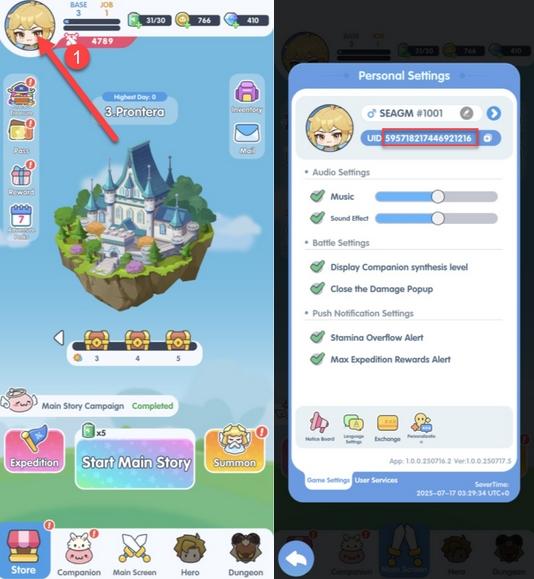
Double-check the copied digits before submitting your order on VGTopup to guarantee that your coins reach the correct account.
How to Top Up Crush Live Coins Using Your UID
Completing a Crush Live coin top up on VGTopup takes less than a minute. Follow these steps to submit your order:
- Select Coin Denomination: Browse the available coin packages on the VGTopup product page and choose the amount you wish to purchase.
- Enter Your UID: Paste your numeric Crush Live User ID into the designated input field.
- Review Order Details: Verify your selected coin package and ensure the entered UID is accurate.
- Proceed to Checkout: Choose your preferred payment method on the checkout screen and complete the transaction.
- Check Your In-App Balance: Once payment is processed, open the Crush Live app, refresh your profile or wallet tab, and verify your updated coin total.
| Top-Up Step | Action Required | Essential Details |
|---|---|---|
| 1. Package Selection | Select coin bundle | Current live pricing displayed at checkout |
| 2. Account Identification | Enter Crush Live UID | Numerical ID found on your profile tab |
| 3. Payment Processing | Select payment channel | Fully encrypted global and local options |
| 4. Delivery Verification | Open Crush Live wallet | Coins credited directly without manual redemption codes |
Benefits of Direct UID Recharge on VGTopup in 2026
VGTopup provides an efficient, transparent digital recharge solution tailored for mobile livestreaming enthusiasts. When purchasing coins through our platform, you receive several distinct advantages:
- Strictly Password-Free Transactions: We never ask for your account password, security questions, or third-party login access. Your Crush Live profile remains completely under your control.
- Direct Digital Processing: Orders are handled automatically by our system upon payment confirmation, routing coins directly to the entered UID.
- Clear Pricing Without Hidden Fees: The final cost is visible on our live checkout screen, allowing you to select the best bundle for your budget.
- Dedicated Support Assistance: Our customer service team is available to assist with order status tracking, UID verification questions, and payment inquiries.
Crush Live Coin Packages and Live Stream Gifting
Different live stream interactions call for different coin levels. Having a ready coin balance ensures you never miss a chance to send time-sensitive gifts during competitive PK battles or creator milestones.
- Small Bundles: Ideal for daily interactions, micro-gifting, sending chat stickers, and maintaining fan club memberships.
- Medium Bundles: Great for participating in multi-guest voice rooms, unlocking dynamic entrance banners, and sending animated screen gifts.
- Large Bundles: Designed for major broadcast events, leaderboard climbs, PK battle pushes, and premium VIP profile enhancements.
All package rates and special denomination selections reflect real-time figures available on the VGTopup live checkout interface.
Supported Payment Methods for Global Crush Live Top-Up
VGTopup supports a wide variety of safe, flexible payment channels to accommodate players across different regions. You can complete your Crush Live coin purchases using globally accepted credit and debit cards, secure e-wallets, and regional payment gateways.
All transactions are processed through encrypted payment processors, ensuring that your financial details remain safe. Check the VGTopup checkout page to view the active payment methods available for your specific country or currency.
Troubleshooting and Frequently Asked Questions for Crush Live Recharge
How to recharge on Crush Live?
To recharge on Crush Live, select your desired coin denomination on VGTopup, input your Crush Live numeric UID, and proceed through the secure checkout. The coins are transferred directly to your in-app wallet balance.
How to buy coins on Crush Live?
You can buy coins by selecting a package on VGTopup, entering your account UID, choosing your payment method, and finalizing the purchase. Your Crush Live balance updates automatically once the transaction is processed.
Where do I find my Crush Live UID?
Launch the Crush Live app and navigate to the Profile or Me section in the bottom-right corner. Your UID is displayed directly beneath your profile picture and nickname. Tap the copy icon beside the numbers to copy it accurately.
Do I need to share my Crush Live login password for top up?
No. VGTopup only requires your numeric UID to process your coin order. Never share your password, verification codes, or personal account credentials with anyone.
How long does it take for Crush Live coins to arrive?
Most orders are processed directly after payment verification. Simply refresh your Crush Live app or re-open your profile wallet to view your new balance.
What should I do if I entered the wrong UID during top up?
Because top-up orders are processed automatically once placed, transactions sent to a valid UID cannot be reversed. If you notice an error immediately before payment processing or if the order fails, contact VGTopup customer support with your order number and transaction receipt for assistance.
What can Crush Live coins be used for in the app?
Crush Live coins are used to send animated virtual gifts to streamers, unlock custom chat badges, purchase dynamic entrance animations, join special audio party rooms, and increase your VIP ranking within the community.
Select Denomination
Tax, payment fees and eligible coupons are calculated at checkout.
| Package | Price |
|---|---|
| 15000 | USD 1.39 |
| 20000 | USD 1.86 |
| 25000 | USD 2.32 |
| 50000 | USD 4.65 |
| 100000 | USD 9.29 |
| 500000 | USD 46.47 |
| 1000000 | USD 92.93 |
| 10000 | USD 0.93 |

































































