



Baat Live Top Up with Fast UID Delivery
Baat Live is a popular interactive live-streaming and voice chat application that connects creators and audiences across the globe. Broadcasters host live video streams, sing, chat, and run interactive multi-guest voice rooms. Viewers participate in discussions, join group activities, and send virtual gifts to their favorite hosts.
To actively participate in community events, send animated gifts, or customize your profile with exclusive room entrances and badges, you need an active balance of in-app currency. A direct Baat Live top up on VGTopup allows you to credit your account immediately using your unique User ID (UID). There is no need to link private social logins or share account credentials. You choose your package, enter your UID, complete your payment, and your balance updates directly inside the application.
How to Top Up Baat Live on VGTopup Using Your UID
Recharging your Baat Live balance takes only a few quick steps. Follow this guide to ensure your top up processes smoothly:
- Choose Your Desired Package: Review the available denomination options listed on the VGTopup product page and select the amount you want to purchase.
- Enter Your Baat Live UID: Type your numeric Baat Live User ID into the required account field. Double-check your numbers to prevent sending credits to the wrong user.
- Select Your Payment Method: Choose from the available local and international payment methods presented at the checkout screen.
- Confirm and Pay: Review your order summary and complete the transaction through the secure payment gateway.
- Check Your In-App Balance: Open the Baat Live app on your phone, go to your profile wallet, and verify your updated balance.
Where to Find Your Baat Live User ID (UID)
Your Baat Live UID is a unique numeric identifier linked directly to your account. You do not need to provide your registered phone number, email, or password during checkout—only this UID.
Follow these steps inside the app to locate your UID:
- Open the Baat Live application on your mobile device.
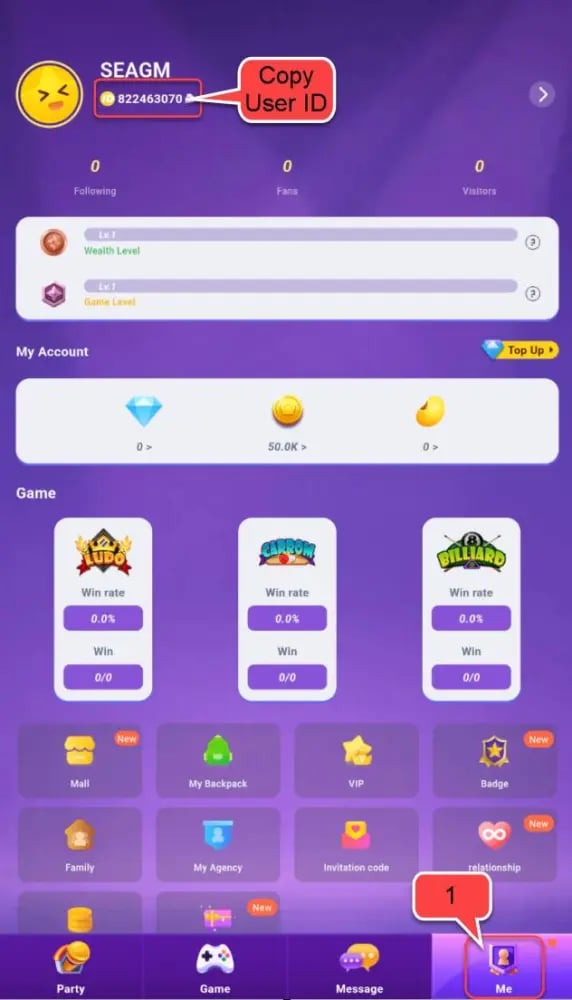
- Tap the Profile (or Me) icon located in the bottom-right corner of the main screen.
- View your profile card located at the top of the screen.
- Your numeric UID is displayed directly beneath your profile nickname and avatar.
- Tap the copy icon next to your UID to copy it directly to your clipboard, then paste it into the VGTopup order field.
Understanding Baat Live Virtual Gifting, Rooms, and Streamer Support
Virtual gifts and tokens form the backbone of interactivity inside the Baat Live platform. When you recharge your account, you unlock several in-app features designed to enhance live room participation:
Supporting Live Streamers and Broadcasters
Sending virtual gifts during a live broadcast directly supports content creators. High-tier gifts trigger special animations on the host's screen, highlighting your support in front of the entire audience. This helps you stand out in popular rooms, catch the broadcaster's attention, and climb the daily or weekly fan leaderboards.
Audio Voice Rooms and Party Seat Perks
Baat Live features multi-guest audio rooms where users gather to talk, play casual games, and listen to music. Having credits allows you to send room-wide gifts, unlock premium microphone frame decorations, and trigger special audio-visual effects when entering high-traffic rooms.
PK Battles and Event Boosts
Streamers frequently engage in live PK (Player Knockout) battles against other hosts. Viewers use their tokens to send gifts during timed rounds, helping their chosen host defeat opponents and secure top ranking positions on platform-wide event charts.
Safe and Secure Recharge: Why You Never Need to Share Passwords
Account safety is essential when purchasing digital items online. Traditional third-party top-ups sometimes ask for user login credentials, exposing accounts to unauthorized access, balance loss, or security lockouts.
VGTopup uses direct UID delivery. This system offers several key security advantages:
- Zero Credential Exposure: You never provide your password, security codes, or linked social media login information.
- No Account Handover: Your profile stays logged in on your personal device at all times with no risk of session hijacking.
- Official Delivery Protocol: Funds are credited through the standard user ID system, preventing policy violations or chargeback penalties on your account.
- Encrypted Transactions: All checkout sessions use modern encryption standards to protect your payment information during processing.
Supported Payment Options and Instant Delivery Process
VGTopup provides multiple payment channels to accommodate buyers from different regions. The available payment options, local currencies, and current package rates are displayed directly on the live checkout page when you place your order.
| Feature | Details |
|---|---|
| Required Account Info | Numeric Baat Live User ID (UID) only |
| Password Requirement | Never required |
| Delivery Method | Direct digital crediting to in-app wallet |
| Order Processing | Automated processing upon payment confirmation |
| Payment Methods | Dynamic global and local payment options at live checkout |
| Customer Support | 24/7 assistance via live chat and support ticket |
Once your transaction completes, the system processes your request automatically. In most cases, your Baat Live balance updates within moments of payment approval.
Baat Live Top-Up Troubleshooting and Order Verification
If you experience any delay or issue with your order, use the following troubleshooting steps to resolve the situation quickly:
1. Refresh Your In-App Balance
If you completed your payment but do not see your new credits immediately, fully close the Baat Live application from your device's recent apps switcher and reopen it. Check your profile wallet screen to see the updated total.
2. Verify Your Order Status on VGTopup
Log in to your VGTopup account and visit your order history. Ensure your transaction shows as completed. If the payment is still pending verification with your payment provider, the system will process the top-up as soon as the funds clear.
3. Check for UID Entry Typos
Review your order receipt to confirm that the UID submitted matches your current Baat Live account. Because UID top-ups are processed automatically, entering an incorrect UID sends the balance to that account immediately. Always use the in-app copy button before checking out.
4. Contact 24/7 Customer Support
If your order is marked complete but your balance has not updated after restarting the app, reach out to the VGTopup customer service team. Provide your VGTopup Order ID, your Baat Live UID, and your payment confirmation receipt so the support staff can trace the delivery and assist you.
Frequently Asked Questions About Baat Live Top Up
How do I top up my Baat Live account on VGTopup?
Select the token or gift package you want on the VGTopup Baat Live page, enter your numeric User ID (UID), choose your preferred payment option, and complete the payment. Your balance updates automatically in the app.
Where can I find my Baat Live UID?
Open the Baat Live app and tap the Profile icon in the bottom-right corner. Your numeric UID is displayed right below your nickname on your profile card. Tap the copy icon next to it to copy your ID.
Do I need to share my Baat Live password to recharge?
No. Recharging on VGTopup requires only your public numeric UID. You should never share your account password or verification codes with anyone.
How long does it take for Baat Live tokens or gifts to arrive?
Delivery is automated and begins immediately after your payment is successfully verified. In most cases, the balance reflects in your Baat Live account within moments.
What should I do if I entered the wrong UID during checkout?
Double-check your UID carefully before confirming payment. Because orders are processed automatically to the provided UID, completed transactions cannot be reversed once delivered. If your order is still pending, contact VGTopup customer support immediately with your correct UID.
Is it safe to buy Baat Live recharges online?
Yes, purchasing through VGTopup is safe because the process only requires your public UID and uses secure, encrypted payment gateways to protect your billing details.
Select Denomination
Tax, payment fees and eligible coupons are calculated at checkout.
| Package | Price |
|---|---|
| Baat Live - Baat Live*15000 | USD 1.34 |
| Baat Live - Baat Live*20000 | USD 1.79 |
| Baat Live - Baat Live*25000 | USD 2.24 |
| Baat Live - Baat Live*50000 | USD 4.47 |
| Baat Live - Baat Live*100000 | USD 8.95 |
| Baat Live - Baat Live*500000 | USD 44.73 |
| Baat Live - Baat Live*1000000 | USD 89.46 |
| Baat Live - Baat Live*10000 | USD 0.89 |

































































