Quando os coins aparecem, mas o presente ainda é rejeitado
Quase todos os guias ignoram isso, e este é o motivo mais comum para um presente não ser enviado. O SuperLive mantém a carteira de onde você envia presentes separada dos Coins brutos que você compra. Uma recarga cai primeiro no seu saldo de Coins para depois abastecer os presentes, de acordo com a mecânica de recarga do TikTok (2026). Você pode estar olhando para um número alto e ainda assim receber um erro de "saldo muito baixo" porque o aplicativo está lendo a outra carteira.
Aqui está o que me surpreendeu: isso não é uma falha de faturamento. As pessoas tratam a mensagem de "saldo de presentes muito baixo" como um bug financeiro e começam a clicar repetidamente no botão de compra, que é exatamente como um problema de confusão de carteira se transforma em um problema de dinheiro real (o Cenário 4 aborda isso). A solução é quase sem graça. Recarregue seus coins, confirme se o total de Coins aumentou e depois envie. Se a tela de presentes ainda indicar saldo baixo, volte ao seu perfil, abra a transmissão novamente e espere o saldo atualizar.
Se você for guardar apenas uma linha deste artigo completo, guarde esta: verifique o total de Coins antes de comprar por impulso. O erro quase nunca significa que você está sem dinheiro. Significa que você está olhando para o medidor errado.
A recarga no aplicativo em menos de um minuto: rápida, mas você paga pela velocidade
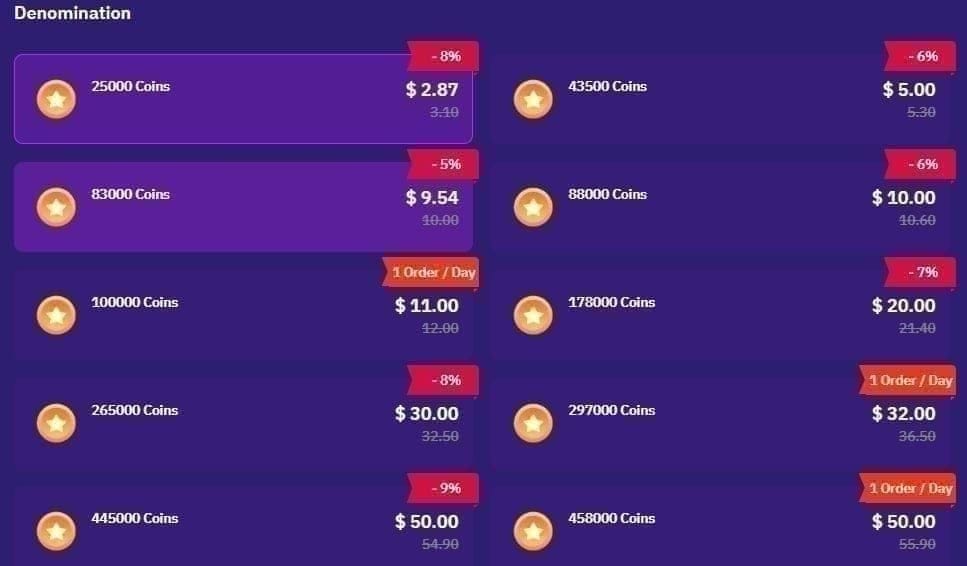
A transmissão está ao vivo e você precisa de coins neste exato segundo. O caminho pelo aplicativo vence disparado em velocidade. Abra o SuperLive, toque no ícone do perfil no canto inferior direito, role até Comprar Coins, escolha um pacote, conecte um cartão ou pagamento do Google ou Apple e confirme. Menos de um minuto, de acordo com o fluxo oficial do aplicativo mostrado em um passo a passo no YouTube em 2025. A entrega ocorre no instante em que o faturamento é aprovado.
O que eu não tinha percebido até colocar os preços lado a lado: as faixas de preço no aplicativo são organizadas, mas caras. De acordo com os dados de paywall da Adapty, os pacotes publicados custam $0,99 para 120 Coins, $4,99 para 600, $9,99 para 1.200, $19,99 para 2.400 e $49,99 para 6.000. Essa faixa intermediária equivale a cerca de $0,0083 por coin, de acordo com o BitTopup (abr. de 2026). Chame isso de taxa de conveniência. Você está pagando a taxa da loja de aplicativos pelo luxo de não sair da transmissão.
Para um presente pequeno e ocasional, essa taxa extra é aceitável e eu a pagaria sem pensar duas vezes. O pacote de 120 coins existe exatamente para o espectador que envia um único presente por mês; direcionar isso através de um site para economizar alguns centavos é perda de tempo. O erro é usar o aplicativo como padrão para tudo, que é o que o próximo cenário traz à tona.
| Pacote (Coins) |
Preço no Aplicativo |
Preço em Terceiros |
Por Coin (Terceiros) |
| 120 |
$0,99 |
N/D |
N/D |
| 605 |
~$5,25 |
$5,10–$5,50 |
~$0,0085 |
| 3.125 |
~$26,25 |
$22,66–$27,50 |
$0,0073–$0,0084 |
| 43.000 |
N/D |
$299–$340 |
$0,0070–$0,0079 |
Fonte: Dados agregados do BitTopup e Enjoygm (2026)
A recarga por ID do SuperLive é onde a economia realmente acontece
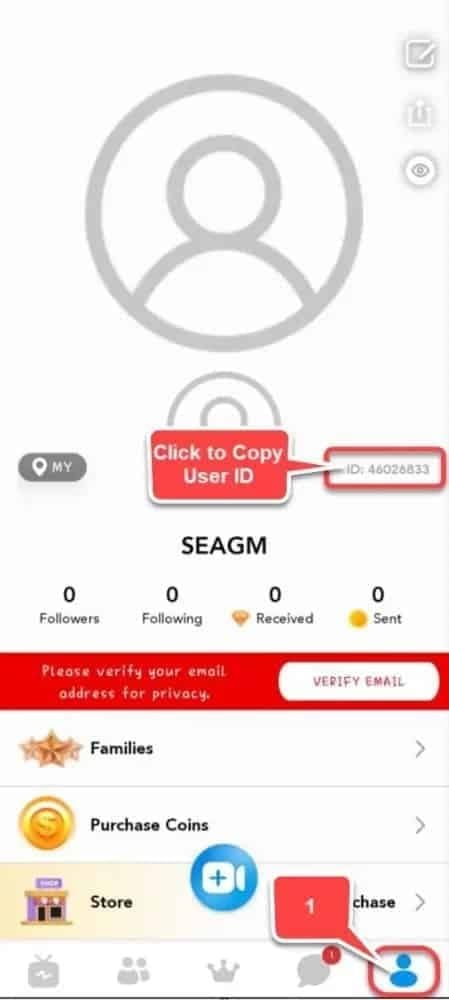
Compre os mesmos coins através do seu ID do SuperLive em uma plataforma web e a taxa de conveniência simplesmente desaparece. Os passos: pegue seu UID de 7 a 10 dígitos na sua página de perfil, insira-o no site de recarga, escolha um pacote, pague com PayPal, cartão ou carteira digital, e os coins chegam instantaneamente, de acordo com a Enjoygm. Sem a comissão da loja de aplicativos no meio do caminho. Esse é o único motivo pelo qual custa menos.
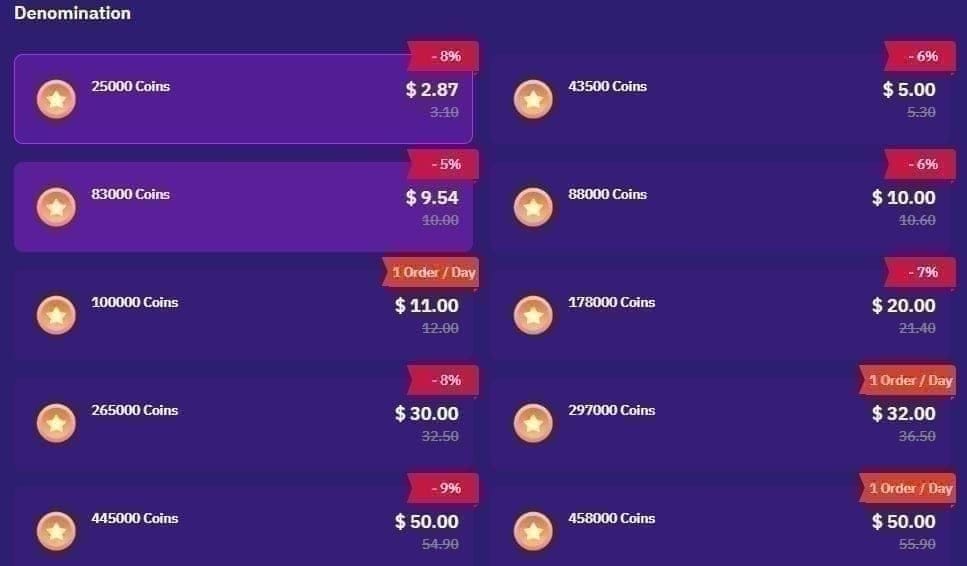
O tamanho da economia honestamente me surpreendeu. A mesma fonte lista 10.000 Coins a $1,45 contra uma referência de $1,99 no aplicativo, 50.000 a $7,25 e 200.000 a $29, um desconto fixo de 27% em relação ao preço do aplicativo. A diferença se mantém nos pacotes maiores: 43.000 Coins saem por cerca de $299–$340, ou $0,0070–$0,0079 por coin, de acordo com o BitTopup, o que fica perto de 28% abaixo da taxa intermediária do aplicativo. Ver as duas opções lado a lado foi o que finalmente me fez perder o hábito de tocar na tela do perfil por puro reflexo.
O ponto inegociável aqui é o UID. Se você errar um dígito, os coins caem na conta de um estranho sem chance de retorno, de acordo com o mesmo guia do BitTopup. Copie e cole. Nunca digite de cabeça. Esse único detalhe de disciplina é a diferença entre uma recarga web bem-sucedida e um problema criado por você mesmo.
Então, quem deve fazer a mudança? A escolha se divide claramente pelo quanto você gasta:
- Espectador casual — pacotes pequenos no aplicativo para presentes pontuais; a economia em uma compra de $0,99 não justifica os passos extras, de acordo com a Adapty.
- Apoiador regular — os pacotes web de 10k a 50k são a escolha ideal; com 27% de desconto, o envio frequente de presentes acumula economias rapidamente, de acordo com a Enjoygm.
- Grande comprador — os pacotes de 43k+ a ~$0,007/coin via recarga por ID oferecem a menor taxa por coin publicada em qualquer lugar, de acordo com o BitTopup.
Divulgação: A VGTopup, que publica este artigo, é uma dessas plataformas baseadas em ID, portanto, avalie isso de acordo. O conselho é válido independentemente de onde você decida comprar, no entanto: além de uma pequena recarga, compare o preço por moeda antes de escolher. O canal importa menos do que fazer as contas.
Quando o pagamento trava, falha ou é recusado silenciosamente
Esta situação foi a que mais me ensinou, principalmente porque a falha geralmente não é do SuperLive. O culpado mais frequente é uma incompatibilidade de região ou moeda. Pague com um método dos EUA em uma conta da região das Filipinas, por exemplo, e você terá uma recusa silenciosa, de acordo com o consenso da comunidade documentado em tópicos do Reddit sobre problemas de recarga no SuperLive (2026). O aplicativo parece quebrado, mas a rede de pagamento está apenas rejeitando um conflito geográfico que você nem consegue ver.
Três estados, três ações:
- Entregue — Saldo de Coins atualizado, recibo emitido. Tudo pronto. Envie o presente.
- Pendente — pagamento autorizado, mas não confirmado. Não tente novamente. Forçar uma recarga pendente rápido demais corre o risco de gerar uma cobrança dupla, de acordo com reclamações documentadas de usuários no Sikayetvar (2025). Aguarde a confirmação ou o estorno automático.
- Falhou — recusado imediatamente, sem cobrança. Mude o método de pagamento ou verifique se a região do seu pagamento corresponde à região da sua conta antes de tentar novamente.
A cobrança dupla é a armadilha mais cara. Já vi pessoas em tópicos de reclamação pagando duas vezes pelo mesmo pacote puramente porque o ícone de carregamento demorou muito e elas tocaram em comprar novamente. Se uma cobrança estiver pendente, dê tempo para o sistema processar (minutos, não segundos) e verifique o histórico de compras do seu banco ou da loja antes de assumir que nada aconteceu.
Para urgências no meio da transmissão, é também por isso que encaro a palavra "instantâneo" com desconfiança. As recargas via web e ID creditam instantaneamente após o pagamento, e no aplicativo o crédito cai no momento em que o faturamento é bem-sucedido, de acordo com várias listagens de recarga (2026). Mas o "instantâneo" pressupõe que o pagamento realmente seja aprovado. Um cartão recusado não é instantâneo, é nada. A lição que continuo reaprendendo a cada atualização: recarregue antes da transmissão, não durante ela. Uma pequena reserva no seu saldo de Coins elimina completamente a armadilha das compras por impulso.
Dimensionar a compra corretamente é a forma silenciosa de economizar dinheiro que ninguém explica direito. O pior custo-benefício não está em um pacote específico. Está no hábito de comprar o menor pacote repetidamente. Cada microrecarga mantém você preso na faixa de preço por coin mais cara, quando uma única compra do tamanho certo teria coberto os mesmos presentes por uma taxa muito melhor.
Dois pontos de referência ancoram essa decisão. Do lado do custo-benefício, os grandes pacotes web chegam a cerca de $0,0070 por coin, de acordo com o BitTopup. Do lado da conveniência, as faixas intermediárias no aplicativo ficam em torno de $0,0083. A diferença se torna dinheiro real quando você envia presentes com alguma regularidade.
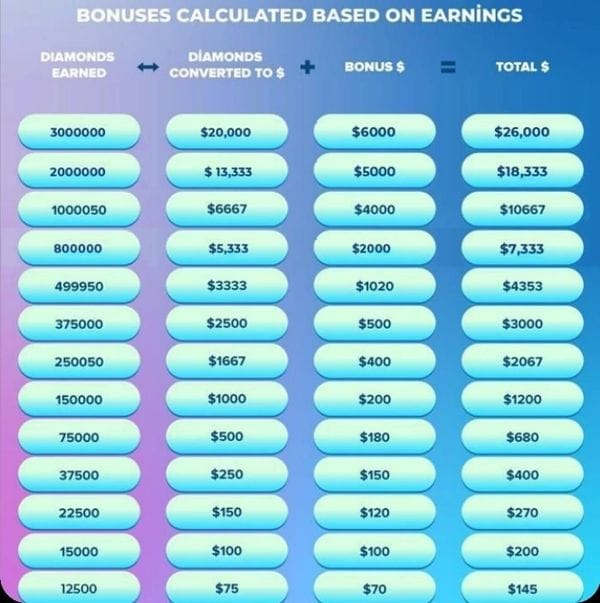
Há um detalhe que vale a pena saber se você já se perguntou para onde seus presentes realmente vão: os apresentadores ficam com cerca de 50% do valor de um presente na forma de Diamonds/Beans, com um limite mínimo de saque em torno de 3.000 Diamonds (~$20), de acordo com o BitTopup. Isso não muda o que você paga, mas redefine a dinâmica do sistema. Seus coins não são transferidos na proporção de 1:1 para o streamer.
Minha regra prática após vários ciclos: estime os presentes que você realisticamente enviará nas próximas semanas e, em seguida, compre um pacote que cubra essa quantidade com a melhor taxa por coin que puder alcançar. Aproveite um bônus de primeira compra uma vez, claro. Depois disso, ignore as promoções chamativas e compare o custo por coin. Esse é o número que realmente faz diferença no seu bolso.
Como os métodos se comparam
| Fator |
Recarga no Aplicativo |
Web / ID do SuperLive |
| Velocidade |
Instantâneo após faturamento |
Instantâneo após pagamento |
| Custo por coin |
~$0,0083 (intermediário) |
$0,0070–$0,0079 (pacotes grandes) |
| Economia vs aplicativo |
Base de comparação |
~27–28% de desconto (segundo Enjoygm / BitTopup) |
| Principal risco |
Taxa de conveniência |
UID incorreto envia coins para outra conta |
| Ideal para |
Pequenos presentes pontuais |
Recargas regulares e grandes |
Fonte: Adapty (2026); Enjoygm (2026); BitTopup (abr. de 2026)
Então, qual é a conclusão? Use o aplicativo para emergências de menos de um minuto com valores pequenos, e a recarga web baseada em ID para todo o resto. O aplicativo em si, com mais de 10 milhões de downloads e uma avaliação de 4,5 estrelas em mais de 220 mil avaliações, de acordo com o Google Play, não é o problema. O hábito de pagar por impulso é. Deixe de tocar na tela do perfil por reflexo, confirme qual carteira o aplicativo está lendo, copie seu UID exatamente e nunca tente novamente uma cobrança pendente. Siga esses quatro passos para gastar menos e evitar falhas a longo prazo.
Perguntas Frequentes
Por que meu saldo de presentes no SuperLive está baixo mesmo depois de comprar coins?
Porque a recarga cai primeiro no seu saldo de Coins, enquanto a tela de presentes pode estar lendo a carteira de presentes separada, de acordo com a mecânica de recarga do TikTok (2026). Se os dois números não sincronizarem após uma compra, saia e entre novamente na transmissão ao vivo para forçar uma atualização. Os coins quase sempre estão lá, apenas não apareceram ainda no medidor de presentes.
É segura, desde que você trate o UID como o campo mais importante. O risco real não é a plataforma, mas sim um ID de 7 a 10 dígitos digitado incorretamente que envia coins para a conta errada sem possibilidade de recuperação, de acordo com o BitTopup. Copie e cole seu UID, confirme se ele corresponde ao seu perfil e depois pague. Métodos de pagamento compatíveis com a região também importam, pois incompatibilidades geram recusas silenciosas.
Quanto tempo os Coins do SuperLive demoram para chegar?
Ambos os caminhos são praticamente imediatos. As recargas via web e ID creditam instantaneamente após o pagamento, e no aplicativo o crédito cai após o faturamento bem-sucedido, de acordo com várias listagens (2026). O detalhe importante: o "instantâneo" pressupõe que a cobrança seja aprovada. Um pagamento pendente ou recusado pela região não entrega nada, portanto, para um presente de última hora, recarregue com antecedência antes da transmissão, em vez de fazer isso no meio dela.
O que eu faço se meus coins não chegarem, mas eu for cobrado?
Verifique o status da transação antes de tomar qualquer atitude. Se estiver pendente, não tente novamente, pois tentativas rápidas em uma cobrança pendente correm o risco de gerar uma cobrança dupla, de acordo com reclamações documentadas no Sikayetvar (2025). Confirme primeiro no histórico de compras do seu banco ou da loja. Se a cobrança foi aprovada, mas os coins nunca chegaram, guarde o recibo como comprovante e entre em contato com o suporte informando o horário e o UID.
Os preços são cotados em USD nos sites globais de recarga, mas as opções de pagamento variam. EUA, Índia, Filipinas e Indonésia contam com carteiras locais e processamento via PayPal, de acordo com a Enjoygm (2026). O preço por coin não muda muito de acordo com o mercado; o que muda é qual método de pagamento é aprovado sem problemas, portanto, use um que corresponda à região da sua conta para evitar recusas.










Comments