Tired of getting locked out of your audio room? Here is how to fix the Yalla Live verification code not sending to phone error and regain instant account access.
You tap the button, watch the timer run down, and nothing arrives. Meanwhile, an active room is waiting or friends are on stream. When a Yalla Live verification code fails to send, your account stays locked with no clear error message explaining where the delivery stalled.
I have run into this wall multiple times. The immediate impulse is to hammer the "Resend" button every ten seconds. That is the worst thing you can do. The problem usually stems from silent carrier spam barriers, improper international dialing syntax, or security tripwires baked straight into the platform. Once you understand how these authentication pipes work, clearing the jam takes only a few minutes.
Why Yalla Live OTP Codes Stop Arriving
Short-message service (SMS) delivery feels instantaneous when it works, but one-time password (OTP) delivery involves an intricate chain of automated handshakes. When you request a code in Yalla Live, the app packages your request alongside specific telemetry: your IP address, carrier identity, network type, and unique hardware identifiers. Yalla evaluates these parameters dynamically during login and registration to weed out abnormal bot activity.
From there, the platform routes a dispatch order to a commercial SMS gateway. These enterprise gateways use dedicated short codes—five- or six-digit numbers capable of blasting out up to 100 messages per second. That high transmission volume keeps delivery fast, but it also paints a giant target on the message. Cellular carriers maintain aggressive automated firewalls designed to catch commercial spam, and verification texts frequently get caught in those crosshairs.
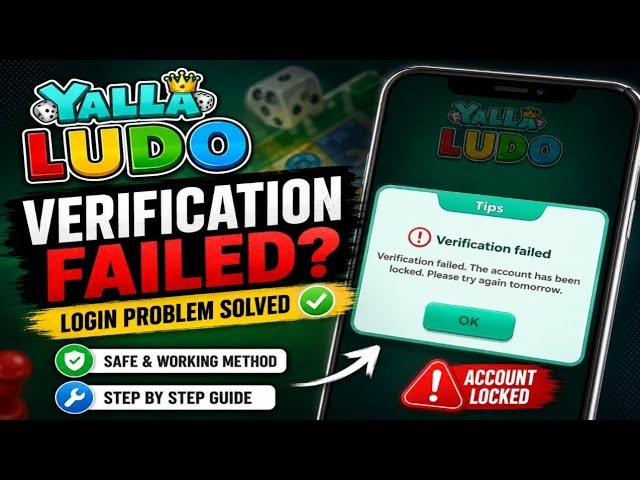
If the gateway passes the text but your handset silently discards it, or the carrier queues it behind regional traffic, you get no error notice—just silence.
Five technical bottlenecks account for nearly every missing SMS:
| Failure Point | Root Mechanism | Immediate Diagnostic Action |
|---|
| Carrier Spam Shield | Inbound short code categorized as automated promotional traffic | Check blocked messages archive; toggle spam protection |
| Rate Limit Enforcement | Consecutive dispatch requests within a short timeframe | Cease all attempts; wait 15 to 30 minutes |
| Gateway Routing Drop | Incorrect country dial code or invalid regional prefix | Re-enter number with explicit international format |
| Stalled Cellular Queue | Handshake desynchronization between device and cellular tower | Toggle airplane mode for 30 seconds to force reconnect |
| VoIP Rejection | Virtual or shared line detected by platform security rules | Replace with a dedicated physical cellular SIM line |
Takeaway: SMS delivery failures are almost always caused by carrier filtering or platform rate limiting rather than a permanent outage on your personal account.
Carrier Filtering and Short-Code SMS Blocking
Your mobile provider's built-in junk filter is the primary culprit behind a yalla sms code not received error. Modern network providers use machine-learning algorithms to scan inbound SMS traffic. When a short code transmits thousands of identical six-digit codes across a single cell tower radius, carrier spam filters occasionally mistake the authentication wave for a phishing attack. The carrier intercepts the message before it ever pings your device.
On the handset side, native operating system protections can cause identical headaches. Both modern Android builds and iOS feature built-in spam and unknown sender protection. If your device sees an incoming message from a six-digit short code that does not exist in your contact address book, it may drop the text silently into a "Spam and Blocked" or "Unknown Senders" folder without lighting up your screen or sounding an alert.

There is also the matter of virtual numbers. If you are trying to register or log in using a Voice over IP (VoIP) number or a free online SMS receiver app, save your breath. Enterprise authentication gateways systematically flag and reject VoIP numbers to prevent mass bot registrations. You must use a legitimate, physical cellular line tied to an active SIM or legitimate carrier eSIM.
Step-by-Step Fixes for Yalla SMS Code Not Received
When your login stalls, run through this sequence in order. Do not skip around, and do not repeatedly spam the request button while working through these steps.
- Check your blocked and junk message folders. Open your native messaging application. On Android, tap your profile icon or the three-dot menu and select "Spam and blocked." On iOS, open Settings, tap Messages, and check the "Unknown & Spam" category. Look for an inbound text from a 5-digit or 6-digit sender containing a numeric code.
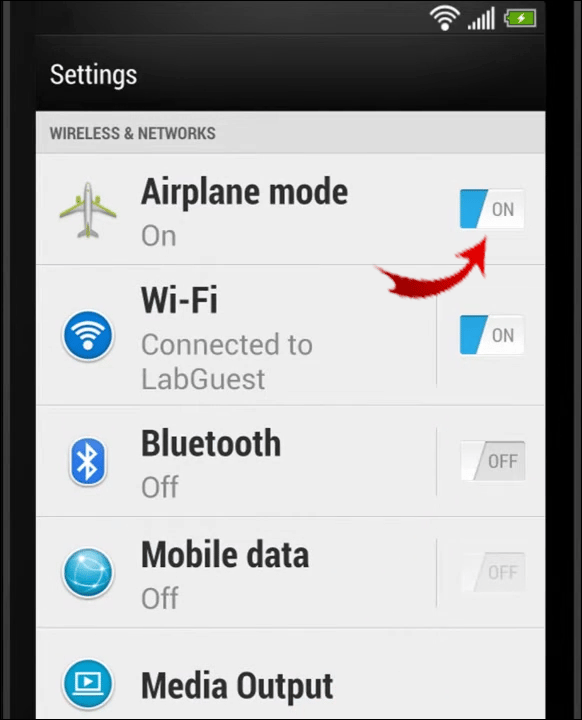
- Cycle airplane mode to clear local network queues. Pull down your control shade or control center. Toggle Airplane Mode on, leave it active for 30 seconds, and turn it back off. This forces your handset to drop its local radio tower handshake and re-register across the carrier network, which routinely flushes stalled incoming SMS queues.
- Verify the country dial code syntax. Look at the phone input field on Yalla Live. The app requires your international country code (such as +1 for the United States, +966 for Saudi Arabia, or +971 for the UAE). If the country code selector automatically prepends the prefix, make sure you did not type the leading zero of your local phone number. Entering a local number as
0501234567 instead of 501234567 under a +971 selector routes the transmission into nowhere. - Reboot the device. If local network processes have frozen or your carrier configuration profile encountered an exception, a simple system restart reloads your SIM profile and clears lingering memory caches.
- Inspect third-party call and SMS screening apps. If you use call-screening tools like Truecaller or carrier-specific apps like AT&T ActiveArmor, open their internal logs. These utilities frequently mark automated short-code messages as suspicious and quarantine them without notifying you.
- Request fallback voice verification if displayed. When SMS fails repeatedly, certain regional interfaces expose an option to receive the authentication code via an automated voice telephone call. Take it. Automated voice calls route over entirely different carrier voice trunks and bypass SMS spam shields altogether.
Once you restore access to your account and re-enter your favorite rooms, you can easily top up your balance safely through vgtopup without worrying about mid-stream session dropouts.
The Rate Limit Trap: Cooldowns and Lockout Thresholds
The fastest way to turn a two-minute inconvenience into a multi-hour lockout is hammering the resend verification code yalla app button. Every authentication platform operates on strict rate-limiting parameters designed to prevent brute-force attacks and save on massive SMS gateway dispatch fees.
A standard numeric one-time passcode contains six digits. That setup allows for 1,000,000 possible combinations (000000 through 999999). To keep those combinations secure against automated brute-force scripts, the lifespan of each generated OTP is aggressively short—typically lasting between 60 seconds and 300 seconds (5 minutes). Stale codes that arrive after their validity window expires will return an error immediately.
When you hit the resend button three to five times in rapid succession, the security algorithms kick in. Instead of sending more texts, the server places a temporary suspension on your phone number and IP address. This rate-limit lockout generally enforces a cooling-off period lasting anywhere from 10 to 15 minutes, and in severe cases up to 30 minutes. Tapping the button during the cooldown period often resets the timer, extending your lockout even further.
These server-side thresholds govern rate limits and expiration timers:
| Parameter | Standard Operational Value | Impact on User Login |
|---|
| Single Code Expiration Window | 60 to 300 seconds (1–5 min) | Codes arriving late due to carrier latency will fail authentication |
| Re-request Throttle Delay | 2 to 3 minutes | Prevents overlapping dispatches and message collision |
| Failed Entry Lockout Limit | 3 to 5 incorrect attempts | Suspends numeric entry to block brute-force scripts |
| Rapid Request Cooldown | 10 to 15 minutes | Enforced pause when the resend button is triggered repeatedly |
| Short-Code Gateway Throughput | Up to 100 messages/sec | High-speed pipe; delays reflect carrier filtering, not server lag |
Takeaway: If your first code fails to show up within two to three minutes, stop tapping. Give the network a few minutes to breathe before initiating a single fresh request.
Operating System Differences: Android, iOS, and PC Emulators
Troubleshooting steps vary depending on where you are running Yalla Live. The underlying operating system determines how network handshakes, application permissions, and security shields treat inbound SMS traffic.
On Android devices, spam protection operates aggressively inside Google Messages. You have deep control over app permissions, background battery optimization, and cache storage. Clearing the app cache for both Yalla Live and your native Messages app can instantly resolve corrupted delivery pathways.
Apple's iOS enforces a tighter sandbox. If message filtering is active, incoming texts get separated into "Known Senders" and "Unknown Senders." Without checking that second tab, verification codes sit unread. Resetting network settings on iOS also clears out stalled eSIM carrier profiles that stop processing short codes.
PC users running Yalla Live via an Android emulator face a distinct hurdle: the emulator has no native SIM card. It cannot receive cellular SMS directly. Emulators rely on your physical smartphone to receive the code while the PC client waits for input. If you run a VPN on your PC while running an emulator, Yalla's anti-fraud system may see a massive geographic discrepancy between your PC's IP address and your phone's carrier location, causing the server to withhold the OTP entirely.
Each platform handles inbound authentication traffic differently:
| Platform | Primary Point of Failure | Recommended Platform Fix |
|---|
| Android | Native Messages spam filter or battery optimization killing background sync | Open Messages > Spam and blocked; disable aggressive battery saver for messaging |
| iOS (iPhone) | Unknown Sender filtering active in Messages preferences | Settings > Messages > Unknown & Spam > Verify filtering status |
| PC Emulator | Network discrepancy between desktop VPN and physical mobile device | Disable desktop VPN; ensure emulator system time matches your local time zone |
| Mobile Roaming | International network carriers rejecting automated short codes | Contact carrier to enable inbound international SMS roaming |
Takeaway: Mobile users should check OS-level spam filters, while emulator users must eliminate IP and geolocation mismatches that trip fraud detection.
Recovering Access When Bound Phone Verification Fails
If you find that your yalla live bound phone verification failed because you changed numbers, moved abroad, or lost access to your primary SIM, standard troubleshooting will not save you. Once a phone line is disconnected, verification texts route exclusively into a void.
In the Yalla ecosystem, account recovery hinges entirely on secondary linked channels. If you bound your account to an email address, Facebook, Twitter, or Google account prior to losing your phone line, you can bypass the SMS challenge on the initial login screen. Select the appropriate third-party login icon instead of entering your phone number.
If you never linked a secondary authentication channel, you must go through manual account recovery. Do not waste time asking customer support agents to read you an OTP over chat or email. For security reasons, front-line customer service personnel do not have the technical authority or capability to view, generate, or override live one-time verification passcodes.
To initiate manual recovery:
- Launch Yalla Live and tap the "Help" or "Feedback" icon on the login screen.
- Select "Account Recovery" or "Lost Bound Phone Number."
- Provide your exact numeric Yalla User ID (UID).
- Submit proof of account ownership, which typically includes historical purchase receipts, registration dates, previously bound phone numbers, and past device models.
Keeping your account verified and linked across multiple platforms protects your wallet. Once you regain access, you can safely reload your wallet via vgtopup to support your favorite broadcasters and participate in live room events.
Voice Verification and Workarounds for Stubborn Logins
When SMS fails, automated voice calls route over entirely different carrier infrastructure. That architectural split explains why a voice verification call often rings through in seconds while text messages stall indefinitely.
SMS texts from short codes rely on signaling channels (specifically the Mobile Application Part over SS7 or Diameter protocols). When carriers experience extreme congestion or deploy aggressive content filtering on text bodies, these data-heavy short-code routes throttle down. Automated voice calls, however, establish a direct circuit or packet-switched voice channel. Carriers prioritize real-time voice call setup over background text queues, allowing voice verification systems to speak the six-digit code directly to you.
If your app presents a "Verify via Phone Call" or "Get Code by Voice" link after the initial SMS countdown reaches zero, use it. Keep a pen handy, answer the call immediately, and listen for the automated voice. Enter the digits without delay, as voice-issued OTP codes carry the exact same short-lived expiration windows as text passcodes.
If neither SMS nor voice works, switch your device's data pathway. If you are attempting to log in over a crowded public Wi-Fi network, disconnect from Wi-Fi entirely and switch to direct mobile cellular data (LTE/5G). Public networks often route through commercial proxies that Yalla's automated security systems flag as suspicious, halting outbound verification texts at the server level.
Before you start jumping across devices or planning to purchase your next balance pack on vgtopup, make sure your primary cellular connection is completely stable.
FAQ
Why is my Yalla verification code not sending to my mobile device?
The delivery failure is typically triggered by mobile carrier spam filtering, entering an incorrect international dial prefix, or hitting a temporary server rate limit. Devices set to automatically silence or block unknown senders will also hide short-code messages from view. Make sure your cellular signal is strong and check your message application's spam folder.
You should wait at least two to three minutes before requesting a secondary verification code. Rapidly tapping the resend button trips anti-abuse filters that put a temporary freeze on your phone number. Giving the gateway a brief pause prevents message collisions and avoids cooling-off lockouts.
Can I use a VoIP or free virtual number to receive my verification code?
No, automated security gateways systematically block virtual, shared, and VoIP numbers to stop abusive bot account creation. The system demands a genuine cellular line issued by a registered carrier. You must provide an active physical SIM or standard carrier eSIM number to receive the OTP.
Does turning on airplane mode help fix missing SMS verification codes?
Yes, enabling airplane mode for 30 seconds forces your mobile device to disconnect from the cellular tower and reset its radio connection. When toggled off, the fresh handshake clears stalled messaging queues and often forces queued short-code texts to deliver immediately. It is one of the most effective local fixes for delayed authentication texts.
What should I do if my verification code is delivered after it already expired?
Wait approximately ten minutes to ensure all delayed gateway traffic has completely cleared out. Once the queue is clear, open the app and trigger a single fresh request so a new, valid code generates. Do not attempt to enter the late code, because standard OTPs expire within 60 to 300 seconds and will be rejected.
Can customer service manually tell me my verification code?
No, customer support agents cannot view, generate, or manually send live verification codes due to strict platform security controls. Support representatives lack the backend administrative permissions to override one-time passcodes. If you cannot receive codes, you must troubleshoot your network line or submit a formal account recovery ticket.
Why do international verification texts fail when I am traveling?
International roaming networks often drop or deprioritize automated short-code messages unless international roaming text services are explicitly activated on your mobile plan. If your home carrier does not maintain an active short-code agreement with the local roaming partner network, incoming authentication texts will fail to arrive entirely.
Solving Yalla Live Verification Code Failures for Good
Fixing a stalled Yalla Live verification code comes down to discipline and basic network hygiene. Hammering the resend button out of panic only digs the hole deeper by locking your account behind a 15-minute rate-limit wall. In almost every case I have diagnosed, the fix involves three basic checks: clearing your messaging app's spam folder, confirming you did not leave a stray leading zero after your country dial code, and cycling airplane mode to flush the local tower connection.
If you find yourself facing an authentication block while traveling or after swapping SIM cards, switch to voice call verification or use your linked secondary social accounts to get past the gate. Once you are back in, link an active email address immediately. Having a fallback authentication method guarantees that the next time an SMS short code gets lost in carrier space, your live voice rooms will not have to wait.








Comments