Customizing your Eggy Party setup requires accessing the input configuration menu to remap active buttons, bind analog movement, and eliminate input latency. On PC through BlueStacks, pressing Ctrl + Shift + A opens the Advanced Editor to modify keyboard bindings or assign physical controller thumbsticks under the Gamepad tab. In addition to button remapping, you can fine-tune movement physics in-game after reaching player level 3, where the Eggy Talents system lets you freely reallocate mobility points between rolling speed and running agility.
Default Control Layout and Action Mechanics
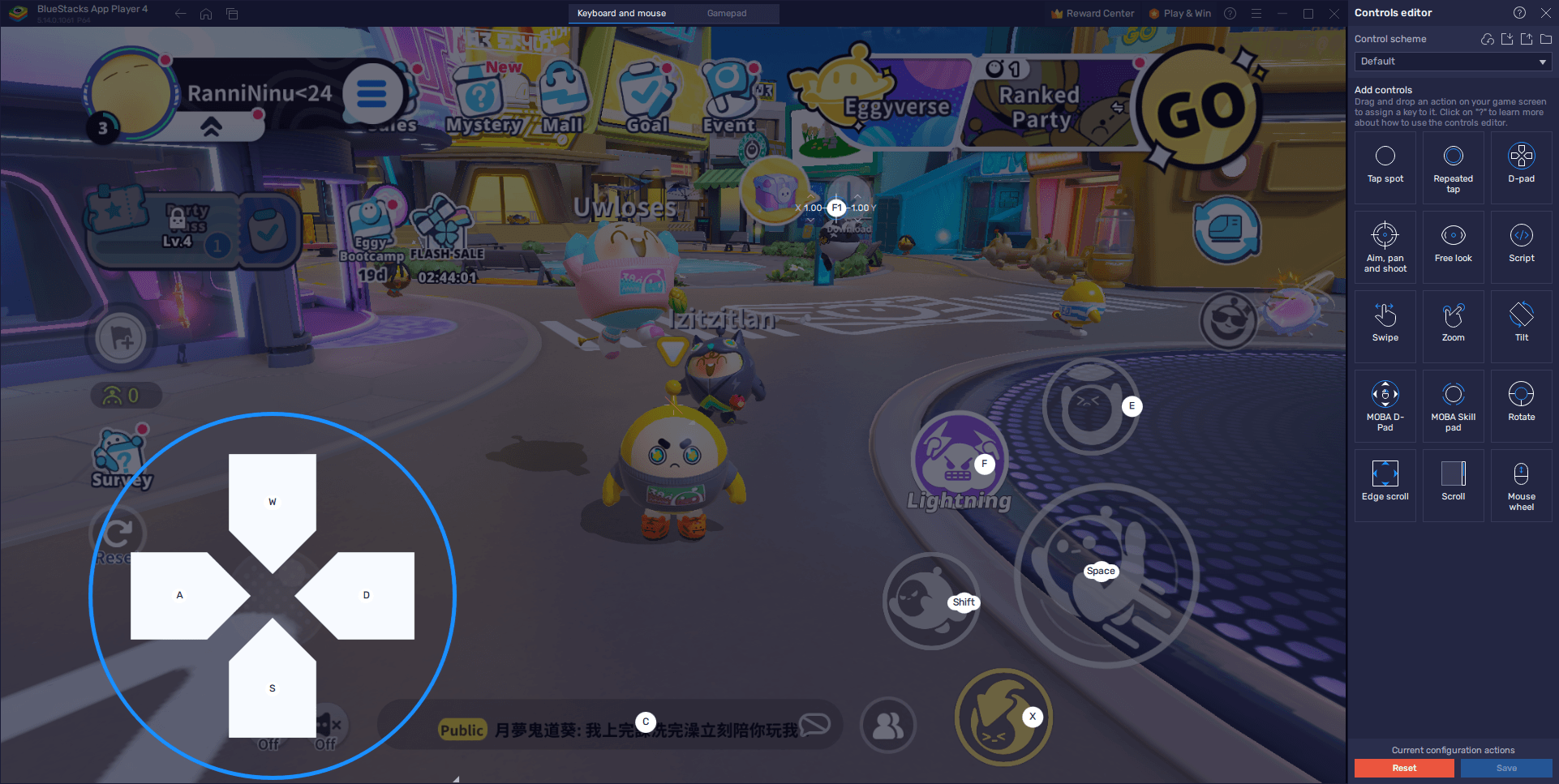
Default PC bindings assign core locomotion, abilities, and interactions across the left side of the keyboard.
| Input | Action | In-Game Mechanics |
|---|
| WASD | Virtual D-Pad Movement | Directs character movement across courses according to BlueStacks Beginners Guide. |
| X | Egg Roll | Transforms your avatar into an egg for a temporary rolling speed boost. |
| Ctrl | Lunge | Executes a quick burst dash or dive; leaves your character temporarily vulnerable upon landing. |
| E | Pick Up / Throw / Use Item | Grabs objects or opponents, throws held targets, or triggers equipped items. |
| F | Ultimate Skill | Activates your selected ultimate ability once its cooldown expires. |
The lunge carries a deliberate trade-off: pressing Ctrl gives you an instant forward burst to clear wide gaps, but the landing animation briefly roots your character in place. Rebinding Lunge or Egg Roll to thumb or mouse buttons prevents misfires during tight platforming sequences.
How to Change Keyboard Controls Step-by-Step
If the default keys feel cramped or lead to misclicks, modify your layout through the emulator's Advanced Editor overlay according to the BlueStacks Features Guide.
- Launch Eggy Party on your PC.
- Press Ctrl + Shift + A while in the game to bring up the Advanced Editor interface.
- Click on any existing on-screen key binding you wish to change, then press your preferred replacement key.
- Remove unwanted inputs by hovering your cursor over the specific binding and clicking the X icon that appears.
- Add extra actions by choosing a control type from the right-hand panel, dragging it directly onto your target screen position, and assigning a key.
- Click the Save button located in the lower right corner to preserve your custom layout.
Test your new configuration in casual mini-games first to verify that your fingers reach action keys comfortably without drifting off the movement cluster.
Setting Up Controller Support and Thumbstick Movement
Mapping a physical controller replaces discrete digital keyboard inputs with analog steering.
- Plug your gamepad into your PC using a USB cable or pair it via Bluetooth.
- Wait for the emulator prompt confirming your device is recognized.
- Press Ctrl + Shift + A inside the game to open the Advanced Editor.
- Select the Gamepad tab located at the top of the interface window.
- Click any target on-screen action and press the corresponding button on your controller to bind it.
- Hover over the D-pad control overlay to bring up the small gear icon.
- Click the gear icon to assign movement directly to your left thumbstick, right thumbstick, or the physical directional pad.
- Click Save in the bottom right corner to lock in your configuration.
Routing movement to an analog stick gives you granular steering arcs instead of fixed eight-direction digital snaps, simplifying navigation on narrow beams and curved bridges.
Delayed jumps and sluggish turns often stem from emulator resource bottlenecks rather than poor key mapping. Allocating adequate hardware capacity stabilizes frame delivery and lowers input response times, as detailed in the BlueStacks Features Guide.
- Open your emulator settings and switch to the Performance tab.
- Set the Performance Mode toggle to High performance.
- Allocate at least 4 CPU cores and at least 4 GB of RAM to the emulator.
- Adjust the frame rate slider to at least 60 FPS, then click Save changes.
- Open the in-game settings menu inside Eggy Party and switch graphical options to the highest setting.
Running at 60 FPS stabilizes visual feedback during high-speed obstacle sequences. This helps you track landings accurately after using speed boosts or lunges.
Adjusting Mobility Stats with Eggy Talents
Input bindings dictate how commands register, but raw character momentum is governed by an in-game progression system.
At player level 3, you unlock Eggy Talents, which grants points to invest in base mobility stats. Points allocated to running agility raise standard walking speed, while points in rolling speed boost momentum during the Egg Roll skill.
Talent allocations are fully reversible between matches. You can reset and redistribute points at any time to see whether boosted foot speed or higher roll velocity better complements your control scheme.
If you want to customize your avatar further while adjusting your layout, Eggy Coins can be used in-game to obtain exclusive cosmetics, draw from seasonal Mystery Boxes, or unlock the premium Party Pass track.
Frequently Asked Questions
Press Ctrl + Shift + A while inside Eggy Party on BlueStacks to open the Advanced Editor. From there, click any binding to reassign it, drag new actions from the panel on the right, and click Save in the lower right corner.
Connect your controller via USB or Bluetooth, press Ctrl + Shift + A, switch to the Gamepad tab at the top, and click the gear icon over the D-pad action to bind directional control to your left or right thumbstick before saving.
The lunge maneuver (mapped to Ctrl by default) is engineered with a recovery window. While it supplies a sudden burst of speed, it triggers a temporary vulnerability period upon landing that halts movement briefly.
Can you change your character's running speed inside Eggy Party?
Yes. Reaching player level 3 unlocks Eggy Talents, where you can freely allocate, upgrade, or downgrade points into specific mobility attributes like running agility and rolling speed.









Comments