



Ro Star Top Up: Fast and Direct Diamond Recharge
Ro Star is a popular interactive voice chat and social entertainment platform where users connect across live audio party rooms, sing together, share moments, and build communities. Within the app, diamonds serve as the primary virtual currency required to access premium social features, support room creators, send animated gifts, and participate in special in-app events.
Performing a Ro Star top up on VGTopup allows you to refill your diamond balance directly using only your Player ID. You do not need to share passwords or link personal credentials. Every transaction is processed through secure payment channels, ensuring your account remains safe while your diamonds are credited smoothly.
What is Ro Star App and How Diamonds Work
The Ro Star mobile application combines interactive voice chat rooms, casual mini-games, and live social broadcasting. Users join community rooms to chat, showcase talents, host discussions, and meet new friends across regions.
Diamonds represent the core utility currency on Ro Star. When you recharge diamonds, you can convert them into interactive features that increase engagement across the platform:
- Virtual Gifts: Send animated presents ranging from simple flowers and stars to luxury yachts, rockets, and custom party effects to hosts and friends in chat rooms.
- Room Atmosphere Boosts: Use diamond-powered effects to activate special room themes, background visuals, audio soundboards, and party effects that energize the crowd.
- VIP Privileges and Profile Frames: Unlock distinct entrance banners, glowing avatar borders, special name tags, and higher room entry priorities.
- Live Ranking and Contests: Support your favorite broadcasters during room PK battles, weekly leaderboards, and seasonal 2026 events to help them win platform-wide honors.
How to Top Up Ro Star Diamonds on VGTopup
Recharging your Ro Star account on VGTopup is simple, fast, and does not require your account password. Follow these steps to complete your order:
- Select Diamond Amount: Choose the diamond pack that matches your spending plan from the product catalog.
- Enter Your Player ID: Type your numeric Ro Star Player ID into the required field. Double-check the numbers to avoid sending diamonds to another user.
- Review Order & Price: Check the live checkout screen for current pricing, currency options, and order details.
- Complete Payment: Pick your preferred payment method and confirm the transaction through the secure payment gateway.
- Receive Diamonds: Once your payment is verified, the system delivers the diamonds directly to your Ro Star account balance.
| Top-Up Step | Action Required | Essential Tip |
|---|---|---|
| 1. Pack Selection | Pick diamond quantity | Check active in-app event requirements |
| 2. ID Entry | Input Ro Star Player ID | Use the in-app copy button to prevent typos |
| 3. Checkout | Review live order total | Confirm your currency before paying |
| 4. Verification | Finalize secure payment | Keep your order reference number handy |
| 5. Account Check | Open Ro Star profile | Restart the app to view refreshed balance |
Where to Find Your Ro Star Player ID
To ensure your diamond recharge arrives without delay, you must provide your exact Ro Star Player ID. Finding your ID takes only a few seconds inside the mobile app:
- Launch the Ro Star app on your mobile device and log in to your account.
- Tap the Me or Profile tab located in the bottom-right corner of the main navigation bar.
- On your profile screen, locate your profile photo and nickname at the top.
- Your unique numeric Player ID is displayed right beneath your username.
- Tap the Copy icon next to the ID number to copy it directly to your clipboard, then paste it into the Player ID input field on VGTopup.
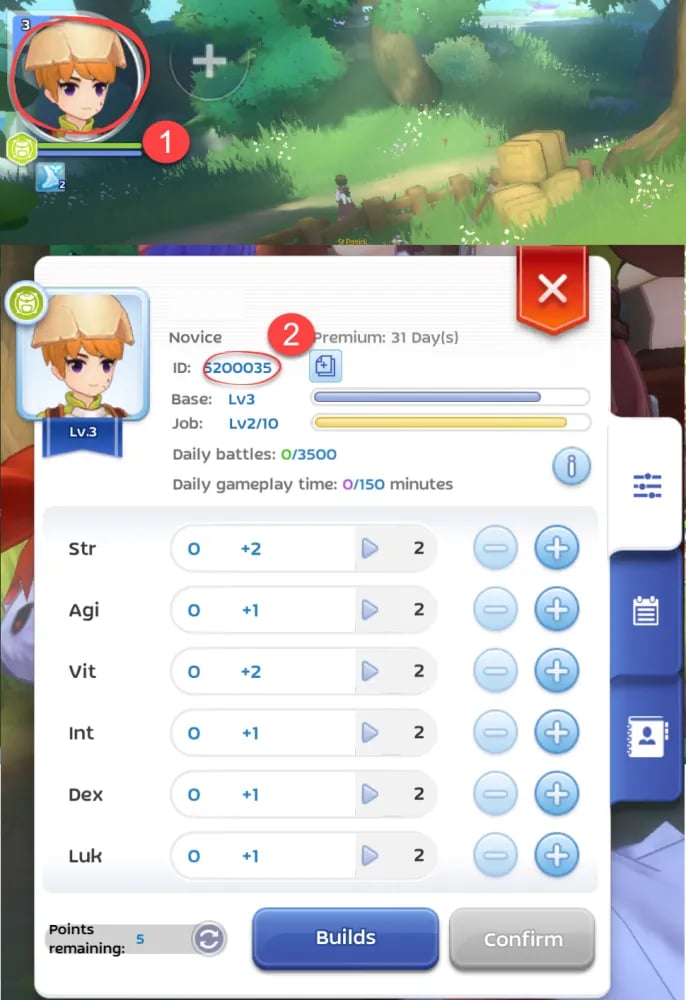
Tip: Never type someone else's ID unless you intend to send diamonds to their account as a gift. Top-up orders processed to a valid ID cannot be reversed once delivered.
Benefits of Ro Star Diamonds: Gifting, Chat Rooms, and Events
Having an active diamond balance on Ro Star opens up several key benefits that enhance your daily experience in the app:
Express Appreciation with Dynamic Gifts
Giving gifts is the primary way to interact with hosts, performers, and friends in audio rooms. When you send diamond gifts, high-tier visual animations appear on screen for all room participants to see. This helps you stand out in crowded rooms and builds stronger social connections with creators.
Gain VIP Status and Custom Customizations
Frequent gifting and diamond usage increase your in-app wealth level. Higher levels grant exclusive visual perks, such as custom chat bubbles, shiny name badges, exclusive entrance vehicles, and animated avatar frames that announce your presence whenever you join a voice room.
Drive Room PK Battles and Seasonal Competitions
During 2026 platform tournaments and friendly PK challenges between room owners, diamonds sent as gifts translate directly into battle points. Supporting your preferred room host during these live competitions helps them climb the regional leaderboards and unlock exclusive platform rewards.
Account Security: Safe ID-Only Ro Star Recharge
Account safety is a top priority when purchasing digital currencies online. VGTopup uses an ID-only recharge system designed to keep your personal data completely private.
- No Password Required: You are never asked to provide your Ro Star password, social media login, or SMS verification codes.
- No Account Sharing: Your account credentials remain solely in your hands, eliminating the risk of unauthorized access or account hijacking.
- Direct System Delivery: Top-ups are processed directly to your account ID through encrypted transaction protocols.
- Safe for Friends & Family: Because only the Player ID is needed, you can safely recharge diamonds for friends, hosts, or family members without needing their private login information.
What to Do If Ro Star Diamonds Do Not Appear Immediately
Most Ro Star top-up orders are processed immediately after payment verification. However, if your diamond balance does not update right away, follow these troubleshooting steps:
- Restart the Ro Star App: Close the Ro Star application completely from your device's background tasks and reopen it. This forces the app to sync with the server and refresh your wallet balance.
- Check Your Order Status on VGTopup: Go to your VGTopup order history to confirm that your payment was successfully processed and marked as completed.
- Verify the Submitted Player ID: Review your order receipt to verify that the Player ID entered matches your Ro Star account number exactly.
- Check In-App Mail/System Notifications: Occasionally, system notifications or event rewards are sent to your in-app inbox before reflecting in your main balance.
- Contact VGTopup Customer Support: If your order shows as completed on VGTopup but your balance has not updated after restarting the app, reach out to the 24/7 VGTopup support team with your order ID and Ro Star Player ID for fast assistance.
Frequently Asked Questions
How do I find my Ro Star Player ID for top-up?
Open the Ro Star app, tap the Profile (Me) icon in the lower-right corner, and locate the numeric ID displayed below your profile photo and nickname. Tap the copy button to copy the exact numbers.
What can I use Ro Star diamonds for?
Ro Star diamonds are used to send animated virtual gifts to room hosts, activate VIP profile decorations, unlock exclusive entrance effects, customize chat bubbles, and support creators during live room PK competitions and platform events.
Do I need to share my Ro Star login password to recharge?
No. VGTopup only requires your Ro Star Player ID to process diamond top-ups. You should never share your account password or security verification codes with anyone.
How long does it take to receive Ro Star diamonds after payment?
Diamonds are credited directly to your account as soon as your payment is verified by the payment processor. The updated balance is usually visible immediately after restarting your Ro Star app.
Can I top up Ro Star diamonds for a friend using their Player ID?
Yes. Because the top-up process only requires a Player ID, you can enter your friend's Ro Star Player ID on VGTopup to send diamonds directly to their account as a gift.
What should I do if my Ro Star diamonds are not credited?
First, restart the Ro Star app to refresh your account data. If the diamonds still do not appear, check your VGTopup order status to ensure payment went through, then contact VGTopup 24/7 customer service with your order details for direct support.
Select Denomination
Tax, payment fees and eligible coupons are calculated at checkout.
| Package | Price |
|---|---|
| Ro Star - Ro Star*10000 | USD 1.73 |
| Ro Star - Ro Star*30000 | USD 5.18 |
| Ro Star - Ro Star*50000 | USD 8.63 |
| Ro Star - Ro Star*70000 | USD 12.08 |
| Ro Star - Ro Star*100000 | USD 17.26 |
| Ro Star - Ro Star*200000 | USD 34.52 |
| Ro Star - Ro Star*500000 | USD 86.30 |
| Ro Star - Ro Star*700000 | USD 120.82 |
| Ro Star - Ro Star*1000000 | USD 172.59 |
| Ro Star - Ro Star*2000000 | USD 345.19 |






























































