Why the app bails right at the pay screen
Is your account broken? Almost never. The break lives in the handoff between the app and your phone's store, not in MIGO. When the app processes a coin purchase, it tosses the transaction to Google Play Billing or Apple App Store IAP, waits for a confirmation, then hands out coins on a totally separate backend. Two systems. Two callbacks. When the store side gags, the app flashes "payment failed" even if money already left your account.
A few real triggers, ranked by how often they're the actual culprit:
- Region and currency mismatch. The quiet card-killer. If your store region, your card's billing country, and the app's expected currency don't agree, the bank or the store just bounces it. Card's fine. The routing isn't.
- Store billing SDK errors. Old Play Services, a stale Apple ID session, or a previous purchase that never finished can leave the billing SDK in a bad mood where new charges silently flop.
- App cache and version drift. A bloated cache or an app build that's fallen behind can park you at "processing" forever.
- Network timeouts. The store confirms, but the callback to MIGO's coin-grant backend times out, and now you've hit the nightmare combo: money gone, zero coins.
Why does web fix most of this? Because it deletes the store SDK from the equation entirely. You pay a gateway directly and identify yourself with a MIGO Live User ID, the numeric tag MIGO sticks on your account (per TopUpLive MIGO Live guide). No Play Billing. No Apple IAP. No region lock welded into your store account. That's why the ID method is the go-to fallback whenever mobile billing faceplants.
And the app itself is healthy, for the record. The Play listing clocks MIGO Live at 10M+ downloads and 70.2K reviews as of 2026, per Google Play MIGO Live. Something that big isn't busted. Your store's payment plumbing is just having an off day.
A "failed" screen is not a refund
This is the bit that saves people from themselves. Because the billing callback and the coin grant run on different systems, that "payment failed" message is frequently a false negative. The store charged you. The coins just hadn't been handed over yet at the exact moment the app gave up waiting. They usually surface a few minutes later.
So the most expensive mistake isn't the original failure. It's smashing "buy" again the second you see red. Re-attempting a failed app payment is the number-one way people get double-charged, and then you're stuck filing a dispute with your bank or app store to claw it back (flagged in a 2026 MIGO Live community group post). Wait. Check your balance. Then decide.
It's also why I lean web for anyone who genuinely wants to diagnose a failure instead of gamble on it. A web checkout hands you a visible order ID at confirmation, and that ID, not your bank reference, is what support uses to trace a missing top-up. The app's billing flow tends to swallow that artifact whole. More visibility, fewer mystery charges.
Topping up from a browser, step by step
No official PC client exists for buying coins. The practical desktop play is a browser-based third-party top-up by ID. There's no first-party web channel, so you punch your User ID into a reputable platform instead (per SEAGM Migo Live Top Up).
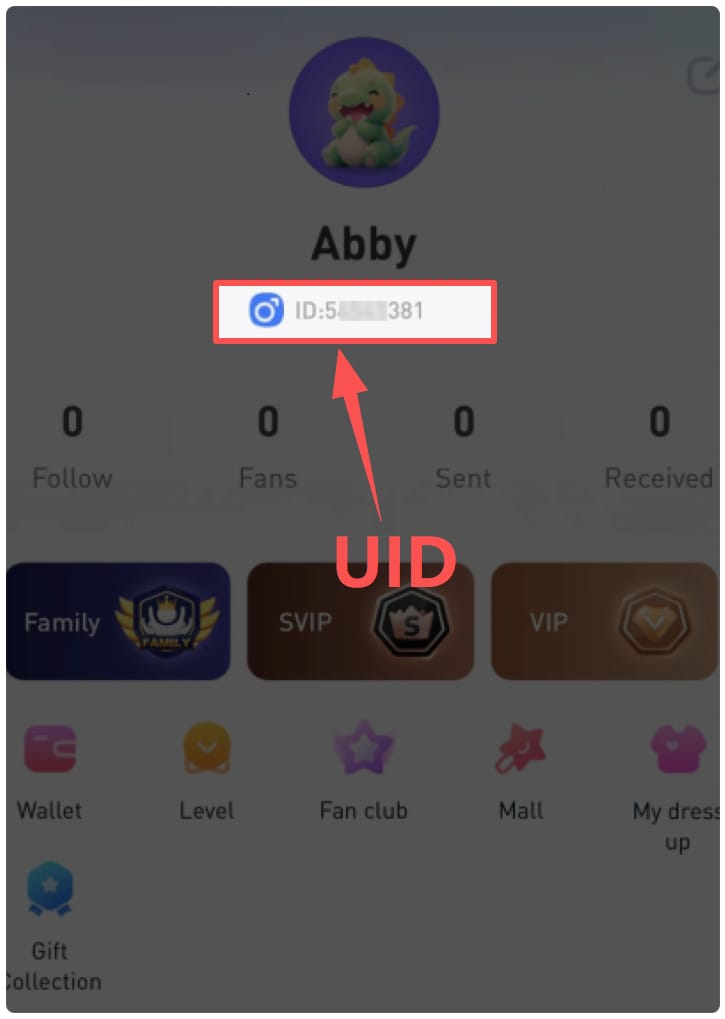
First, grab your MIGO Live ID. Open the app, tap your profile picture in the top-left, and copy the User ID sitting under your avatar. It's a run of numbers. Copy it exactly. One wrong digit and the coins land in whoever owns that ID, with no undo button anywhere.
Second, pick a channel and your pack. On a web platform you choose your coin package, paste the ID, select a payment method, check out. SEAGM's 2026 flow is a fair representation of how the major sites do it. Disclosure while I'm here: this is published by VGTopup, itself a web-based MIGO Live coin top-up that runs by ID. Worth stacking against any channel you're already eyeing, and the only thing that truly matters is whether it shows you a clear order confirmation at the finish.
Third, confirm and screenshot. The instant that order ID pops, grab a screenshot before you close the tab. If something goes sideways later, that screenshot is the single most useful thing you can hand a support agent. People blow past this constantly, then can't trace a missing top-up. Don't be that ticket.
If you want one line to bookmark: the cleanest way to run a MIGO Live Gold recharge when the app refuses is browser → pick pack → paste ID → pay → screenshot the order ID.
App vs web: where each one actually wins
Most guides skip this comparison entirely, which is wild. App pricing is clean and first-party. Web pricing rides on the platform and your payment method. Here's the honest split.
| Factor |
In-app (IAP) |
Web / ID top-up |
| Payment layer |
Google Play Billing / Apple IAP |
Direct payment gateway |
| Speed |
Instant when it works |
Instant or up to 30 min (per Moogold) |
| Order ID visibility |
Often buried |
Clear at checkout |
| Common failure cause |
Region/SDK mismatch |
Wrong ID entry |
| Payment methods |
Store-account methods only |
Cards, e-wallets (varies by region) |
| Works when app crashes? |
No |
Yes |
Source: synthesized from SEAGM, Moogold and Codashop guides (2026).
Now the "is web cheaper" thing. The myth says web automatically dodges store commission and lands lower. Don't bet on it. The app's published pack ladder is tidy: 5,500 coins for $0.99, 27,500 for $4.99, and 55,000 for $9.99, per a 2026 YouTube tutorial on buying coins in the app. Notice the middle and top packs scale straight (five times the coins, five times the price, no volume bonus), so there's no "buy bigger to save" trick to milk on the app side.
| Package |
Coins |
Price (USD) |
| Small |
5,500 |
$0.99 |
| Medium |
27,500 |
$4.99 |
| Large |
55,000 |
$9.99 |
Source: YouTube How to Buy Coins in Migo Application (2026).
Web prices can swing up or down depending on the platform's processing fees and any regional promo, so treat "web is always cheaper" as unproven. The web route's real edge isn't price anyway. It's that it works when the app won't, plus you walk away with a traceable order ID.
On payment methods, though, web genuinely cracks open doors the app can't. In Vietnam, Codashop supports MoMo and Visa/Mastercard for MIGO Live, per Codashop MIGO Live, so an e-wallet user locked out of the store's options can still recharge. That regional flexibility beats a few cents of price gap any day.
"Money gone, no coins" — the recovery playbook
Don't panic and don't re-pay. Work the clock instead, because the coin grant and the charge run on different systems and quietly reconcile on their own most of the time.
At 0–30 minutes: do nothing but check. Web channels credit immediately or inside half an hour, so a delay in that range is normal, not a failure. Refresh your in-app balance. Hands off "buy."
At ~1 hour: still nothing? Pull up your order ID. If you went web, you've got it from checkout (you screenshotted it, right?). Hit the platform's support with that ID, or reach MIGO support through the app. That's the standard recovery path flagged across third-party FAQs in 2026 (per Lootbar MIGO Live Recharge).
At 24 hours: if it's a charge with no order ID and no coins (the classic app-IAP timeout) you're now in dispute territory. Take it to your bank or app store, not just MIGO, since the money may be parked in failed-transaction limbo on the store side.
| Time since payment |
What you do |
| 0–30 min |
Wait and refresh balance. Do not re-pay. |
| ~1 hour |
Contact support with the order ID. |
| 24 hours |
Open a dispute with bank / app store if charged with no coins. |
Source: synthesized from Moogold and Lootbar guides (2026).
One thread ties all three rows together: the order ID is the currency of resolution. A bank reference number tells MIGO basically nothing useful. The order ID lets them pin the exact transaction. If you steal one habit from this whole article, make it screenshotting that confirmation.
How to vet a top-up route before you pay
Non-negotiables here, because the failure mode isn't subtle. It's losing money, or losing an account.
Red flags. Walk away on the spot:
- It asks for your MIGO Live password or login. A legit ID-based top-up needs nothing but your numeric User ID. Anything reaching for your password is fishing for your account.
- No order ID or confirmation page at checkout. No traceable reference means no help later.
- Pressure tactics, "bonus coins" that sound too good to be physically possible, or a checkout with no recognizable payment gateway.
What a clean checkout looks like:
- Asks only for User ID and your payment details. Never your account password.
- Shows the pack, the price, and the currency before you confirm.
- Returns a visible order ID the second payment clears.
- Uses recognizable payment options (cards, established e-wallets like MoMo in supported regions, per Codashop's listing).
The ID-only model is a safety feature, not a limitation. Since you never hand over login credentials, the worst case from a typo is coins going to the wrong ID. Bad, sure, but not an account compromise. That's a far smaller blast radius than any route asking you to log in. Codashop's standing warning across its regional listings says it flat out: entering the wrong MIGO Live ID credits coins to another account. Triple-check that number. It's the only real risk that's fully in your hands.
Which route to use, and when
App working fine? Use it. Instant, first-party, simplest thing going. The web/ID route earns its keep the moment the app throws an error, region-locks your card, or freezes at "processing." That's not some fringe edge case. It's the entire reason this page exists.
My read after weighing the trade-offs: the web/ID route is underrated even for people whose app technically works, purely for the order-ID transparency. When something goes wrong (and with two separate billing and grant systems running, occasionally it will), you want the path that hands you a paper trail. The app's billing flow doesn't.
Three rules I'd staple to every spender's habits:
- Never re-pay a "failed" screen. Wait 30 minutes, check your balance first. Re-paying is exactly how the double charge happens.
- Screenshot the order ID before you close any tab. It's the one thing support can act on.
- Confirm your User ID character by character. Coins sent to a wrong ID never come home.
Price isn't the deciding factor between app and web. Reliability and traceability are. Spend your attention there.
Frequently Asked Questions
Why won't MIGO Live let me top up coins in the app?
Most of the time it's the store billing layer, not your account: a region/currency mismatch between your store account and card, a stale Google Play or App Store session, or an app version trailing the current build. Clearing the app cache, updating, and lining up your store region with your card's billing country fixes a lot of it. If it still won't budge, the web/ID route hops over that whole layer.
Can I really buy MIGO Live coins from a desktop browser?
Yep, through a third-party web top-up by ID. There's no official PC client for buying coins, so you enter your numeric MIGO Live User ID on a reputable platform and pay direct (per SEAGM, 2026). It works the same whether the browser's on a PC, a Mac, or a phone, which is exactly why it survives an app crash.
My payment went through but no coins showed up — what now?
Wait first. Web channels credit immediately or within 30 minutes (per Moogold), so a short delay is normal. Past an hour, hit support with your order ID. That reference, not your bank's transaction number, is what lets MIGO trace it. If you were charged through the app with no order ID after 24 hours, open a dispute with your bank or app store rather than waiting around forever.
Where exactly is my MIGO Live ID?
Open the app, tap your profile picture in the top-left, and your User ID sits right under your avatar. Copy it directly instead of typing it out (per TopUpLive, 2026). It's purely an identifier. A legit web top-up never needs anything beyond this number, so any site sniffing for your password is one to leave.
Is it safe to top up MIGO Live coins on the web?
It's safe when the checkout asks only for your User ID and payment details, never your account login. The biggest genuine risk is fat-fingering the ID, which ships coins to a stranger's account with no recovery (a standing warning on Codashop). Stick to platforms that surface a clear order ID at confirmation, and screenshot it. That paper trail is your insurance.











Comments