Het ID-veld is uw bottleneck, niet de betaalknop
Het echte tijdverlies bij een herhaalaankoop is niet het tikken op "betalen". Het is het opzoeken en opnieuw bevestigen van uw imo-ID, een 7-10-cijferige numerieke code die niet uw gebruikersnaam en niet uw telefoonnummer is, volgens de BitTopup IMO Diamond Recharge Guide 2026. Als u dat veld eenmaal onder de knie hebt, is alles daarna een kwestie van spiergeheugen.
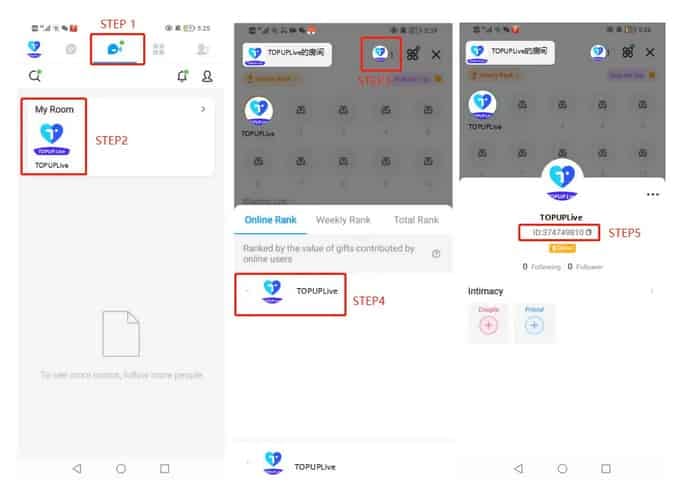
Uw ID opnieuw ophalen: open imo → tabblad Me → My Room (knop bovenaan in het midden) → tik op uw avatar rechtsboven → Online Rank → kopieer de cijferreeks onder uw bijnaam. Dat is de officiële route die de gids voorschrijft. Leer deze één keer uit uw hoofd en u hoeft nooit meer naar het nummer te zoeken.
Nu het deel waar diamanten stilletjes verdwijnen. Het handmatig overtypen van die ID bij elke aankoop is de meest vermijdbare fout in het hele proces. Volgens tests van BitTopup uit 2026 is een foutieve ID-invoer verantwoordelijk voor ongeveer 40% van de mislukte leveringen. Een typefout zorgt er niet voor dat de bestelling naar u wordt teruggestuurd. Het stuurt de diamanten naar het daadwerkelijke account dat eigendom is van het nummer dat u verkeerd hebt ingevoerd, en die krijgt u vrijwel nooit meer terug. De diamanten volgen de ingevoerde ID, zonder uitzondering.
De echt snelle methode is dus niet snel typen. Het is helemaal niet typen:
- Haal uw vorige bestelling op uit de geschiedenis (in de volgende sectie staat precies waar deze staat).
- Controleer of de opgeslagen ID overeenkomt met de ID die nu op uw avatarscherm staat.
- Selecteer hetzelfde pakket opnieuw en betaal.
Twee van die drie stappen zijn verificatie. En dat is bewust zo.
Voor de speler die gewoon zijn gebruikelijke pakket wil: sla de ID op zodat deze automatisch wordt ingevuld. De enige taak bij elke herhaling is dan even kijken, niet typen, voordat u betaalt.
Drie registers houden uw geschiedenis bij, en u controleert de verkeerde
Uw imo-diamantenrecords kunnen in maximaal drie afzonderlijke registers staan, en ze tonen niet allemaal hetzelfde. Weten welk register uw daadwerkelijke vraag beantwoordt, voorkomt vroegtijdige paniek.
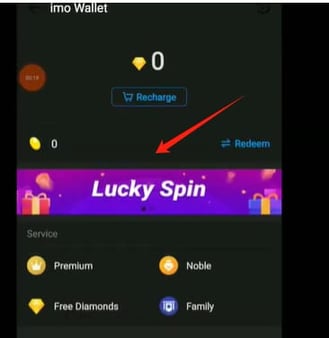
Volg in de app Me → imo Wallet → transaction history (of het pictogram voor diamanten/beans), volgens de BitTopup IMO Diamonds Not Received Guide. Dat is het leidende overzicht van wat er daadwerkelijk aan uw saldo is toegevoegd. Op de website van een externe opwaardeeraanbieder staat de geschiedenis in uw account bij die aanbieder, en dat is het register dat bewijst dat u hebt betaald, inclusief bestelnummer. Het derde record is uw e-mail- of sms-bon, die ik eerlijk gezegd betrouwbaarder vind dan de andere twee, omdat deze een tijdstempel heeft, niet stilletjes op de achtergrond opnieuw kan worden gesynchroniseerd en blijft bestaan, zelfs als u bent uitgelogd uit de app.

| Waar te kijken |
Wat het bewijst |
Belangrijke getoonde velden |
| imo Wallet → transaction history |
Diamanten zijn daadwerkelijk bijgeschreven op uw saldo |
Saldowijziging, tijdstempel |
| Account bij aanbieder (opwaardeersite) |
Betaling is geslaagd; bestelling bestaat |
Bestelnummer, gebruikte imo-ID, pakket, bedrag |
| E-mail- / SMS-bon |
Voltooide bevestiging met tijdstempel |
Bestelnummer, pakket, tijdstempel |
Bron: BitTopup IMO Diamonds Not Received Guide en IMO Official FAQ (2021–2026)
Er schuilt een addertje onder het gras bij die tijdstempels. De tijden op de bon worden vaak weergegeven in de tijdzone van de aanbieder, niet de uwe. Een bestelling die u twintig minuten geleden hebt geplaatst, kan daardoor lijken op een bestelling uit "de toekomst" of van een andere dag, waardoor het lijkt alsof deze ontbreekt wanneer u de geschiedenis in de app bekijkt. Controleer altijd het bestelnummer, nooit de tijd. Dat nummer is de constante factor die alle drie de registers met elkaar verbindt, en het is het enige veld waarvan het de moeite waard is om na elke aankoop een screenshot te maken. Als u ooit contact moet opnemen met de klantenservice, verandert dat nummer een zoektocht in een opzoeking van dertig seconden.
Voor iedereen wiens bon in een notificatie-zwart gat is verdwenen: de bestellijst in uw account bij de aanbieder is uw snelste hersteloptie, aangezien het bestelnummer daar alle andere gegevens direct ophaalt.
Controleer het pakket voordat u erop vertrouwt dat het hetzelfde niveau is

Het opnieuw bestellen van hetzelfde niveau is eenvoudig genoeg, maar "hetzelfde" verdient een echte controle, omdat het aanbod van imo erg breed is. We hebben het over 10 diamanten voor ongeveer $0,20 tot een pakket van 41.700 diamanten voor bijna $800, volgens de BitTopup IMO Diamond Recharge 2026 Complete Guide. Pakketten en de valuta waarin ze zijn geprijsd kunnen per regio verschillen, dus het niveau van vorige maand bevindt zich vandaag niet gegarandeerd in dezelfde positie.
Er is één limiet waar grote spenders rekening mee moeten houden: de dagelijkse opwaardeerlimiet is 10.000 diamanten, volgens diezelfde gids. Als uw "herhaling" een grote opwaardering is, moet u deze mogelijk over meerdere dagen verspreiden in plaats van één megabestelling te plaatsen die het systeem niet volledig zal verwerken.
Web versus in-app is een geldkwestie, geen kwestie van gemak. Externe web-opwaarderingen zijn vaak aanzienlijk goedkoper dan in-app-prijzen, waarbij gidsen uit 2026 besparingen van 38-60% melden volgens de gegevens van BitTopup. De in-app-route (Me → imo Voice → My Diamonds → Recharge, volgens de IMO Official FAQ) is de eenvoudigste weg en schrijft binnen enkele minuten bij, maar die eenvoud kost u extra bij de kassa. Vergelijk hetzelfde pakket op beide manieren en het prijsverschil op het web valt direct op.
De echte "snelle" ontgrendeling is het opslaan van uw betaalmethode. Op de meeste externe platforms zorgt het opslaan van de kaart samen met een opgeslagen ID ervoor dat de volgende aankoop een herhaalbestelling met één tik wordt, wat het gedocumenteerde gedrag is op platforms zoals GamsGo en BitTopup in 2026. Zonder dat beide zijn opgeslagen, is een "herhaling" net zo traag als uw eerste keer. Ter info: dit is exact de manier waarop een platform als imo Diamonds goedkoop opwaarderen herhaalbestellingen verwerkt: controleer of de ID correct automatisch is ingevuld en betaal vervolgens.

Een vlekkeloze herhaalaankoopprocedure:
- Open de laatste bestelling en noteer het pakket en de valuta.
- Controleer of dat exacte niveau vandaag nog steeds voor dezelfde prijs bestaat.
- Controleer of de opgeslagen ID overeenkomt met uw huidige avatarscherm.
- Betaal en houd uw wallet in de gaten. 95% van de leveringen op BitTopup komt binnen 5 minuten aan volgens de gegevens uit 2026, en de meeste bestellingen via derden worden binnen enkele minuten na betaling bijgeschreven, volgens platforms zoals Enjoygm and GamsGo.
Voor de herhaalkoper die op zoek is naar echte snelheid met één tik: sla zowel ID als betaling op, want al het andere start gewoon weer het trage proces voor nieuwe gebruikers.
Als een herhaling vastloopt, lees dan de status voordat u opnieuw op betalen tikt
Een vastgelopen bestelling is het moment waarop u twee keer geld kunt verliezen: eerst door de vastgelopen bestelling, en daarna door een paniekerige herhaalbetaling. De oplossing is om de status correct te lezen en pas opnieuw te proberen als de geschiedenis aangeeft dat dit kan.
| Status |
Wat het daadwerkelijk betekent |
Directe juiste actie |
| In behandeling (Pending) |
Betaling ontvangen, levering nog niet gesynchroniseerd |
Wacht en controleer de geschiedenis opnieuw — betaal niet opnieuw |
| Voltooid (Completed) |
Diamanten bijgeschreven op de ingevoerde ID |
Controleer het saldo; u bent klaar |
| Mislukt (Failed) |
Betaling is niet doorgegaan |
Veilig om opnieuw te proberen, bij voorkeur met opgeslagen ID |
| Terugbetaald (Refunded) |
Afschrijving teruggedraaid |
Bestel opnieuw als u het pakket nog steeds wilt |
Bron: BitTopup IMO Diamonds Not Received Guide (2026)
In behandeling (Pending) is de gevaarlijke status. Meestal is uw betaling al verwerkt en is het alleen wachten tot de levering is gesynchroniseerd. Dit lost zich meestal binnen enkele minuten vanzelf op. Opnieuw betalen bij deze status is de gedocumenteerde oorzaak van dubbele afschrijvingen, volgens de BitTopup-herstelgids van 2026. Het bestelnummer blijft de hele tijd hetzelfde, en dat is precies waarom opnieuw controleren beter is dan opnieuw betalen. U volgt de afhandeling van dezelfde bestelling, niet een verloren bestelling.
Uw beste verzekering tegen dubbele afschrijvingen is hetgeen wat de meeste gidsen overslaan: de bestelgeschiedenis zelf. Open vóór elke nieuwe poging het register van de aanbieder en controleer of het bestelnummer van uw vastgelopen poging al op voltooid staat of nog in behandeling is. Als de bestelling er staat, hebt u al betaald en wordt u bij een nieuwe poging gewoon twee keer gefactureerd voor één levering. Open altijd eerst de geschiedenis. Dat is de methode.
Als de diamanten na een redelijke wachttijd echt niet zijn verschenen, voer dan de volgende stappen uit: start de app opnieuw op, wis de cache en controleer de geschiedenis van uw wallet opnieuw. Nog steeds niets na 30 minuten? Neem contact op met de klantenservice met uw betalingsbewijs bij de hand. Dat is de te volgen route, en dat is waar uw screenshot van het bestelnummer zijn waarde bewijst. Een waarschuwing over het blind vertrouwen op de in-app-geschiedenis alleen: een recente bestelling is mogelijk nog niet gesynchroniseerd met de wallet, dus een "ontbrekende" vermelding daar is geen bewijs dat de betaling is mislukt. Controleer het register van de aanbieder en de bon voordat u conclusies trekt.
Voor iedereen die naar een bevroren "in behandeling" staart: wacht, controleer het bestelnummer in de geschiedenis opnieuw en blijf met uw vingers van de betaalknop af. De nieuwe poging is de valkuil, niet de oplossing.
De routine voor herhaalaankopen die ik daadwerkelijk zou aanraden
De snelste betrouwbare herhaalaankoop is niet de aankoop met de minste tikken. Het is de aankoop waarbij bij elke stap een verificatiemoment is ingebouwd. Advies dat puur op snelheid is gericht, bezorgt mensen in 95% van de gevallen hun diamanten en verpest de overige 5% door verkeerd verzonden aankopen die niemand terugbetaalt.
Mijn vaste routine, gesorteerd per type speler:
- De incidentele herhaalkoper (af en toe hetzelfde kleine pakket): sla de imo-ID op zodat deze automatisch wordt ingevuld, controleer deze vluchtig voor het betalen en maak een screenshot van het bestelnummer. Klaar.
- De frequente / grootverbruiker: sla zowel ID als betaling op voor bestellingen met één tik, maar respecteer de dagelijkse limiet van 10.000 diamanten en verdeel grote aankopen over meerdere dagen. Open de geschiedenis vóór elke nieuwe poging, want bij uw volume kost één dubbele afschrijving u direct veel van uw bespaarde tijd.
- De speler die net een slechte ervaring heeft gehad: typ de ID nooit meer handmatig over. Controleer de opgeslagen ID elke keer met uw actieve avatarscherm en beschouw de e-mailbon als uw echte aankoopbewijs, nog vóór de in-app-geschiedenis.
Het bestelnummer is de rode draad door dit alles: uw verzekering tegen dubbele afschrijvingen, uw snelle toegang tot de klantenservice en uw hulpmiddel bij tijdzoneverschillen. Leg het één keer per aankoop vast en de meeste dingen die mis kunnen gaan, zijn direct uitgesloten.
Veelgestelde vragen
Hoe weet ik of de diamanten naar het juiste account zijn gegaan en niet naar dat van iemand anders?
Open imo Wallet → transaction history en controleer of het saldo daadwerkelijk is aangepast zodra de bestelling op voltooid staat. Omdat diamanten worden bijgeschreven op de imo-ID die bij het afrekenen is ingevoerd en niet op uw ingelogde sessie, betekent een saldo dat niet is veranderd terwijl de bestelling op "voltooid" staat meestal dat een verkeerd getypte ID ze ergens anders heen heeft gestuurd. Controleer dit door de ID op uw bon te vergelijken met het nummer op uw Online Rank-scherm.
Kan ik geld terugkrijgen als dezelfde opwaardering twee keer is mislukt?
Een status "mislukt" betekent dat er geen betaling is doorgegaan, dus er valt meestal niets terug te betalen en u kunt het veilig opnieuw proberen. Het daadwerkelijke risico op terugbetaling is een dubbele afschrijving door opnieuw te betalen terwijl de status op "in behandeling" staat. Daarom is het belangrijk om het bestelnummer in de geschiedenis van uw aanbieder te controleren voordat u het opnieuw probeert. Als u inderdaad twee voltooide afschrijvingen ziet voor één levering, neem dan contact op met de klantenservice met beide bonnen en de bijbehorende bestelnummers.
Waarom lijkt mijn recente bestelling te ontbreken in de app, hoewel ik wel heb betaald?
Hier zijn twee redenen voor. Een net geplaatste bestelling is mogelijk nog niet gesynchroniseerd met de imo Wallet, waardoor de in-app-geschiedenis achterloopt op uw daadwerkelijke betaling. Daarnaast worden tijdstempels op bonnen vaak weergegeven in de tijdzone van de aanbieder, waardoor een nieuwe bestelling kan lijken op een bestelling van een andere dag. Controleer dit aan de hand van het bestelnummer in uw account bij de aanbieder of uw e-mail in plaats van te zoeken op tijdstip.
Kan ik mijn imo-ID opslaan voor snellere herhaalaankopen?
Ja, en dat is de grootste upgrade op het gebied van snelheid en veiligheid die er is. Het opslaan van de ID voorkomt het handmatig typen, wat volgens tests van BitTopup uit 2026 verantwoordelijk is voor ongeveer 40% van de mislukte leveringen. Koppel dit aan een opgeslagen betaalmethode voor echte herhaalaankopen met één tik; zonder dat beide zijn opgeslagen, verloopt een "herhaalaankoop" net zo traag als uw eerste keer.
Kan ik exact hetzelfde diamantpakket herhalen dat ik eerder heb gekocht?
Meestal wel, maar controleer dit eerst. Het aanbod van imo loopt van ongeveer 10 diamanten ($0,20) tot 41.700 ($800) volgens de gids van BitTopup uit 2026. Zowel de pakketten als de valuta kunnen per regio verschillen, dus het niveau van vorige maand kan vandaag een andere positie of prijs hebben. Zoek de oude bestelling op en vergelijk het pakket en de valuta met de huidige winkel voordat u betaalt.
Wat is er nodig om een ander account op te waarderen als dat nodig is?
imo staat het opwaarderen voor een ander account pas toe als uw eigen account aan bepaalde voorwaarden voldoet: het account moet langer dan 15 dagen geregistreerd zijn en er moet al voor meer dan 10 diamanten zijn opgewaardeerd, volgens de IMO Official FAQ. Voor eenvoudige herhaalaankopen op uw eigen account is deze voorwaarde niet van toepassing. Dit geldt alleen voor het opwaarderen van de ID van iemand anders.







Comments